I have just completed the tailoring of endeavourOS on a Raspberry Pi 4B, and it does pretty well what I need, but there is an annoying problem with Dolphin. I have used many different Linux OSs over the past three decades (Mandrake, Mandriva, Mepis, PCLinuxOS, Debian, Puppy, Raspbian and Manjaro) and in every case double clicking on a file icon in the appropriate file manager acted to open the file in the appropriate package, or alternatively a right-click gave options including ‘open’ or ‘open with’. This does not happen at present in Dolphin. Instead, the right-click options don’t include the ‘open’ ones, and with a double click, before the application (e.g. LibreOffice) opens fully, this window pops up:
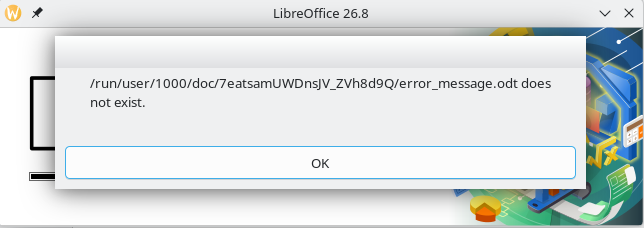
when the file error_message.odt is actually in the folder Documents.
This behaviour does not happen with pcmanfm, so I am at a loss to understand what is going on in Dolphin (which has been my preferred file manager in KDE for years). If anyone knows (or suspects they know) how to solve it, I’d be very interested to hear their views.