Does anyone use a motherboard with X870 chipset? If so what particular motherboard model is it and do you have any issues such as headphones via aux front panel connection not outputting or scratching noise etc or other kinds of problems?
Can you post the hardware specs.
inxi -Fxxc0z | eos-sendlog
inxi -Aa
I think it uses the ACL1220P audio codec? Have you checked your audio profile to see that it is using the proper configuration? analog stereo or analog surround. Think it might be 7.1 audio. It should be supported.
⨉⪧ inxi -Aa
Audio:
  Device-1: Advanced Micro Devices [AMD/ATI] Navi 48 HDMI/DP Audio
    driver: snd_hda_intel v: kernel pcie: gen: 5 speed: 32 GT/s lanes: 16
    bus-ID: 03:00.1 chip-ID: 1002:ab40 class-ID: 0403
  Device-2: Advanced Micro Devices [AMD/ATI] Radeon High Definition Audio
    driver: snd_hda_intel v: kernel pcie: gen: 4 speed: 16 GT/s lanes: 16
    bus-ID: 73:00.1 chip-ID: 1002:1640 class-ID: 0403
  Device-3: Advanced Micro Devices [AMD] Ryzen HD Audio
    driver: snd_hda_intel v: kernel pcie: gen: 4 speed: 16 GT/s lanes: 16
    bus-ID: 73:00.6 chip-ID: 1022:15e3 class-ID: 0403
  Device-4: Generic USB Audio driver: hid-generic,snd-usb-audio,usbhid
    type: USB rev: 2.0 speed: 480 Mb/s lanes: 1 mode: 2.0 bus-ID: 1-10:4
    chip-ID: 26ce:0a08 class-ID: 0300
  API: ALSA v: k7.1.4-1-cachyos status: kernel-api
    tools: alsactl,alsamixer,amixer
  Server-1: sndiod v: N/A status: off tools: aucat,midicat,sndioctl
  Server-2: JACK v: 1.9.22 status: off tools: N/A
  Server-3: PipeWire v: 1.6.8 status: active with: 1: pipewire-pulse
    status: active 2: wireplumber status: active 3: pipewire-alsa type: plugin
    tools: pactl,pw-cat,pw-cli,wpctl

~
⨉⪧ inxi -Fxxc0z
System:
  Kernel: 7.1.4-1-cachyos arch: x86_64 bits: 64 compiler: clang v: 22.1.8
  Desktop: Xfce v: 4.20.2 tk: Gtk v: 3.24.52 wm: xfwm4 dm: LightDM
    Distro: CachyOS base: Arch Linux
Machine:
  Type: Desktop Mobo: ASRock model: X870 Riptide WiFi
    serial: <superuser required> Firmware: UEFI vendor: American Megatrends LLC.
    v: 4.41 date: 06/02/2026
CPU:
  Info: 12-core model: AMD Ryzen 9 7900 bits: 64 type: MT MCP arch: Zen 4
    rev: 2 cache: L1: 768 KiB L2: 12 MiB L3: 64 MiB
  Speed (MHz): avg: 4353 min/max: 430/5485 boost: enabled cores: 1: 4353
    2: 4353 3: 4353 4: 4353 5: 4353 6: 4353 7: 4353 8: 4353 9: 4353 10: 4353
    11: 4353 12: 4353 13: 4353 14: 4353 15: 4353 16: 4353 17: 4353 18: 4353
    19: 4353 20: 4353 21: 4353 22: 4353 23: 4353 24: 4353 bogomips: 177258
  Flags-basic: avx avx2 ht lm nx pae sse sse2 sse3 sse4_1 sse4_2 sse4a
    ssse3 svm
Graphics:
  Device-1: Advanced Micro Devices [AMD/ATI] Navi 44 [Radeon RX 9060 XT]
    vendor: Tul / PowerColor driver: amdgpu v: kernel arch: RDNA-4 pcie:
    speed: 32 GT/s lanes: 16 ports: active: DP-1,DP-2
    empty: HDMI-A-1,Writeback-1 bus-ID: 03:00.0 chip-ID: 1002:7590
  Device-2: Advanced Micro Devices [AMD/ATI] Raphael vendor: ASRock
    driver: amdgpu v: kernel arch: RDNA-2 pcie: speed: 16 GT/s lanes: 16 ports:
    active: none empty: DP-3, DP-4, DP-5, HDMI-A-2, Writeback-2
    bus-ID: 73:00.0 chip-ID: 1002:164e temp: 40.0 C
  Display: x11 server: X.Org v: 21.1.24 compositor: xfwm4 v: 4.20.0 driver:
    X: loaded: amdgpu unloaded: modesetting alternate: fbdev,vesa dri: radeonsi
    gpu: amdgpu display-ID: :0.0 screens: 1
  Screen-1: 0 s-res: 3840x1080 s-dpi: 96
  Monitor-1: DP-1 mapped: DisplayPort-0 pos: primary,right
    model: BenQ RL2755 res: 1920x1080 hz: 60 dpi: 82 diag: 686mm (27")
  Monitor-2: DP-2 mapped: DisplayPort-1 pos: left model: AOC 2450W
    res: 1920x1080 hz: 60 dpi: 94 diag: 598mm (23.5")
  API: EGL v: 1.5 platforms: device: 0 drv: radeonsi device: 1 drv: radeonsi
    device: 2 drv: swrast gbm: drv: radeonsi surfaceless: drv: radeonsi x11:
    drv: radeonsi inactive: wayland
  API: OpenGL v: 4.6 vendor: amd mesa v: 26.1.5-arch3.1 glx-v: 1.4
    direct-render: yes renderer: AMD Radeon RX 9060 XT (radeonsi gfx1200 ACO
    DRM 3.64 7.1.4-1-cachyos) device-ID: 1002:7590
  Info: Tools: api: eglinfo,glxinfo de: xfce4-display-settings
    x11: xdpyinfo, xprop, xrandr
Audio:
  Device-1: Advanced Micro Devices [AMD/ATI] Navi 48 HDMI/DP Audio
    driver: snd_hda_intel v: kernel pcie: speed: 32 GT/s lanes: 16
    bus-ID: 03:00.1 chip-ID: 1002:ab40
  Device-2: Advanced Micro Devices [AMD/ATI] Radeon High Definition Audio
    driver: snd_hda_intel v: kernel pcie: speed: 16 GT/s lanes: 16
    bus-ID: 73:00.1 chip-ID: 1002:1640
  Device-3: Advanced Micro Devices [AMD] Ryzen HD Audio
    driver: snd_hda_intel v: kernel pcie: speed: 16 GT/s lanes: 16
    bus-ID: 73:00.6 chip-ID: 1022:15e3
  Device-4: Generic USB Audio driver: hid-generic,snd-usb-audio,usbhid
    type: USB rev: 2.0 speed: 480 Mb/s lanes: 1 bus-ID: 1-10:4
    chip-ID: 26ce:0a08
  API: ALSA v: k7.1.4-1-cachyos status: kernel-api
  Server-1: sndiod v: N/A status: off
  Server-2: JACK v: 1.9.22 status: off
  Server-3: PipeWire v: 1.6.8 status: active with: 1: pipewire-pulse
    status: active 2: wireplumber status: active 3: pipewire-alsa type: plugin
Network:
  Device-1: MEDIATEK MT7925 Wi-Fi 7 160MHz driver: mt7925e v: kernel pcie:
    speed: 5 GT/s lanes: 1 bus-ID: 0a:00.0 chip-ID: 14c3:0717
  IF: wlan0 state: up mac: <filter>
  Device-2: Realtek Killer E3000 2.5GbE vendor: ASRock driver: r8169
    v: kernel pcie: speed: 5 GT/s lanes: 1 port: b000 bus-ID: 0b:00.0
    chip-ID: 10ec:3000
  IF: enp11s0 state: down mac: <filter>
Bluetooth:
  Device-1: MediaTek Wireless_Device driver: btusb v: 0.8 type: USB rev: 2.1
    speed: 480 Mb/s lanes: 1 bus-ID: 1-12:6 chip-ID: 0e8d:0717
  Report: btmgmt ID: hci0 rfk-id: 74 state: down bt-service: enabled,running
    rfk-block: hardware: no software: yes address: <filter> bt-v: 5.4 lmp-v: 13
Drives:
  Local Storage: total: 3.88 TiB used: 2.62 TiB (67.6%)
  ID-1: /dev/nvme0n1 vendor: Kingston model: SNV3S500G size: 465.76 GiB
    speed: 63.2 Gb/s lanes: 4 serial: <filter> temp: 23.9 C
  ID-2: /dev/sda vendor: Western Digital model: WD30EZRX-00D8PB0
    size: 2.73 TiB speed: 6.0 Gb/s serial: <filter>
  ID-3: /dev/sdb vendor: Samsung model: SSD 850 EVO 250GB size: 232.89 GiB
    speed: 6.0 Gb/s serial: <filter>
  ID-4: /dev/sdc vendor: Patriot model: P210 512GB size: 476.94 GiB
    speed: 6.0 Gb/s serial: <filter>
Partition:
  ID-1: / size: 135.66 GiB used: 22.1 GiB (16.3%) fs: ext4 dev: /dev/dm-0
    mapped: luks-339adcf8-ce3e-46f1-91d2-3759b35a9ac2
  ID-2: /boot/efi size: 2.02 GiB used: 800 KiB (0.0%) fs: vfat
    dev: /dev/nvme0n1p3
  ID-3: /home size: 295.52 GiB used: 201.9 GiB (68.3%) fs: ext4
    dev: /dev/dm-2 mapped: nvme0n1p2_crypt
Swap:
  ID-1: swap-1 type: partition size: 23.98 GiB used: 0 KiB (0.0%) priority: -1
    dev: /dev/dm-1 mapped: Swap
  ID-2: swap-2 type: zram size: 30.42 GiB used: 7.85 GiB (25.8%)
    priority: 100 dev: /dev/zram0
Sensors:
  System Temperatures: cpu: 48.1 C mobo: 28.0 C
  Fan Speeds (rpm): N/A
  GPU: device: amdgpu temp: 29.0 C mem: 27.0 C fan: 0 device: amdgpu
    temp: 40.0 C
Info:
  Memory: total: 32 GiB note: est. available: 30.42 GiB
    used: 13.55 GiB (44.5%)
  Processes: 758 Power: uptime: 14d 19h 50m wakeups: 55 Init: systemd v: 261
    default: graphical
  Packages: 1421 pm: pacman pkgs: 1382 pm: flatpak pkgs: 39 Compilers:
    clang: 22.1.8 gcc: 16.1.1 Shell: fish v: 4.8.1 running-in: xfce4-terminal
    inxi: 3.3.41
Mine is: 7.1 CH HD Audio with Content Protection (Realtek ALC4082 Audio Codec)
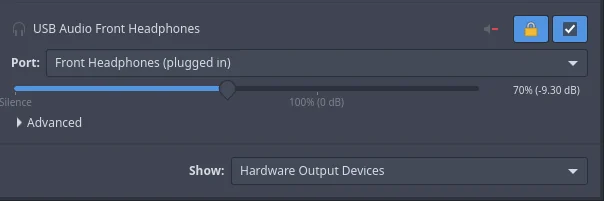
This is what it is set to, whilst it says usb audio I am using aux connection. And if I disconnect it can detect it being disconnected.
I had the exact same issue on endeavourOS and other distros as well.
I am likely to make a warranty claim but i want to know if anyone with a motherboard of X870 can still use linux without any audio issues so I am sure I can buy it without problems.
Is this only with these headphones? (I always check things like this if possible with a different device to rule it out, if you did wondering why you thought motherboard might have been the issue also)
Yes, via hdmi/monitor it works fine.
I used to have two different gigabyte motherboards on the exact same desktop and using the exact same headphones with endeavourOS, never had issues. Only when I changed to this current motherboard whilst still having endeavourOS, I had issues, the only way to get it to work is to connect to to back panel and then back to front panel and same issue when I reboot or if I stawrt playing video games via bottles.
What is weird is that on hibernation headphones will still continue to work just fine so no idea what is going on.
Realtek ALC4082 (USB-based audio codec) on Arch Linux, ensure you have alsa-ucm-conf, sof-firmware, and pipewire-pulse (or pulseaudio) installed. Then, check alsamixer to unmute and adjust the specific PCM 1 or front panel controls that govern the separate USB audio jack mapping.
Edit: Check if the following packages are installed alsa-ucm-conf sof-firmware alsa-firmware
Edit: You can use wpctl to check also wpctl status and other commands with wpctl.
Edit: Maybe this helps
Hi,
Just checked they are installed.
I will check it out once the issue starts again thanks mate, One quick thing:
:: pulseaudio-17.0+r98+gb096704c0-1.2 and pipewire-pulse-1:1.6.8-1.2 are in conflict. Remove pipewire-pulse? [y/N]
Should I replace pipewire-pulse with pulseaudio? Are there any differences between the two?
just a couple of things, should I obtain a motherboard that doesn’t use USB-based audio codec for Linux ~ is it only limited to USB-based audio codec where this issue occurs? I am surprised that most linux distros have not yet addressed this issue if its affecting a lot of people.
No I wouldn’t do that. I also don’t think I would replace the motherboard either but I can’t tell you what you should do.
To fix Realtek ALC4080/ALC4082 front panel audio issues on Arch Linux, update alsa-ucm-conf, verify your PipeWire/ALSA profiles, unmute the correct PCM channels in alsamixer, and ensure the front-panel cable is plugged into the motherboard’s JAUD1 header.
Check alsamixer: Run alsamixer, press F6 to select your USB/ALC4082 audio card, and check that channels like PCM 1 (which often controls front jacks) are unmuted and turned up.
Switch Profile: Open your volume control or sound settings and switch the profile for the ALC4082 device to Pro Audio if individual port routing fails.
Also
Hi I do run sudo pacman -Syu on a regular biases so I would imagine alsa-ucm-conf would also get updated when updates are available.
Yes tried that already doesn’t do anything
All I got is this (screenshot taken while audio is working):
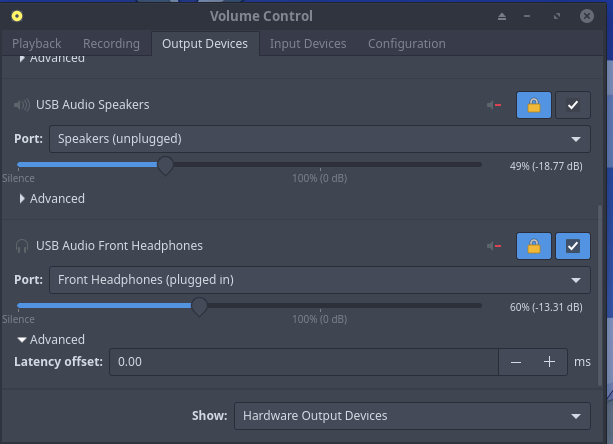
its called HD_AUD101 on my motherboard and I did hook it up. I mean the audio completely works just fine on Windows, on Linux I have to connect to back panel and then front panel then it will output.
lets say I did this:
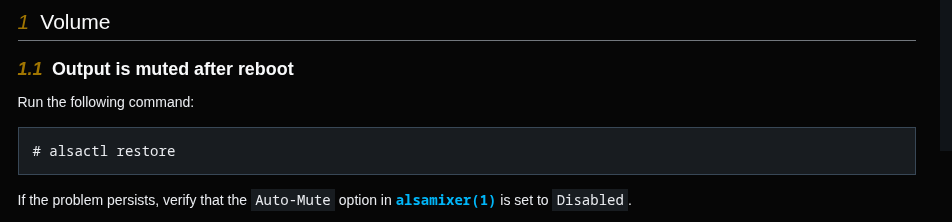
I could even create a systemd startup to run this on boot, lets say it works, the issue is everytime I start a video game (via bottles) then audio again gets muted (even though OS does not report this) and again I have to connect to back panel then front panel again.
I would rather not but lets say I fix it, every time I boot into live ISO it would still have the exact same issue, I never had issues with HD audio it sounds like a problem with USB based codec (which is used despite me using aux connection).
I mean do you happen to know if (Arch)Linux is going to fix this issue?
Try these fixes. You’ll have to read through it first.