Disable Execution time in terminal

Screenshot_20250818_203809

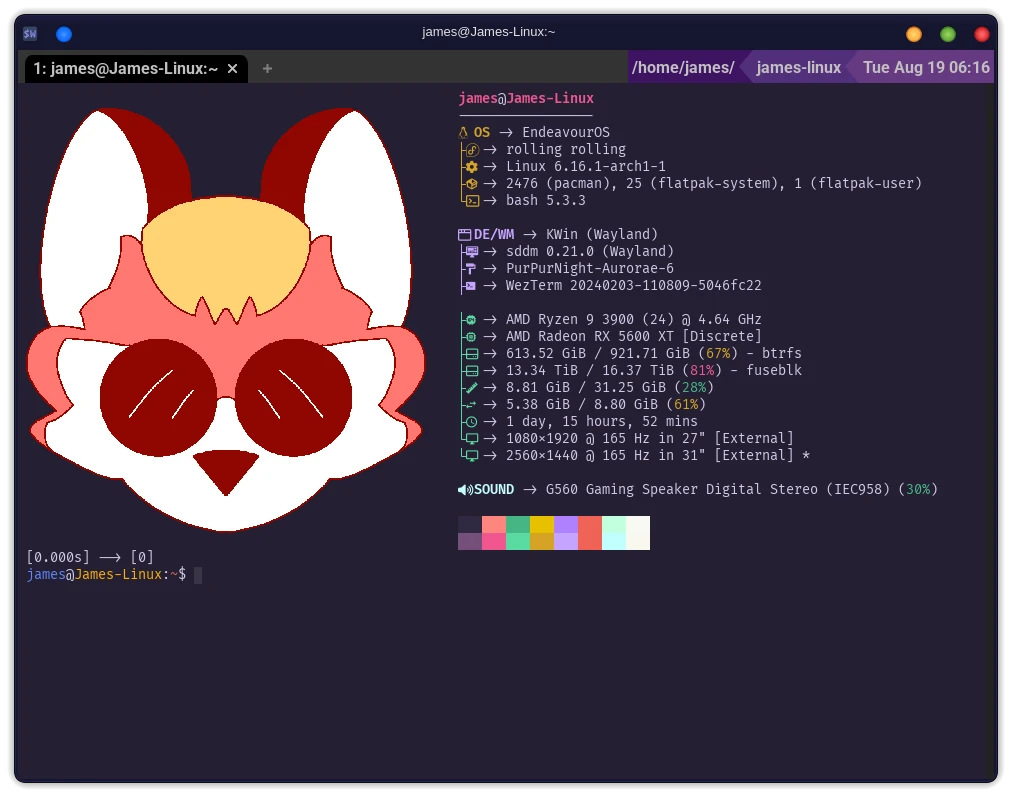
I’ve recently had a (minor) issue, where the execution time is being displayed after EVERY command,

I can not seem to find anything in my .bashrc or .bash_profile that would be causing it.

I tried a few different Terminal emulators, Konsole, Wezterm, Alacrity, they all display the same behavior so it has to be something system centric, but I can’t figure it out.

This happens no matter what command I execute, what terminal, running Yay for updates, running fastfetch, anything. I’m a bit stumped.

system-based timers are explained here but I can’t tell which one governs yr problem-

this reading, however, about time commands, builtin and system, gets closer

my own takeaway of this is it’s impossible to have this in every terminal, every command unless there is a bash script you wrote or a program wrote somewhere in files.

the thing with typical ‘timer’-like outputs is they show 3: user, real, sys. Yours shows one.

how to create the scripts is here:

but how to disable them, let alone find them, is never explained in the 30-minute rabbit hole I detoured on..

…at the very least I hope I could nudge you in a direction. I got a crash course but outside some basic chron stuff I never used all these time commands.

1 Like

First just to be sure – are we using BASH?

You might double-check your konsole profile and/or something like echo $SHELL.


Are something different.
Thats like fstrim.timer that, if enabled, will automatically start the fstrim.service once a week.

I read that as systemd. :sweat_smile:

2 Likes

just a picture search of “execution time in terminal linux” yields the triple output I mentioned.

In fact no images exist yet of any bracketed numbers…leads me to believe execution time is not what’s being measured in your output?

All good. No expert on the guts of time programs as I said above, just trying to help with a starting point of troubleshooting–you definitely got it closer. It’s quite an intriguing problem.

I agree problem lies in this layer

edit: added “in your output” to be clearer

1 Like

That is definitely not the default EnOS prompt setup.
This is setup globally in:
/etc/bash.bashrc

[don@J5040 ~]$ cat /etc/bash.bashrc
#
# /etc/bash.bashrc
#

# If not running interactively, don't do anything
[[ $- != *i* ]] && return

# Prevent doublesourcing
if [[ -z "${BASHRCSOURCED}" ]] ; then
  BASHRCSOURCED="Y"
  # the check is bash's default value
  [[ "$PS1" = '\s-\v\$ ' ]] && PS1='[\u@\h \W]\$ '
  case ${TERM} in
    Eterm*|alacritty*|aterm*|foot*|gnome*|konsole*|kterm*|putty*|rxvt*|tmux*|xterm*)
      PROMPT_COMMAND+=('printf "\033]0;%s@%s:%s\007" "${USER}" "${HOSTNAME%%.*}" "${PWD/#$HOME/\~}"')
      ;;
    screen*)
      PROMPT_COMMAND+=('printf "\033_%s@%s:%s\033\\" "${USER}" "${HOSTNAME%%.*}" "${PWD/#$HOME/\~}"')
      ;;
  esac
fi

if [[ -r /usr/share/bash-completion/bash_completion ]]; then
  . /usr/share/bash-completion/bash_completion
fi

alias ll='ls -l --color=auto'
alias la='ls -al --color=auto'
alias lb='lsblk -o NAME,FSTYPE,FSSIZE,LABEL,MOUNTPOINT'

The line

  [[ "$PS1" = '\s-\v\$ ' ]] && PS1='[\u@\h \W]\$ '

will determine the bash Prompt globally.

As you mentioned, the prompt can also be configured locally in .bashrc or .bash_profile.
which you have checked.

So if you haven’t checked /etc/bash.bashrc then that would be my next thing to check.

HTH

Pudge

3 Likes

As @cscs said check what shell you’re using, because it’s the kind of thing you see with zsh, but not by default.

I use a zsh plugin myself :
cmdtime

1 Like

ok a few great suggestions, and as drunkenvicar mentioned it’s hard to pin down

I am in fact using bash

james@James-Linux:~$ echo $SHELL
/bin/bash
[0.021s] → [0]
james@James-Linux:~$

the above is a direct copy paste from terminal.

I checked /etc/bash.bashrc still don’t see anything.

I’d like to try and paste the contents of all three here, to get another set of eyes on it.

here is /etc/bash.bashrc

#
# /etc/bash.bashrc
#

# If not running interactively, don't do anything
[[ $- != *i* ]] && return

# Prevent doublesourcing
if [[ -z "${BASHRCSOURCED}" ]] ; then
  BASHRCSOURCED="Y"
  # the check is bash's default value
  [[ "$PS1" = '\s-\v\$ ' ]] && PS1='[\u@\h \W]\$ '
  case ${TERM} in
    Eterm*|alacritty*|aterm*|foot*|gnome*|konsole*|kterm*|putty*|rxvt*|tmux*|xterm*)
      PROMPT_COMMAND+=('printf "\033]0;%s@%s:%s\007" "${USER}" "${HOSTNAME%%.*}" "${PWD/#$HOME/\~}"')
      ;;
    screen*)
      PROMPT_COMMAND+=('printf "\033_%s@%s:%s\033\\" "${USER}" "${HOSTNAME%%.*}" "${PWD/#$HOME/\~}"')
      ;;
  esac
fi

if [[ -r /usr/share/bash-completion/bash_completion ]]; then
  . /usr/share/bash-completion/bash_completion
fi

next up
.bash_profile

#
# ~/.bash_profile
#

[[ -f ~/.bashrc ]] && . ~/.bashrc


export INPUTRC=~/.inputrc


shopt -s histappend

export PATH=$PATH:/home/james/.spicetify

## [Completion]
## Completion scripts setup. Remove the following line to uninstall
[ -f /home/james/.dart-cli-completion/bash-config.bash ] && . /home/james/.dart-cli-completion/bash-config.bash || true
## [/Completion]


# Added by LM Studio CLI (lms)
export PATH="$PATH:/home/james/.lmstudio/bin"
# End of LM Studio CLI section


# Created by `pipx` on 2025-08-13 17:05:30
export PATH="$PATH:/home/james/.local/bin"

.bashrc

#
# ~/.bashrc
#

# If not running interactively, don't do anything
[[ $- != *i* ]] && return

alias ls='ls --color=auto'
alias grep='grep --color=auto'
PS1='[\u@\h \W]\$ '
[ -r /home/james/.byobu/prompt ] && . /home/james/.byobu/prompt   #byobu-prompt#


if [ -f ~/.bash_aliases ]; then
  . ~/.bash_aliases
fi


fastfetch

export PATH=$PATH:/home/james/.spicetify

# Added by LM Studio CLI (lms)
export PATH="$PATH:/home/james/.lmstudio/bin"
# End of LM Studio CLI section


# Created by `pipx` on 2025-08-13 17:05:30
export PATH="$PATH:/home/james/.local/bin"

The alias file mentioned there in case anyone asks only contains one entry (currently)

#unpack folders to current level
alias unpack-folders='find . -type f -exec mv {} . \;'

I’m “pretty” sure it’s a display of execution time as, just eyeballing it, it seems to coincide with however long the last command took to execute. I don’t use the terminal a “LOT” but I use it for YAY and a few other things here & there.

This is not breaking my system or impacting functionality in any way, it just looks odd, and started recently, and I was stumped trying to hunt it down.

Even when I first open Terminal, I have it set to always do Fastfetch (because it’s pretty) and it even displays there, just past fastfetch before the first usable prompt
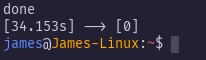
It;s not in there is it?

1 Like

The contents of /home/james/.byobu/prompt

[ -r /usr/share/byobu/profiles/bashrc ] && . /usr/share/byobu/profiles/bashrc  #byobu-prompt#

Does that have it in (and so on)

1 Like

That “MIGHT” be it, looking there I see this section

byobu_prompt_runtime() {
	# Calculate the approximate runtime of the previous command
	# Uses bash 5.0's EPOCHREALTIME
	local starttime endtime duration days hours minutes seconds microseconds nanoseconds str
	[ ! -r $BYOBU_RUN_DIR/timer.$$ ] && printf "[0.000s]" && return
	read starttime < $BYOBU_RUN_DIR/timer.$$ 2>/dev/null || true
	# strip to non-decimal time. avoids LP: #2052610
	endtime=${EPOCHREALTIME/[^0-9]/}
	starttime=${starttime/[^0-9]/}
	duration=$((endtime - starttime))
	days=$((duration/1000000/60/60/24))
	hours=$((duration/1000000/60/60%24))
	minutes=$((duration/1000000/60%60))
	seconds=$((duration/1000000%60))
	nanoseconds=$((duration-days*1000000*60*60*24-hours*1000000*60*60-minutes*1000000*60-seconds*1000000))
	nanoseconds=$(printf "%.6d" ${nanoseconds})
	microseconds=${nanoseconds:0:3}
	# Shorten our string as much as possible
	[ "$days" = "0" ] && days= || days="${days}d "
	[ "$hours" = "0" ] && hours= || hours="${hours}h "
	[ "$minutes" = "0" ] && minutes= || minutes="${minutes}m "
	str="${days}${hours}${minutes}${seconds}.${microseconds}s"
	printf "[%s]" "$str" 1>&2
}

# Requires Bash 4.x
export PS0='$(printf "%s" ${EPOCHREALTIME/[^0-9]/} >"$BYOBU_RUN_DIR/timer.$$")'


I commented out the very top line, & that seems to have done the trick
I’m not sure what added it, as said this was a recent change, that I didn’t (intentionally) initiate. but at least it’s gone now, thank you everyone for all the help!!!

1 Like

Did you comment out only this line?

byobu_prompt_runtime() {

I’d comment out the export instead, just commenting the top line could cause subtle problems.

I commented out both the top line and the export. I tried commenting only the export line, and opened a fresh terminal and the time was still showing, so I commented both & it seemed to work.

Either comment out off it, or uncomment the first line. Both will have the effect of not running the other commands when it redraws your prompt.

So a point of weirdness, commenting only the bottom like the “export” has no effect
commenting out both the Export line and the “byobu_prompt_runtime” part gets rid of the execution time, but Also removes the coloring from the prompt (as in earlier screenshot, username in blue, system name in orange)

Again none of this alters functionality, or hinders me in any way, in fact it’s almost kind of nice to see execution time, but it’s just WEIRD, and I didn’t do it (intentionally)…

Its from the byobu package.
Was that installed intentionally? Or maybe it was just a dependency?

pacman -Qi byobu
yay -Sii byobu | grep 'Required\|Optional'
Optional Deps   : None
Required By     : None
Optional For    : None

For me it’s a dependency for Hollywood, a silly little program. I Knew where it came from, what I mean is I didn’t intentionally initiate this recent change, I’ve had hollywood & therefore byobu for about 3 years. I’ve had Wezterm for about 6 months, this behavior started within the last couple weeks.

So it’s not a matter of finding what byobu is dependency of, it’s a matter of what made a change to /usr/share/byobu/profiles.

A different user showing the inate dependencies of a(n uninstalled) package is not really all that relevant.

Yup, there we go.

Well its from the package.
If that file wasnt previously provided by that package, or was but with a different configuration, then that has simply changed with the newer version of the package.

But I might mention that it hasnt changed in 5 months and the recent changes dont seem related.

https://github.com/dustinkirkland/byobu/commits/master/usr/share/byobu/profiles/bashrc

Maybe something else happened like .. you changed your shell to bash and thus got the contents of their bashrc?