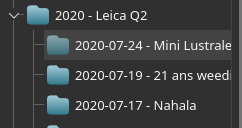
I don’t know if it is good enough for you, but what I do is first importing manually my photos in folders, arranging them as I want (with this year-month-day scheme) and THEN, I open Digikan which scan my photos folders and import them as I have configured them.
See below a screenshot how it appears in the Digikam Album tab