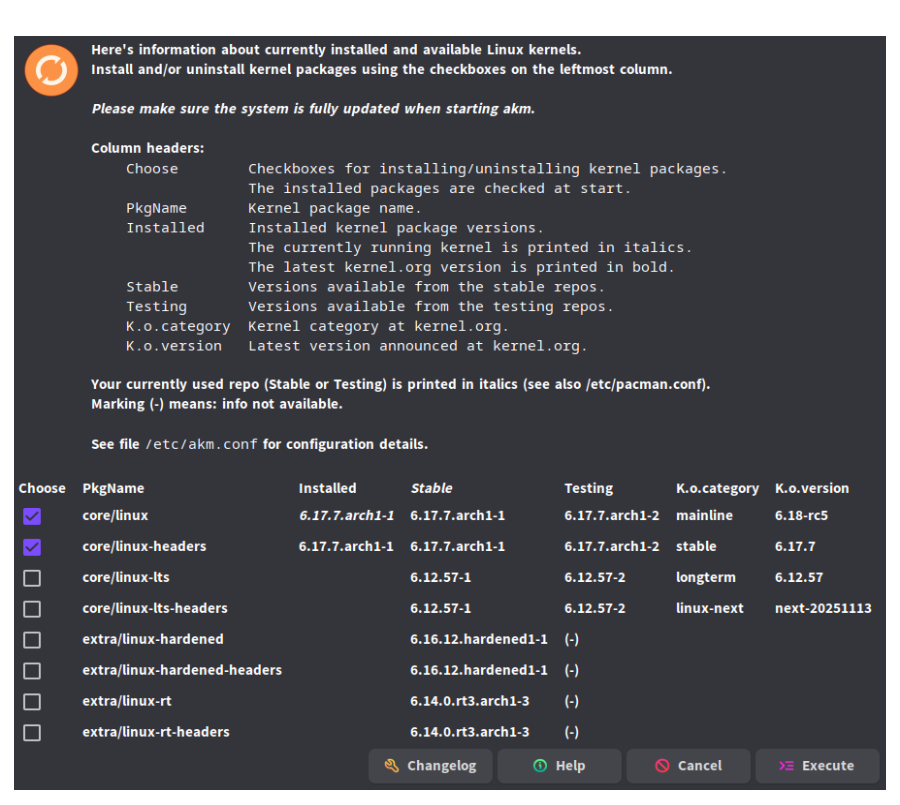
Well 6.13.7 was the latest kernel available at the moment the ISO was made , but being a rolling distro the kernel got updated to 6.17.7. The lts kernel is now at 6.12.57 also look at this screenshot.
I see that downgrading is quite easy, my last confusion regarding the kernels is how they work in terms of downloads. When upgrading from say 6.10.x to 6.12.x. Will it download all kernels in between, or just the latest. And if rolling back, would it then roll back to 6.10, or the one prior to 6.12.x (if it downloads all kernels in between when doing a system update).
I haven’t found any of this on the wiki, but maybe I’m looking in the wrong places.
No, it will only download (and upgrade to) the latest version available in the kernel series.
It depends which version you choose to downgrade to. It will download (and downgrade to) the chosen version. It won’t download all the kernels in between.
However, I don’t see any reason why downgrade to whole other kernel series. You would normally downgrade to a prior version in the same kernel series temporarily if you encounter an issue with the latest version available for that series.
A normal upgrade downloads only the latest packages (kernel or other).
Note also that partial upgrades are not supported because they can and will cause compatibility issues.
In practice it means downgrading a package is only a temporary workaround, and should be considered as the last resort if something is not working after an upgrade.
That makes a lot of sense. Thanks for clarifying. I wasn’t sure how to do so, and trying a different kernel was easier to compare. In the end it was a combo of kernel and a breaking of the power performance state for the laptop which was causing the issues. All the replies from everyone has helped me for when I will need a downgrade in the future.
I’d focus on major kernel versions, before doing package downgrades for kernel, drivers or apps.
Or do you mean running a full system update vs only updating/downgrading kernel or drivers?
If the latter, because the updates are tied to work with the specific kernel version?
By the way, is there an easy way to do the same with terminal? If for some reason the system won’t boot and downgrading needs to be done pre-boot. I’m not sure where to find all the different kernel version links. The ones I found via wiki only points to full ISO’s for installers.
Not sure what you mean exactly but I try to answer.
Arch based systems do not support partial upgrades (typically meaning one or more packages have been downgraded but not all). A system in a partially upgraded state may experience small or big bad problems depending what has been downgraded. Downgrading essential system packages like e.g. kernel or a GPU driver can easily cause a boot failure or even worse issues.
Typically downgrading some regular app like an editor could typically make the app work in unexpected ways. Of course there might even be security issues with a downgraded web browser.
So downgrading is practically never recommended. It is not a magic trick to fix everything.
Better to solve the actual problem with a package by
waiting the package to be fixed
replacing it with another well-known native package either temporarily or sometimes permanently
And preferably report (in a very detailed way) the problem to the developer of the package.
 I’m curious if anyone could help me understand what the difference is.