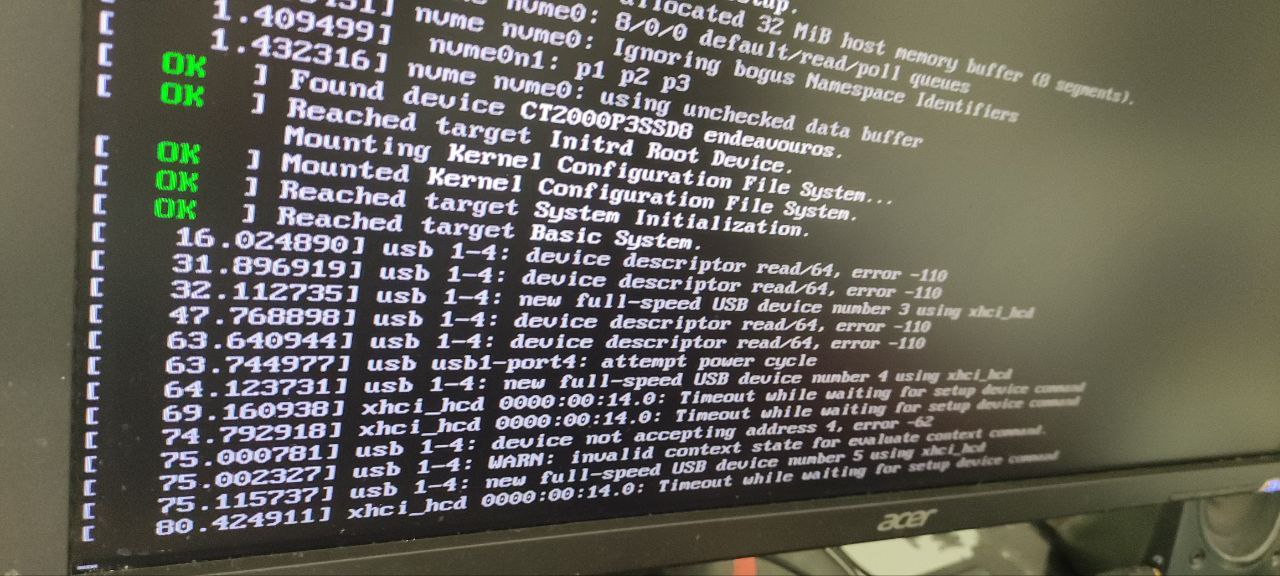
I have a controller that usually breaks when I reboot my system. I had the same issue on Windows. The controller only works after you plug it in and out again. The issue I’m having on EndeavourOS that I don’t have on Windows is that my system will stop for a while during boot when I have the controller plugged in which is causing some issues.
I get this error at the step Reached Target: Basic System
16.024760J usb 1-4: device descriptor read/64, error -110
I tried editing my grub config with
GRUB_CMDLINE_LINUX_DEFAULT=“modprobe.blacklist=xpad”
and
GRUB_CMDLINE_LINUX_DEFAULT=“usbcore.quirks=0e6f:02db:no-lpm”
GRUB_CMDLINE_LINUX_DEFAULT=“usbcore.quirks=0e6f:02db:bk”
But it doesn’t make a difference.
I could just plug the controller out every time I boot but I wonder if there’s a way to disable the USB check or just not have the system lock up for so long when it finds this error?
then use a /etc/modprobe.d/blacklist.conf to prevent loading this module.
Write one additional line into the file for your controller (i.e. ‘blacklist module-name’).
I think, you need to find therefore the name for the module the system tries to load…
Then this device should be ignored.
Sorry for being so short, it’s from memory only.
I am sure, the Arch-wiki has some detailed guidance for this - or ask your loved search-engine…
What you suggested doesn’t work and permanently disables all controllers if I blacklist xpad.
I found the solution though “usbcore.quirks=0e6f:02db:u” adding this to my GRUB default fixed it and now I don’t even have to re-plug the controller. I’m not sure exactly why.
So it seems today when booting the issue returned so I must’ve done something wrong when testing and the quirk didn’t actually solve the issue. So I’m back to square one.
Yes, I have tried the USB ports on the back and front of the case and I still have the same issue.
Again this happens on all the USB ports on my PC, and the controller works fine when plugged in when the system is running.
I know the issue is with the controller because I get the same error when starting my laptop (also running EndeavourOS) with it plugged in.
But again on Windows it doesn’t delay the boot when plugged in I just have to re-plug it to actually use it.
On EndeavourOS it gets stuck for a significant amount of time and if I wait for it to boot I still have to re-plug the controller to use it.
If this is just some Linux issue that can’t be resolved easily I’ll just have to live with it. I was just hopping there was some way to just wait with loading the controller until the system is running because then it works fine.
Just inspected your dmesg-output again, I think your delay will happen some later. If you boot without ‘quiet’, you will see all the messages of systemd starting his units.
I expect you will find one (or more) lines saying “a start job is running…” and some seconds counting down.
Hopefully you can read this and (later) locate this in your journal (check the timestamps). Maybe you can take a photo.
If you get this, I hope we come closer to your problem…
OK, but this is not, what I expected to see.
Your ‘long delay’ happens exactly in this moment when you take this photo?
Later on are no more delays as I describe in my last post?