Using EOS KDE Plasma 6 and want to change the whisker menu icon size. There two sizes in the menu. The main drop down list on the left has one size but in the Favorites listing the icons are twice the size. How do I make them the same? Thanks
Are you actually using the whisker menu on Plasma (and if so, why)?
Or the other way around, if you are using whisker menu .. are you sure you are on KDE Plasma?
I’ve never tried XFCE’s Whisker Menu with KDE Plasma. 
OK I said it wrong. The menu that drops down when I click on the launcher symbol at the upper left corner. I can’t find a way to screen-capture this. There are two icon sizes in the menu. The main drop down list on the left has smaller size but in the Favorites listing the icons are twice the size. How do I make them the same? Thanks
Are you referring to the KDE Plasma Application Launcher menu? By default, it should be at the bottom left. Could you share a screenshot of your desktop so we can better understand what you’re seeing?
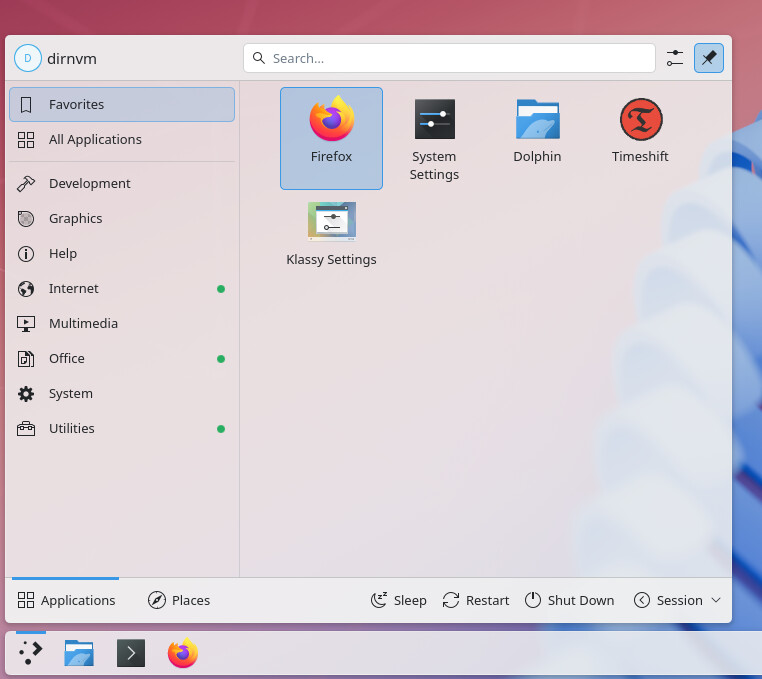
This is called the Kickoff menu , if it is the one on the screenshot you are talking about. Not sure that can be easily changed, there is this altenative.
https://userbase.kde.org/File:Kickoff_Menu_Switch_to_Dashboard.png

If you are referring to the Application Launcher (Kickoff) menu then you can right-click on it and select “Configure Application Launcher”. From there just make sure that “Show favorites” and “Show other applications” have the same selection (both “in a grid” or both “in a list”).
Thank you very much
1 Like
This topic was automatically closed 2 days after the last reply. New replies are no longer allowed.