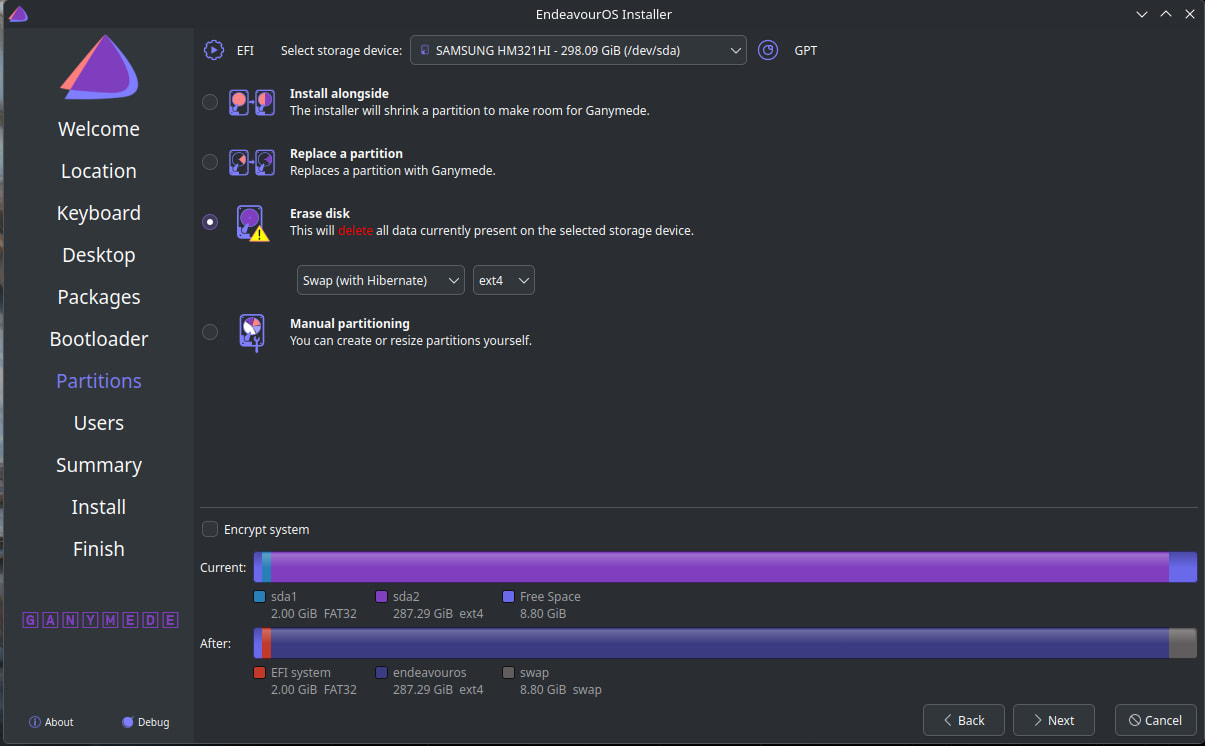
Hi, I am poating this from my phone because the computer I’m using can’t install EndeavourOS because neither Calamares or KDE Partition Manager can create an ext4 partition to install it. I’m trying to install Endeavour to this PC as a gift to a friend (the entire PC is the gift). It’s nothing major, an i5 2500 and an RX 560.
Thankfully, KDE Connect works, so I can send atuff right to my phone and post here.
I am too much of a noob to even begin pointing to where my problem is, but after being on for a few minutes, the system just kinda hangs and stop responding to inputs. The cursor still moves, but things dont respond to being clicked.
If I act quick, I can get Calamares to start, and I am able to try and install, but it always hangs exactly om “Creating a new ext4 partition on /dev/sda…”
I was able to get the following registries during it:
https://termbin.com/ejqj
https://termbin.com/e20j
Is this just a case of bad HDD? I find it super weird, because it doesn’t error or anything. I tried waiting over 15 minutes and it just stood there.
I hope I can be helped, I don’t know how to extract more logs out of the system…
Can you post
sudo parted -l
Then if possible inxi -Faz | eos-sendlog You can post the url.
https://0x0.st/PX-a.txt
Got my actual PC back up and running now, will be able to do more.
edit: note I can’t run the command while the formatting is running, idk if that’s supposed to happen or not.
Drives: Local Storage: total: 326.91 GiB used: 0 KiB (0.0%) SMART Message: Unable to run smartctl. Root privileges required. ID-1: /dev/sda maj-min: 8:0 vendor: Samsung model: HM321HI size: 298.09 GiB block-size: physical: 512 B logical: 512 B speed: 3.0 Gb/s tech: HDD rpm: 5400 serial: <filter> fw-rev: 0001 scheme: MBR
Looks like your motherboard supports UEFI. The UEFI Bios is outdated. You may want to update that. Also i see that the current drive is installed in MBR and not UEFI.
Edit: In other words the partition on the drive is MBR not GPT
It would be better to check and change the settings in the Bios and make sure if there is a secure boot setting that it is disabled, CSM is disabled so that it installs in UEFI mode and not MBR Bios mode. The default bootloader is systemd-boot which isn’t supported in bios mode. But if you use grub you can install in MBR Bios mode. But if the board is UEFI I don’t know why you wouldn’t want to take advantage of it’s superior capabilities.
Edit: You can if you like use MBR Bios mode and install EOS but you’ll have to use grub as your bootloader which has to be selected during the install process. Your choice.
Edit: Also how did you create the live usb? What tool did you use?
@BalaDeSilver
Is it your intent to wipe out what is on the drive currently and only install EOS? Or is it going to be dual boot with Windows?
Strange, I can’t seem to find an UEFI mode on the bios… Maybe if I do update it?
I used Ventoy. When I try to run it, it shows normal mode and grub2 mode. I have no idea if that changes anything. Maybe normal is UEFI or something, I did notice it offered another option to chose as a bootloader, but that didn’t help either. I just did that now to confirm. It stops at 5% in the same spot.
And this is an EOS only drive, no Windows or other OSs in it, so I’ve wiped it like 10 times already, and nothing.
Okay if it doesn’t support UEFI that’s fine. I don’t use ventoy and if you do you have to make sure it is up to date.
If you boot on the live ISO do you have internet? Are you installing using the online install? I would update the arch mirrors in the welcome menu first. Then run the installer and select erase disc with swap and ext4. When it comes up select grub as the bootloader.
Edit: If you are having trouble with ventoy then create a new live usb with another method such as etcher on Windows or something else. Not sure what you are using to do it from?
Edit:
https://discovery.endeavouros.com/installation/create-install-media-usb-key/2021/03/
I have my own working EOS install on a Ryzen 3600 and RTX 3060, which used the exact same USB stick, and it worked. It even formatted my other drive I was having problems with. The main problem seems to be the computer itself.
Maybe it is a bad drive, but the computer was working fine before I took it to install EOS, so IDK what the problem is, really. It specifically hangs when trying to format an old HDD from a laptop that I stuck on it.
The strange thing is: it DOES format the disk. You can see it is correctly formatted. It has an EFI FAT32 partition, a main ext4 partition, and free space which should be the swap partition. It does format the main partition, then hangs forever, and never gets to formatting the swap partition. And I can never skip formatting. Very weird IMO.
Also, it does have internet (otherwise, KDE Connect could never work for the screenshots, or the uploads), and updating mirrors did nothing. I tried sudo pacman -Syu before trying to install, but that hangs too.
Do you think it could be a USB 3.0 stick into a 2.0 port problem?
If you have EOS installed you can install popsicle from the AUR. That is the tool i use for creating live USB from the ISO.
I don’t think so but you can try another port if you have one.
Wait, it took a long time, but it seems to have passed the hangup in formatting. It is now hanging in “Install base system”, but it is new behavior.
Maybe updating mirrors did actually do something.
Although, this does make sense to be a naturally long process, so I’ll keep it on while I go take a shower. It’s 11:40 PM and I need to prepare to sleep.
If when I come back after the shower or after sleeping and the install is successful, I’ll mark as the solution.
The solution ended up being to use grub2 mode on Ventoy, choosing grub as a bootloader, and updating mirrors (I clicked once in each of the 4 options).
Thank you ricklinux for your patience and help