Having now completed my shift from Manjaro to EndeavourOS on my Rapberry pi 4B, there is only one unimplemented step remaining. Manjaro had an instance of Piclone, so that I was able to maintain full system back-ups by copying the whole of the Micro SD card. It was a long process with a 64GB card, but had the advantage of safeguarding against corruption of the working card, as it could be replaced by the later of two back-ups. A search for piclone on Add/Remove Software gave a null result. Can anyone out there advise on how to get piclone working, or suggest how to transfer the Manjaro version safely to my EndeavourOS system, which is now working successfully.
yay Piclone                                  12:40:40
1 aur/piclone-git r146.71b0bcb-1 (+1 0.00) [569d5h]
    Raspberry Pi system clone utility
==> Packages to install (eg: 1 2 3, 1-3 or ^4)
==>
Found this topic on the Manjaro forum that might help.
The method described to install it can also be used on EOS as far as I know.
It is in the AUR so I think it should work.
Unfortunately neither this suggestion, nor the one based on the Manjaro forum, worked. I set out below the result of a final test use of yay Piclone:
[petern@localhost ~]$ yay Piclone
1 aur/piclone-git r146.71b0bcb-1 (+1 0.00) [571d5h]
Raspberry Pi system clone utility
==> Packages to install (eg: 1 2 3, 1-3 or ^4)
==> 1
AUR Explicit (1): piclone-git-r146.71b0bcb-1
:: PKGBUILD up to date, skipping download: piclone-git
1 piclone-git (Build Files Exist)
==> Packages to cleanBuild?
==> [N]one [A]ll [Ab]ort [I]nstalled [No]tInstalled or (1 2 3, 1-3, ^4)
==> N
1 piclone-git (Build Files Exist)
==> Diffs to show?
==> [N]one [A]ll [Ab]ort [I]nstalled [No]tInstalled or (1 2 3, 1-3, ^4)
==> N
==> Making package: piclone-git r146.71b0bcb-1 (Sat 19 Sep 2026 01:14:26 PM BST)
==> Retrieving sources…
→ Updating piclone git repo…
==> WARNING: Skipping verification of source file PGP signatures.
==> Validating source files with sha256sums…
piclone … Skipped
:: (1/1) Parsing SRCINFO: piclone-git
==> Making package: piclone-git r146.71b0bcb-1 (Sat 19 Sep 2026 01:14:36 PM BST)
==> Checking runtime dependencies…
==> Checking buildtime dependencies…
==> Retrieving sources…
→ Updating piclone git repo…
==> Validating source files with sha256sums…
piclone … Skipped
==> Removing existing $srcdir/ directory…
==> Extracting sources…
→ Creating working copy of piclone git repo…
Cloning into ‘piclone’…
done.
==> Starting prepare()…
/home/petern/.cache/yay/piclone-git/PKGBUILD: line 22: ./autogen.sh: No such file or
directory
==> ERROR: A failure occurred in prepare().
Aborting…
→ error making: piclone-git-exit status 4
→ Failed to install the following packages. Manual intervention is required:
piclone-git - exit status 4
[petern@localhost ~]$
As can be seen, I responded to the first prompt with ‘1’, which I assumed was the correct one, and took the default option for all the others. I am uncertain about what is meant by the comment about “Manual intervention”, so any advice would be welcome.
Do this:
cd ~/yay/piclone-git
mv PKGBUILD PKGBUILD.old
Open an editor and copy and paste this new PKGBUILD in and save:
# Maintainer: Frede Hundewadt <fh@uex.dk>

pkgname=piclone-git
pkgver=r160.8b9c6c6
pkgrel=1
pkgdesc="Raspberry Pi system clone utility"
arch=(x86_64 i686 armv7h aarch64)
url="https://github.com/raspberrypi-ui/piclone"
license=(GPL2)
depends=(gtk3 glib2 parted dosfstools e2fsprogs coreutils util-linux zenity dbus gvfs sudo wayland)
makedepends=(git meson ninja gettext wayland-protocols)
source=("git+https://github.com/raspberrypi-ui/piclone.git")
sha256sums=('SKIP')

pkgver() {
    cd piclone
    printf "r%s.%s" "$(git rev-list --count HEAD)" "$(git rev-parse --short HEAD)"
}

prepare() {
    cd piclone
    # Upstream's language-list generator is missing its executable bit.
    chmod +x po/linggen

    # Use Zenity instead of the Raspberry Pi-specific sudopwd helper.
    sed -i 's|/usr/bin/sudopwd|/usr/lib/piclone/pwdpic.sh|g' src/piclone.c
    cat > data/pwdpic.sh <<'EOF'
#!/bin/sh
exec zenity --password --title="SD Card Copier"
EOF
}

build() {
    arch-meson piclone build
    meson compile -C build
}

package() {
    DESTDIR="${pkgdir}" meson install -C build
    install -Dm755 piclone/data/pwdpic.sh "${pkgdir}/usr/lib/piclone/pwdpic.sh"
}
Still in this directory issue:
makepkg -si
If this works:
sudo pacman -U piclone-git-r160.8b9c6c6-1-x86_64.pkg.tar.zst
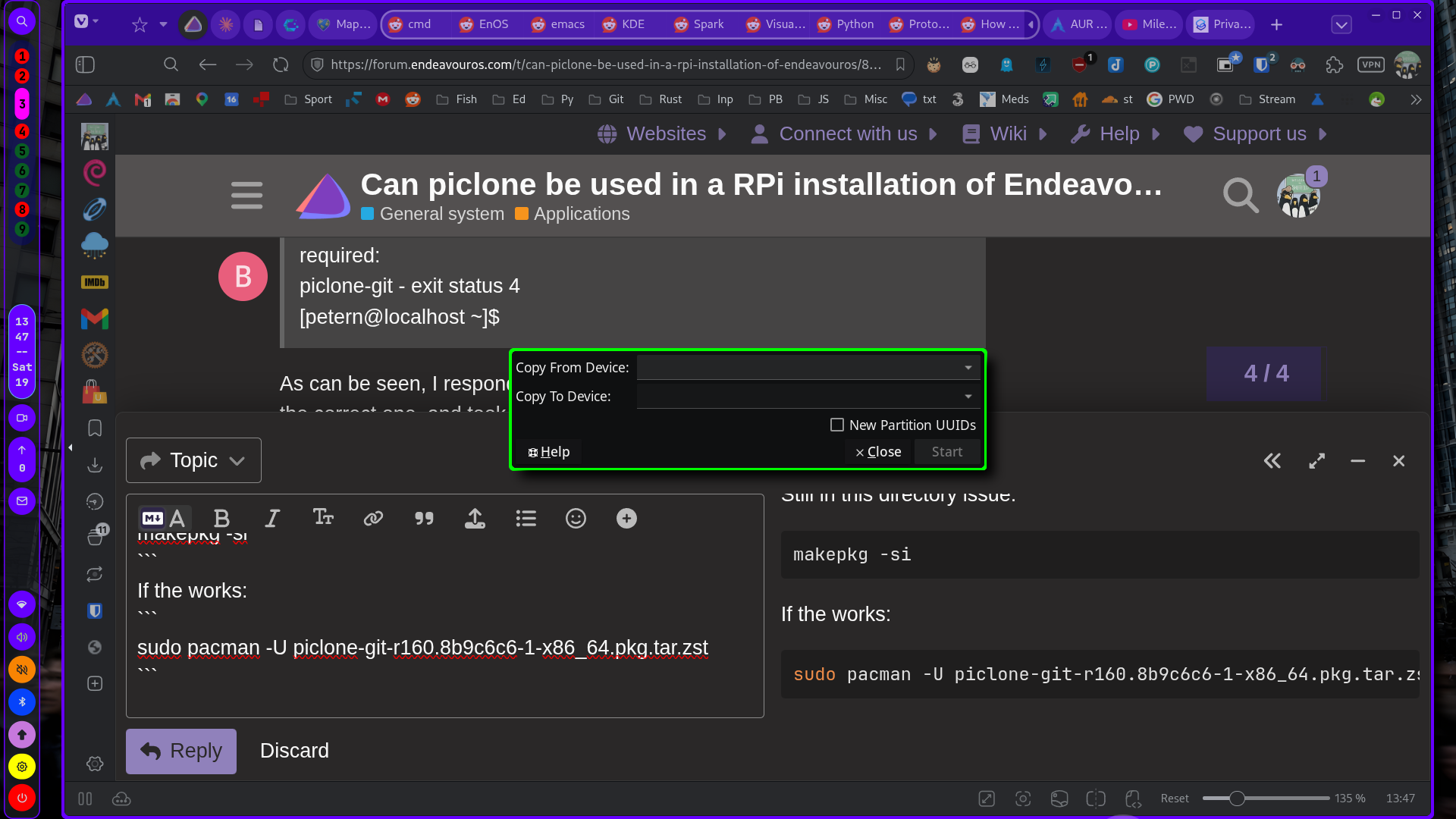
works here:
Also:
2 extra/rpi-imager 2.0.11.1-1 (2.1 MiB 7.2 MiB)
    Raspberry Pi Imaging Utility
is available.
Still a problem. I followed your instructions, but initially got the following response:
[petern@localhost ~]$ cd ~/yay/piclone-git
bash: cd: /home/petern/yay/piclone-git: No such file or directory
[petern@localhost ~]$
I then used ‘find’ to locate the file PKGBUILD and discovered that it was in .cache/yay/piclone-git, so the next step was to try cd ~/.cache/yay/piclone-git which worked as seen below
[petern@localhost ~]$ cd ~/.cache/yay/piclone-git
[petern@localhost piclone-git]$ ls
piclone PKGBUILD src
[petern@localhost piclone-git]$ mv PKGBUILD PKGBUILD.old
[petern@localhost piclone-git]$ ls
piclone PKGBUILD.old src
[petern@localhost piclone-git]$ nano PKGBUILD
[petern@localhost piclone-git]$ makepkg -si
==> ERROR: arch is not allowed to be empty.
==> ERROR: pkgrel is not allowed to be empty.
==> ERROR: pkgver is not allowed to be empty.
==> ERROR: pkgname is not allowed to be empty.
==> ERROR: Extra package() function for split package ‘’
[petern@localhost piclone-git]$ ls
piclone PKGBUILD PKGBUILD.old src
[petern@localhost piclone-git]$
a puzzling set of error messages since your code provided the first four of the items identified as ‘empty’ errors. As a non-systems person I’m not sure about the last of the items.
I then tried creating a directory yay in my home folder and copying the contents from the .cache/yay folder, but the result of makepkg -si was exactly the same. Any suggestions?
I also note your reference to the possibility of
2 extra/rpi-imager 2.0.11.1-1 (2.1 MiB 7.2 MiB)
    Raspberry Pi Imaging Utility
How would I use this?
-
Did you check the PKGBUILD was saved?
-
yay -S rpi-imager
This is a link to the compiled package I made:
Download and install:
sudo pacman -U /path/to/downloaded/file.zst
Here’s what happened:
[petern@localhost ~]$ sudo pacman -U Downloads/piclone-git-r160.8b9c6c6-1-x86_64.pkg.tar.zst
[sudo] password for petern:
loading packages…
error: failed to prepare transaction (package architecture is not valid)
:: package piclone-git-r160.8b9c6c6-1-x86_64 does not have a valid architecture
[petern@localhost ~]$
Where do I go from here? (By the way, the ls command in my last post shows that PKGBUILD was in the directory.)
Oops, you are on an arm device, I am sorry. I assumed intel/amd.
For all practical purposes, the only difference between ARM devices and x86_64 devices is how it boots up. Once you get to the apps level, it is the same either way. Everything you suggested above is legitimate.
Today is my 76th birthday, so today is pretty much filled up. But tomorrow I will see if can compile piclone from the AUR and give it a whirl on my RPi 4b.
Pudge
EDIT: I have to amend my above post. Looking through this Topic, I noticed that @xircon compiled piclone. So that would be compiled for x86_64 and wouldn’t work on ARM aarch64.
Happy 76th, Pudge! May you have many more.
Happy 76th @Pudge. A few more should be added to those 


Happy birthday @Pudge. Hope you have a joyous day.
I had a little time, so I looked at the AUR PKGBUILD for piclone. It hasn’t been updated for over 1 1/2 years.
Looking at the PKGBUILD,
pkgdesc="Raspberry Pi system clone utility"
arch=(x86_64 i686 armv7h aarch64)
So the pkgdesc describes the app as a “Raspberry Pi system clone utility”, but in the next line it has the architectures as (x86_64 i686 armv7h aarch64) which sounds like a conflict.
The architecture should not include x86_64 or i686, it should only be armv7h and aarch64.
x86_64 being listed is what allowed @xircon to compile it on his x86_64 machine.
Later I will try compile piclone and see what happens.
Pudge
The app is just a fancy GUI wrapper around parted and cp -axv - I mean literally. Depending on the backup needs (image or device) it’s probably just easier to use a different app or even dd.
Congratulations on your birthday, young man! I await your further comments on the piclone problem.
To simulate the conditions of a new install, I installed the EnOS image for RPi 4b to a uSD card then installed Plasma.
I tried to install piclone-git using “yay -S piclone-git” and ended up with this error.
==> Starting prepare()...
/home/don/.cache/yay/piclone-git/PKGBUILD: line 22: ./autogen.sh: No such file or directory
==> ERROR: A failure occurred in prepare().
    Aborting...
 -> error making: piclone-git-exit status 4
 -> Failed to install the following packages. Manual intervention is required:
piclone-git - exit status 4
The key thing being
/home/don/.cache/yay/piclone-git/PKGBUILD: line 22: ./autogen.sh: No such file or directory
I then downloaded the files from the AUR and used make-pkg to compile it locally.
same results and error message.
looking at line 22 of the PKGBUILD for piclone it wants to run autogen.sh which is not included with the downloaded files.
So as far as running piclone on EOS, someone would have to get ahold of the maintainer and try to convince him to fix the PKGBUILD that is 1 1/2 years old. The github repository for piclone is totally oriented to debian so no help there.
At this point, I would agree with @Schlaefer and move on to some thing else to make your backups.
Pudge
This neat project can shrinkwrap your pi’s backup (I think the guy died a while ago)
As for piclone - despite the name - it is a simple sd-card copier and therefore not limited to arm architecture.
Scratch that - was thinking about another build I did.
They switched to meson in this commit. That removed autogen.sh etc, the PKGBUILD needs to be updated to reflect that (obviously).