Basically I have 2 activities. A default one, and a game one. I want to autostart Steam in the game activity. I had it auto-starting, but I find no way to keep it off the default activity.
Hi @sempterobit ,
Basically ‘I am Master of none’ as well, but the ‘Jack’ inside me created this script:
cat steam.sh
#!/bin/bash
# Switch to the last activity no matter how it is named
defact=$(qdbus6 org.kde.ActivityManager /ActivityManager/Activities ListActivities | head -n 1)
games=$(qdbus6 org.kde.ActivityManager /ActivityManager/Activities ListActivities | tail -n 1)
qdbus6 org.kde.ActivityManager /ActivityManager/Activities SetCurrentActivity "$games"
# Launch the application
steam &
sleep 15
qdbus6 org.kde.ActivityManager /ActivityManager/Activities SetCurrentActivity "$defact"
exit
adjust the sleep time and call it from Autostart.
Got to plasma System Settings → Window Rules and force it on an Activity.
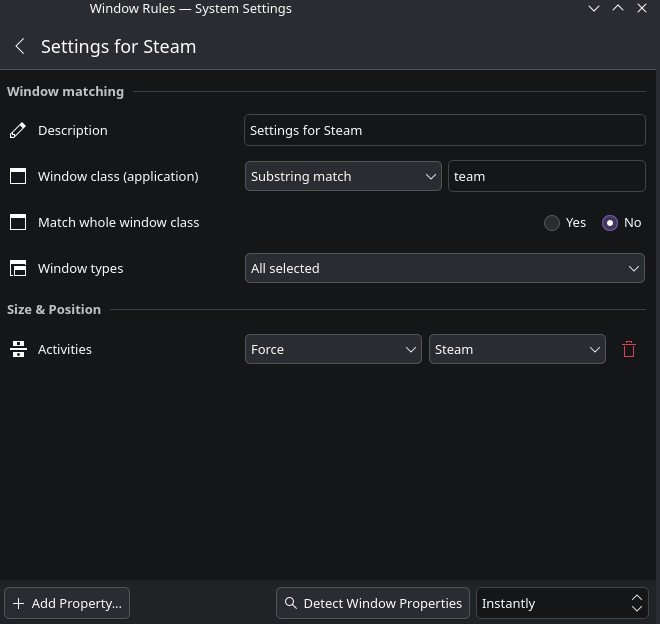
I messed with it for over 2 hours, and can t not get it to work. Basically everything loads on the activity screen I was on when I restart computer.
What about setting the sleep time to 30 in the script?
In terminal this line gets the UUID of the activities:
qdbus6 org.kde.ActivityManager /ActivityManager/Activities ListActivities
then check the activity change by
qdbus6 org.kde.ActivityManager /ActivityManager/Activities SetCurrentActivity <UUID of your act>
If this works then only the speed your net and yr hw that matters. See sleep time