At 114MB it’s too big for my needs. It comes bundled with bloat (an editor, it’s own pdf viewer, and some kind of viewer program and maybe one more.) I’d like all these apps gone. I only use one Calibre button, just one: Convert.
My needs: a program able to convert epub, mobi, lrf, pdb, tlr (probably) more into pdfs. The End.
I don’t need 99% of Calibre, which is a wonderful app. I’m even open to CLI.
Until I can clone Endeavour to a bigger SSD, existing space is at a premium right now.
Thank you for any guidance!
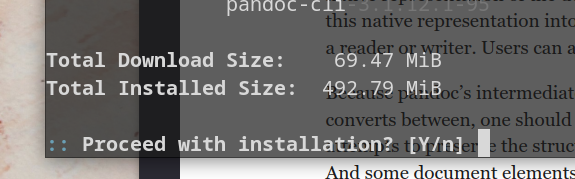
Yeah, recommended. If you don’t need some rather special Pandoc stuff (Lua filters, I believe), the -bin is surely the better alternative.
I use Pandoc for a plethora of things, like creating ebooks from Markdown, so I have to live with all the often-updated Haskell deps.
@drunkenvicar: Note that “good” PDF creation might require several commandline switches. EPUB are typically made for e-readers (small screen, reflowing), you might have to set things like PDF geometry for output, otherwise it’ll probably default to 8½x11″, or A4.
You can write a script for that, or make include files for often-used parameter sets.
I found the following a few minutes ago on GitHub. It’s a command line app based on Calibre, but for the very reason you’re looking for an alternative to Calibre; i.e. it’s only purpose is conversion.
OK, this is interesting. I’m OK with an 8.5X11 default but it never occurred to me their were different quality levels. I’m OK in the terminal with these kind of moves. Could you explain more?
I can dig this, thank you. Conversion is my only requirement. Looks like an easy cmake.
Installed thank you
yeah I print to pdf a lot it’s time-saving. but after Calibre not sure I want a weighty GUI “that will open those formats.” Unless there are really light ones.
Nah, I’m getting old, too… and lazier… I did use Atom in the past as my LaTeX editor, but since Pulsar isn’t yet so far as a perfect successor, I use TexMaker once in a while for LaTeX editing.
But most of my writing, tbh, is in Markdown.
Really the most future-proof, easy, and with Pandoc you can make anything from it: Beautiful HTML, academic papers, nice PDFs, functional ebooks, just anything. Even crappy “Word” documents. shiver…
The program(s) are shareware, so you can try before you buy. And don’t let the DRM part cause you to think it’s not for you. You can also convert non-DRM ebooks.
I don’t have WINE, or an attached WIN, or money for that matter, but I really am happy you are turning your brain inside out. I try to do that for people who need help although my trick bag aint real deep compared to the powerhouses here–
who is the picture of? it’s not Whitman, Twain, or Thoreau, A. Watts, not Jung or ___?