Best guess: AI
btop working here, no crashes when i hit P but i’m on
nvidia and Kernel Version: 6.15.3-arch1-1 (64-bit)
Works fine for me. I’m on amd integrated gpu. Can you try to backup your existing btop config and let it generates the fresh new one?
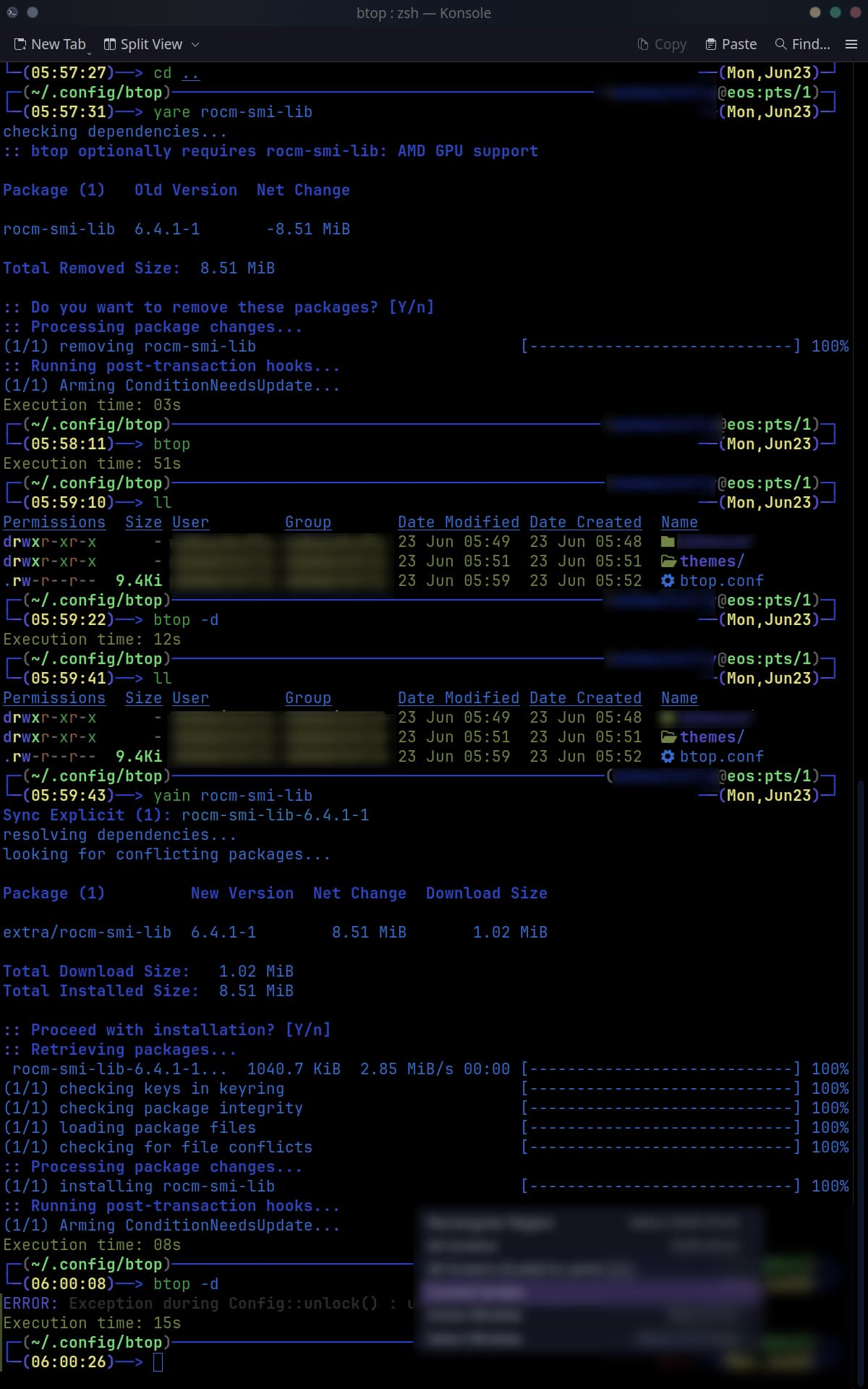
Bug: when I hit p, btop crashes:
Debugging:
I did move the config files to another dir, the crash persisted.
I removed aur/btop-gpu-git 1.3.0.r875.e15e0b7-1 (+2 0.00)
I installed extra/btop 1.4.3-3 (555.2 KiB 1.6 MiB) (Installed)
The crash persisted.
Then, I noticed that the optional package
extra/rocm-smi-lib 6.4.1-1 8.51 MiB 1.02 MiB
was installed.
I removed extra/rocm-smi-lib 6.4.1-1 8.51 MiB 1.02 MiB
The crash disappeared.
I installed extra/rocm-smi-lib 6.4.1-1 8.51 MiB 1.02 MiB
The crash came back.
Thus, the crash is when btop access the optional package rocm-smi-lib
Now, let us find dmsg for amd
And we will find the I2C access is generating a bunch of errors. Those access is to fetch data from amd sensors. The acces is done via rocm-smi-lib.
[    3.541815] [drm] amdgpu kernel modesetting enabled.
[    3.541931] amdgpu: Virtual CRAT table created for CPU
[    3.541939] amdgpu: Topology: Add CPU node
[    3.541971] amdgpu: Overdrive is enabled, please disable it before reporting any bugs unrelated to overdrive.
[    3.542435] amdgpu 0000:03:00.0: amdgpu: detected ip block number 0 <soc15_common>
[    3.542438] amdgpu 0000:03:00.0: amdgpu: detected ip block number 1 <gmc_v9_0>
[    3.542440] amdgpu 0000:03:00.0: amdgpu: detected ip block number 2 <vega20_ih>
[    3.542441] amdgpu 0000:03:00.0: amdgpu: detected ip block number 3 <psp>
[    3.542443] amdgpu 0000:03:00.0: amdgpu: detected ip block number 4 <powerplay>
[    3.542444] amdgpu 0000:03:00.0: amdgpu: detected ip block number 5 <dm>
[    3.542446] amdgpu 0000:03:00.0: amdgpu: detected ip block number 6 <gfx_v9_0>
[    3.542447] amdgpu 0000:03:00.0: amdgpu: detected ip block number 7 <sdma_v4_0>
[    3.542448] amdgpu 0000:03:00.0: amdgpu: detected ip block number 8 <uvd_v7_0>
[    3.542449] amdgpu 0000:03:00.0: amdgpu: detected ip block number 9 <vce_v4_0>
[    3.542469] amdgpu 0000:03:00.0: No more image in the PCI ROM
[    3.542484] amdgpu 0000:03:00.0: amdgpu: Fetched VBIOS from ROM BAR
[    3.542487] amdgpu: ATOM BIOS: 113-D3600200-106
[    3.588857] amdgpu 0000:03:00.0: vgaarb: deactivate vga console
[    3.588860] amdgpu 0000:03:00.0: amdgpu: Trusted Memory Zone (TMZ) feature not supported
[    3.588865] amdgpu 0000:03:00.0: amdgpu: PCIE atomic ops is not supported
[    3.588882] amdgpu 0000:03:00.0: amdgpu: MEM ECC is not presented.
[    3.588883] amdgpu 0000:03:00.0: amdgpu: SRAM ECC is not presented.
[    3.588890] amdgpu 0000:03:00.0: amdgpu: RAS INFO: ras initialized successfully, hardware ability[4] ras_mask[4]
[    3.588937] amdgpu 0000:03:00.0: amdgpu: VRAM: 16368M 0x0000008000000000 - 0x00000083FEFFFFFF (16368M used)
[    3.588939] amdgpu 0000:03:00.0: amdgpu: GART: 512M 0x0000000000000000 - 0x000000001FFFFFFF
[    3.589070] [drm] amdgpu: 16368M of VRAM memory ready
[    3.589073] [drm] amdgpu: 32768M of GTT memory ready.
[    3.589567] amdgpu: hwmgr_sw_init smu backed is vega20_smu
[    3.644389] amdgpu 0000:03:00.0: amdgpu: reserve 0x400000 from 0x83fec00000 for PSP TMR
[    3.756508] amdgpu 0000:03:00.0: amdgpu: RAP: optional rap ta ucode is not available
[    4.200959] [drm:smu_v11_0_i2c_xfer [amdgpu]] *ERROR* Received I2C_NAK_7B_ADDR_NOACK !!!
[    4.201235] [drm:smu_v11_0_i2c_xfer [amdgpu]] *ERROR* WriteI2CData() - I2C error occurred :1
[    4.201429] [drm:amdgpu_ras_eeprom_init [amdgpu]] *ERROR* Failed to read EEPROM table header, res:-5
[    4.201611] amdgpu 0000:03:00.0: amdgpu: Failed to initialize ras recovery! (-5)
[    4.274155] amdgpu: HMM registered 16368MB device memory
[    4.277538] kfd kfd: amdgpu: Allocated 3969056 bytes on gart
[    4.277551] kfd kfd: amdgpu: Total number of KFD nodes to be created: 1
[    4.277738] amdgpu: Virtual CRAT table created for GPU
[    4.277926] amdgpu: Topology: Add dGPU node [0x66af:0x1002]
[    4.277928] kfd kfd: amdgpu: added device 1002:66af
[    4.277941] amdgpu 0000:03:00.0: amdgpu: SE 4, SH per SE 1, CU per SH 16, active_cu_number 60
[    4.277944] amdgpu 0000:03:00.0: amdgpu: ring gfx uses VM inv eng 0 on hub 0
[    4.277945] amdgpu 0000:03:00.0: amdgpu: ring comp_1.0.0 uses VM inv eng 1 on hub 0
[    4.277946] amdgpu 0000:03:00.0: amdgpu: ring comp_1.1.0 uses VM inv eng 4 on hub 0
[    4.277947] amdgpu 0000:03:00.0: amdgpu: ring comp_1.2.0 uses VM inv eng 5 on hub 0
[    4.277948] amdgpu 0000:03:00.0: amdgpu: ring comp_1.3.0 uses VM inv eng 6 on hub 0
[    4.277949] amdgpu 0000:03:00.0: amdgpu: ring comp_1.0.1 uses VM inv eng 7 on hub 0
[    4.277950] amdgpu 0000:03:00.0: amdgpu: ring comp_1.1.1 uses VM inv eng 8 on hub 0
[    4.277951] amdgpu 0000:03:00.0: amdgpu: ring comp_1.2.1 uses VM inv eng 9 on hub 0
[    4.277952] amdgpu 0000:03:00.0: amdgpu: ring comp_1.3.1 uses VM inv eng 10 on hub 0
[    4.277953] amdgpu 0000:03:00.0: amdgpu: ring kiq_0.2.1.0 uses VM inv eng 11 on hub 0
[    4.277954] amdgpu 0000:03:00.0: amdgpu: ring sdma0 uses VM inv eng 0 on hub 8
[    4.277955] amdgpu 0000:03:00.0: amdgpu: ring page0 uses VM inv eng 1 on hub 8
[    4.277956] amdgpu 0000:03:00.0: amdgpu: ring sdma1 uses VM inv eng 4 on hub 8
[    4.277957] amdgpu 0000:03:00.0: amdgpu: ring page1 uses VM inv eng 5 on hub 8
[    4.277958] amdgpu 0000:03:00.0: amdgpu: ring uvd_0 uses VM inv eng 6 on hub 8
[    4.277959] amdgpu 0000:03:00.0: amdgpu: ring uvd_enc_0.0 uses VM inv eng 7 on hub 8
[    4.277959] amdgpu 0000:03:00.0: amdgpu: ring uvd_enc_0.1 uses VM inv eng 8 on hub 8
[    4.277960] amdgpu 0000:03:00.0: amdgpu: ring uvd_1 uses VM inv eng 9 on hub 8
[    4.277961] amdgpu 0000:03:00.0: amdgpu: ring uvd_enc_1.0 uses VM inv eng 10 on hub 8
[    4.277962] amdgpu 0000:03:00.0: amdgpu: ring uvd_enc_1.1 uses VM inv eng 11 on hub 8
[    4.277963] amdgpu 0000:03:00.0: amdgpu: ring vce0 uses VM inv eng 12 on hub 8
[    4.277964] amdgpu 0000:03:00.0: amdgpu: ring vce1 uses VM inv eng 13 on hub 8
[    4.277965] amdgpu 0000:03:00.0: amdgpu: ring vce2 uses VM inv eng 14 on hub 8
[    4.284341] amdgpu: Detected AMDGPU DF Counters. # of Counters = 8.
[    4.284353] amdgpu: Detected AMDGPU 2 Perf Events.
[    4.284470] amdgpu 0000:03:00.0: amdgpu: runtime pm is manually disabled
[    4.284472] amdgpu 0000:03:00.0: amdgpu: Runtime PM not available
[    4.285107] amdgpu 0000:03:00.0: [drm] Registered 6 planes with drm panic
[    4.285108] [drm] Initialized amdgpu 3.61.0 for 0000:03:00.0 on minor 2
[    4.298432] fbcon: amdgpudrmfb (fb0) is primary device
[    4.450849] amdgpu 0000:03:00.0: [drm] fb0: amdgpudrmfb frame buffer device
[    6.138490] snd_hda_intel 0000:03:00.1: bound 0000:03:00.0 (ops amdgpu_dm_audio_component_bind_ops [amdgpu])
[    7.688281] [drm:smu_v11_0_i2c_xfer [amdgpu]] *ERROR* TIMEOUT ERROR !!!
[    7.688755] [drm:smu_v11_0_i2c_xfer [amdgpu]] *ERROR* ReadData() - I2C error occurred :8
[    7.712275] [drm:smu_v11_0_i2c_xfer [amdgpu]] *ERROR* TIMEOUT ERROR !!!
[    7.712602] [drm:smu_v11_0_i2c_xfer [amdgpu]] *ERROR* ReadData() - I2C error occurred :8
[    7.736303] [drm:smu_v11_0_i2c_xfer [amdgpu]] *ERROR* TIMEOUT ERROR !!!
[    7.737305] [drm:smu_v11_0_i2c_xfer [amdgpu]] *ERROR* ReadData() - I2C error occurred :8
[    7.760277] [drm:smu_v11_0_i2c_xfer [amdgpu]] *ERROR* TIMEOUT ERROR !!!
[    7.760756] [drm:smu_v11_0_i2c_xfer [amdgpu]] *ERROR* ReadData() - I2C error occurred :8
[    7.784289] [drm:smu_v11_0_i2c_xfer [amdgpu]] *ERROR* TIMEOUT ERROR !!!
[    7.785215] [drm:smu_v11_0_i2c_xfer [amdgpu]] *ERROR* ReadData() - I2C error occurred :8
[    7.808277] [drm:smu_v11_0_i2c_xfer [amdgpu]] *ERROR* TIMEOUT ERROR !!!
[    7.808748] [drm:smu_v11_0_i2c_xfer [amdgpu]] *ERROR* ReadData() - I2C error occurred :8
[    7.832274] [drm:smu_v11_0_i2c_xfer [amdgpu]] *ERROR* TIMEOUT ERROR !!!
[    7.833561] [drm:smu_v11_0_i2c_xfer [amdgpu]] *ERROR* ReadData() - I2C error occurred :8
[    7.856275] [drm:smu_v11_0_i2c_xfer [amdgpu]] *ERROR* TIMEOUT ERROR !!!
[    7.857442] [drm:smu_v11_0_i2c_xfer [amdgpu]] *ERROR* ReadData() - I2C error occurred :8
[16343.107642] amdgpu 0000:03:00.0: amdgpu: psp gfx command UNLOAD_TA(0x2) failed and response status is (0x117)
[16343.795408] amdgpu 0000:03:00.0: amdgpu: MODE1 reset
[16343.795412] amdgpu 0000:03:00.0: amdgpu: GPU mode1 reset
[16343.795502] amdgpu 0000:03:00.0: amdgpu: GPU psp mode1 reset
[16344.323515] amdgpu 0000:03:00.0: Refused to change power state from D0 to D3hot
[16344.370643] amdgpu 0000:03:00.0: amdgpu: PSP is resuming...
[16344.418316] amdgpu 0000:03:00.0: amdgpu: reserve 0x400000 from 0x83fec00000 for PSP TMR
[16344.530025] amdgpu 0000:03:00.0: amdgpu: RAP: optional rap ta ucode is not available
[16345.121721] amdgpu 0000:03:00.0: amdgpu: ring gfx uses VM inv eng 0 on hub 0
[16345.121724] amdgpu 0000:03:00.0: amdgpu: ring comp_1.0.0 uses VM inv eng 1 on hub 0
[16345.121726] amdgpu 0000:03:00.0: amdgpu: ring comp_1.1.0 uses VM inv eng 4 on hub 0
[16345.121727] amdgpu 0000:03:00.0: amdgpu: ring comp_1.2.0 uses VM inv eng 5 on hub 0
[16345.121728] amdgpu 0000:03:00.0: amdgpu: ring comp_1.3.0 uses VM inv eng 6 on hub 0
[16345.121729] amdgpu 0000:03:00.0: amdgpu: ring comp_1.0.1 uses VM inv eng 7 on hub 0
[16345.121730] amdgpu 0000:03:00.0: amdgpu: ring comp_1.1.1 uses VM inv eng 8 on hub 0
[16345.121731] amdgpu 0000:03:00.0: amdgpu: ring comp_1.2.1 uses VM inv eng 9 on hub 0
[16345.121732] amdgpu 0000:03:00.0: amdgpu: ring comp_1.3.1 uses VM inv eng 10 on hub 0
[16345.121733] amdgpu 0000:03:00.0: amdgpu: ring kiq_0.2.1.0 uses VM inv eng 11 on hub 0
[16345.121734] amdgpu 0000:03:00.0: amdgpu: ring sdma0 uses VM inv eng 0 on hub 8
[16345.121735] amdgpu 0000:03:00.0: amdgpu: ring page0 uses VM inv eng 1 on hub 8
[16345.121736] amdgpu 0000:03:00.0: amdgpu: ring sdma1 uses VM inv eng 4 on hub 8
[16345.121737] amdgpu 0000:03:00.0: amdgpu: ring page1 uses VM inv eng 5 on hub 8
[16345.121738] amdgpu 0000:03:00.0: amdgpu: ring uvd_0 uses VM inv eng 6 on hub 8
[16345.121739] amdgpu 0000:03:00.0: amdgpu: ring uvd_enc_0.0 uses VM inv eng 7 on hub 8
[16345.121740] amdgpu 0000:03:00.0: amdgpu: ring uvd_enc_0.1 uses VM inv eng 8 on hub 8
[16345.121741] amdgpu 0000:03:00.0: amdgpu: ring uvd_1 uses VM inv eng 9 on hub 8
[16345.121742] amdgpu 0000:03:00.0: amdgpu: ring uvd_enc_1.0 uses VM inv eng 10 on hub 8
[16345.121743] amdgpu 0000:03:00.0: amdgpu: ring uvd_enc_1.1 uses VM inv eng 11 on hub 8
[16345.121744] amdgpu 0000:03:00.0: amdgpu: ring vce0 uses VM inv eng 12 on hub 8
[16345.121745] amdgpu 0000:03:00.0: amdgpu: ring vce1 uses VM inv eng 13 on hub 8
[16345.121746] amdgpu 0000:03:00.0: amdgpu: ring vce2 uses VM inv eng 14 on hub 8
ERRORS
[    4.200959] [drm:smu_v11_0_i2c_xfer [amdgpu]] *ERROR* Received I2C_NAK_7B_ADDR_NOACK !!!
[    4.201235] [drm:smu_v11_0_i2c_xfer [amdgpu]] *ERROR* WriteI2CData() - I2C error occurred :1
[    4.201429] [drm:amdgpu_ras_eeprom_init [amdgpu]] *ERROR* Failed to read EEPROM table header, res:-5
[    7.688281] [drm:smu_v11_0_i2c_xfer [amdgpu]] *ERROR* TIMEOUT ERROR !!!
[    7.688755] [drm:smu_v11_0_i2c_xfer [amdgpu]] *ERROR* ReadData() - I2C error occurred :8
[    7.712275] [drm:smu_v11_0_i2c_xfer [amdgpu]] *ERROR* TIMEOUT ERROR !!!
[    7.712602] [drm:smu_v11_0_i2c_xfer [amdgpu]] *ERROR* ReadData() - I2C error occurred :8
[    7.736303] [drm:smu_v11_0_i2c_xfer [amdgpu]] *ERROR* TIMEOUT ERROR !!!
[    7.737305] [drm:smu_v11_0_i2c_xfer [amdgpu]] *ERROR* ReadData() - I2C error occurred :8
[    7.760277] [drm:smu_v11_0_i2c_xfer [amdgpu]] *ERROR* TIMEOUT ERROR !!!
[    7.760756] [drm:smu_v11_0_i2c_xfer [amdgpu]] *ERROR* ReadData() - I2C error occurred :8
[    7.784289] [drm:smu_v11_0_i2c_xfer [amdgpu]] *ERROR* TIMEOUT ERROR !!!
[    7.785215] [drm:smu_v11_0_i2c_xfer [amdgpu]] *ERROR* ReadData() - I2C error occurred :8
[    7.808277] [drm:smu_v11_0_i2c_xfer [amdgpu]] *ERROR* TIMEOUT ERROR !!!
[    7.808748] [drm:smu_v11_0_i2c_xfer [amdgpu]] *ERROR* ReadData() - I2C error occurred :8
[    7.832274] [drm:smu_v11_0_i2c_xfer [amdgpu]] *ERROR* TIMEOUT ERROR !!!
[    7.833561] [drm:smu_v11_0_i2c_xfer [amdgpu]] *ERROR* ReadData() - I2C error occurred :8
[    7.856275] [drm:smu_v11_0_i2c_xfer [amdgpu]] *ERROR* TIMEOUT ERROR !!!
[    7.857442] [drm:smu_v11_0_i2c_xfer [amdgpu]] *ERROR* ReadData() - I2C error occurred :8
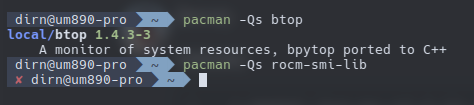

It will work with the AMD iGPU as well and will show its usage. I am not sure if it is absolutely something needed, but it can show you the usage and memory usage for the iGPU.
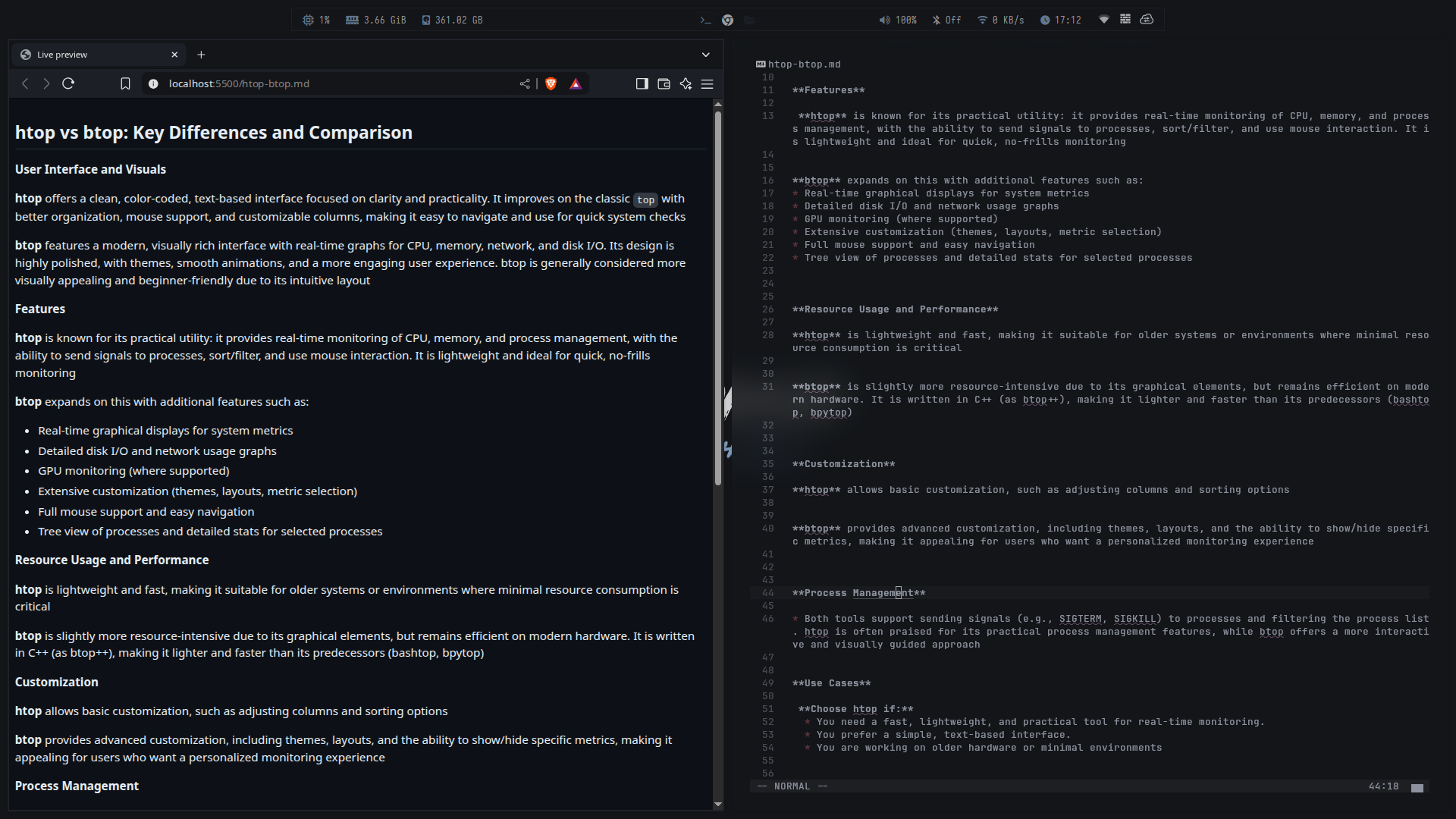
What are you using to browse the internet, localhost:5500?
It’s just the preview of his MD file in browser, you can do that directly from neovim
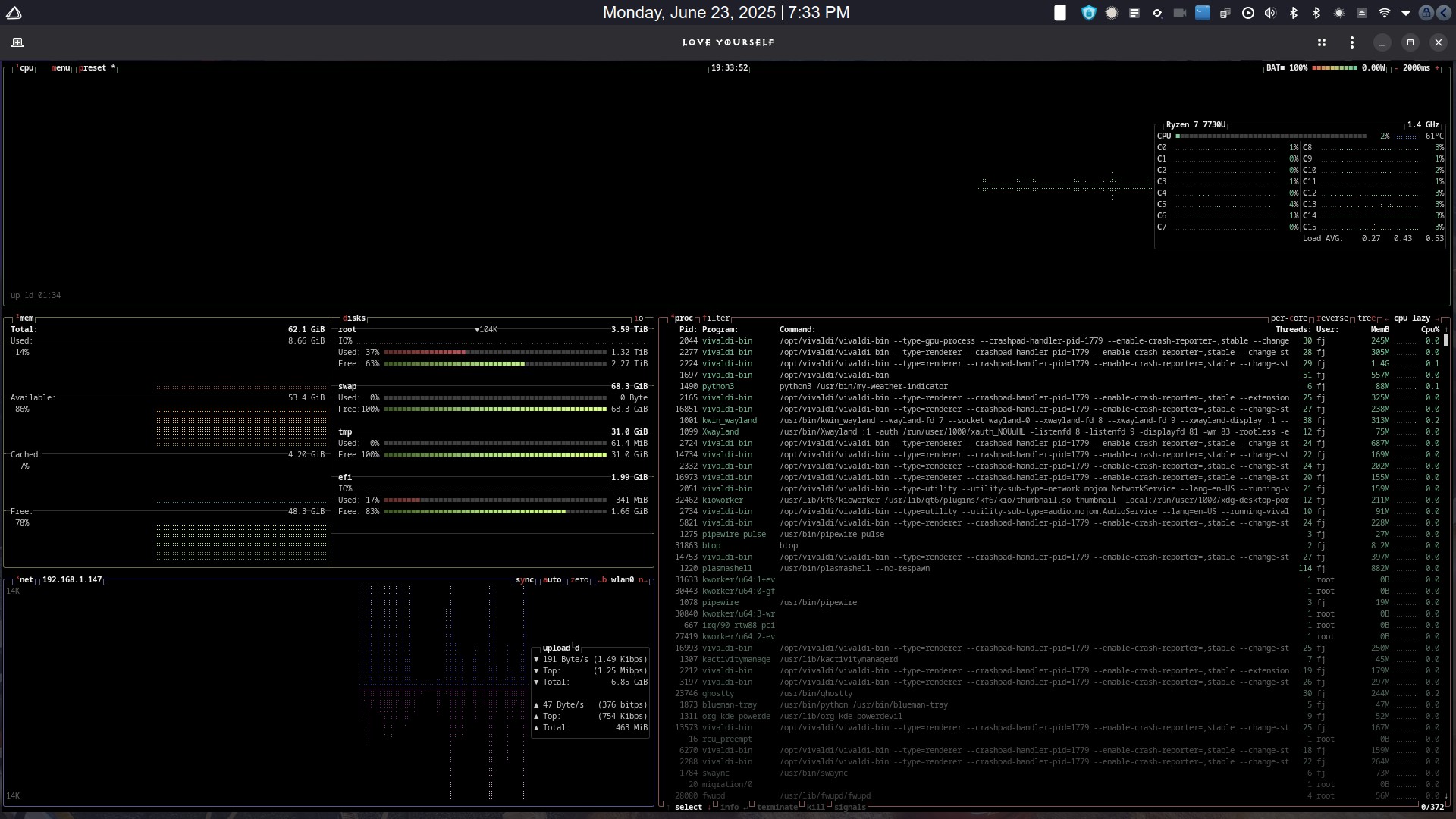
I’ve checked with chatgpt, it’s more suitable for discreet gpu. Thanks for the info 
I like that glances (on any specific system) can be viewed remotely via web-mode.
Oh, interesting. I didn’t know that.
Had never heard of btop before reading this thread. Liking it a lot. Many thx! 