If the only option is to SAVE the document or image as PDF, then your printer is not properly installed.
At the above image, Click on “Administration” then “Manage Printers”
Should show a summary of your printer if it is properly installed. Click on Printer name.
Click on “Maintenance” should see “Print test page”.
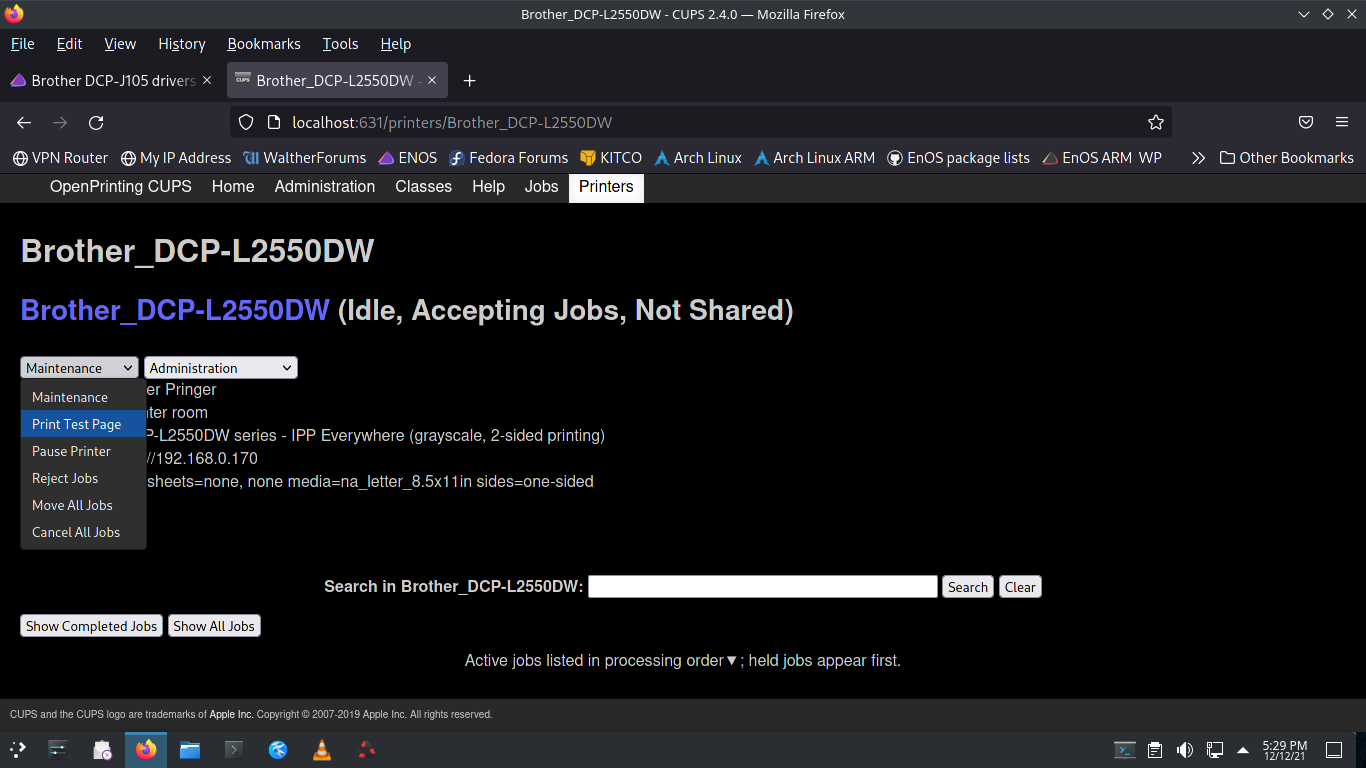
If you don’t see your printer name listed as in the above image, then your printer is not installed.
I have never installed a Brother Printer to work on WiFi.
First I believe that you will have to prepare your wireless router to connect to the printer.
Then, at the printer, on my Brother printer there is a little white “WiFi” button. I pressed it and on the little LCD screen on the printer it brought up
“Setup WiFi? yes or no”
I pressed yes and it brought up
“Connecting WLAN” then it searched for a WiFi connection. Finally it timed out and said
“No Access Point”
So since I have not prepared the WiFi router, the printer was not able to connect to WiFi.
If there is any way possible to hook a LAN cable (ethernet) from the router to the printer I would try to get that working first. Then when you know the printer is working, see about setting up WiFi for it.
I wish I Could help you more on the WiFI part.
Pudge
EDIT:
One last question. How is the computer you are trying to print from connected to the router or switch. Etherner or WiFi
EDIT 2:
I have been thinking about this. Maybe it is possible to go from the WiFi on your computer directly to the WiFi on the printer without anything in between? I don’t know as I don’t use WiFi.