Booting straight to BIOS (interrupted update mid-run)

Good evening all,
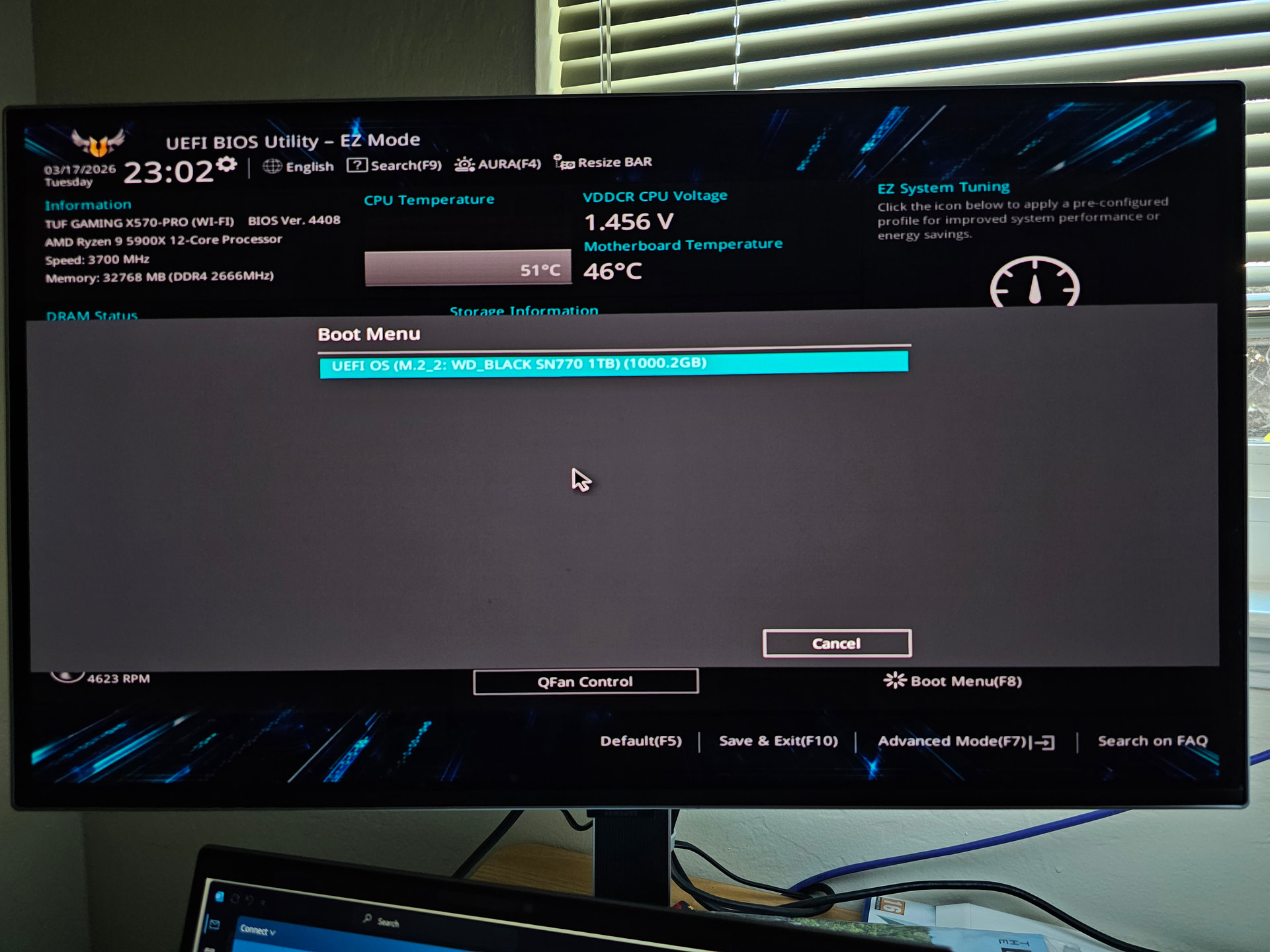
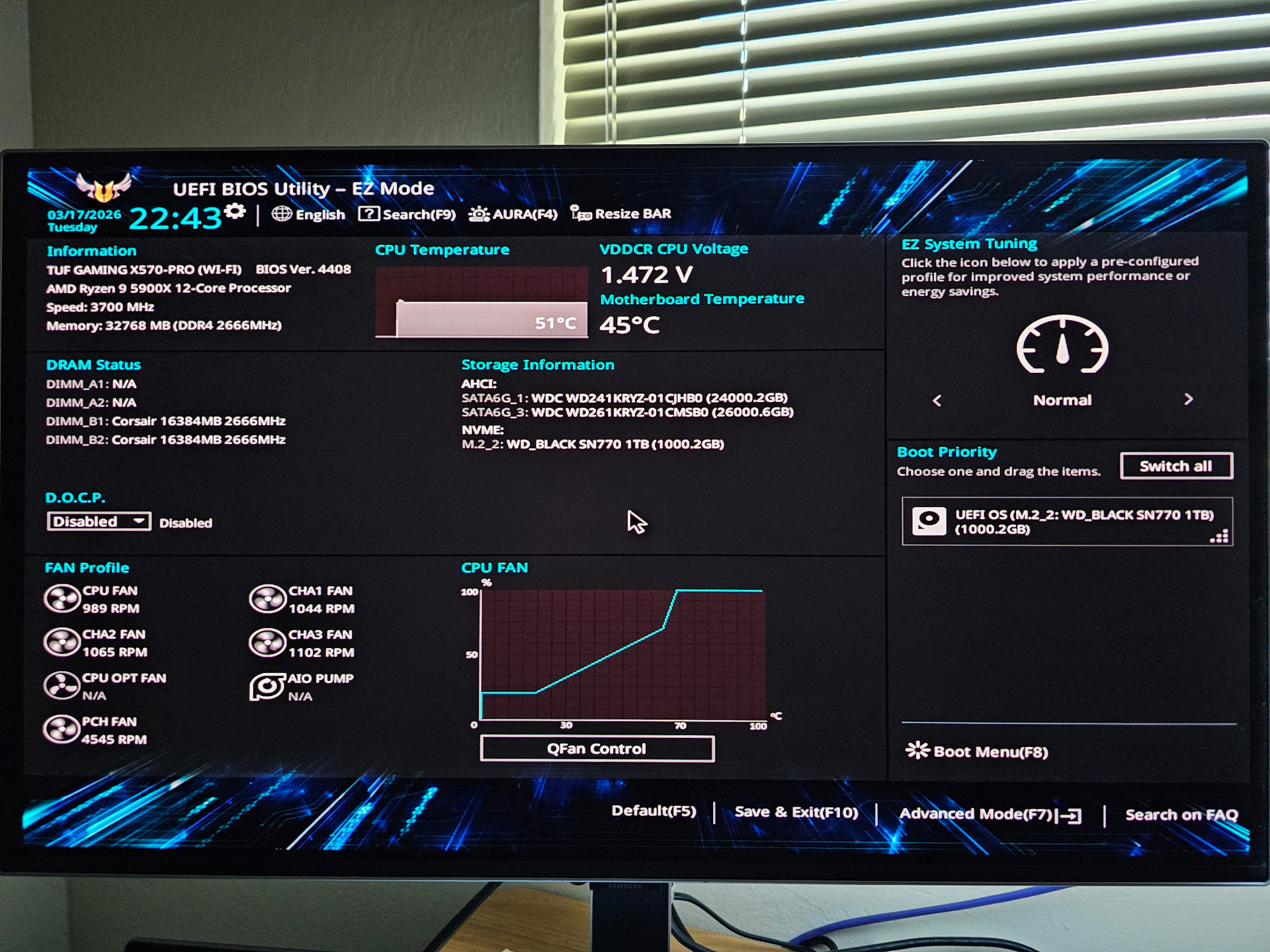
When booting up my computer now, I am consistently going straight into the BIOS, the view of which I have attached in the first screenshot. The basic motherboard and CPU models are in the upper left. It seems that my storage volumes and the SSD with EndeavourOS are identified, but even after adjusting various settings, and even trying restoring BIOS settings to default, I am not able to boot into my OS. On Sunday I was in the middle of an eos update when I restarted my computer, and this issue first occurred on startup right afterward so I suspect I may have screwed something up by doing so, and the partition with my OS may not be mounting properly. If there is more information I should provide about my specs, or the situation at hand, I will gladly do so, and I am happy to take the time to learn what I need to in order to resolve this issue. If there is anybody on the forum who can offer insight into the problem, I would greatly appreciate your help. Please be patient with my inexperience. Thank you in advance.

Best,

KaiyoteKave

Welcome back @KaiyoteKave :waving_hand::smiley:

Could you elaborate briefly on what you mean, when you say “I was in the middle of an eos update when I restarted my computer”?

To get your system back to a working state, you’ll likely need to use arch-chroot, so it might pay to start preparing a USB Live ISO, and familiarising yourself with the process of using arch-chroot to repair your system:

https://discovery.endeavouros.com/system-rescue/arch-chroot/2022/12/

More details would hopefully help clarify next steps.

Bink, thank you for the prompt reply. I suspected that the solution would require something similar to this. I am leaving my house right now for about 45 minutes for a run, but I want to take the time to carefully read the information in the guide you send regarding chroot when I return, after which I can reply with more information. I believe that I still have the USB from when I installed Endeavour on my system a few years ago. Would it work to use that same stick for a USB Live ISO, or would I need to prepare a new external drive for that purpose?

When I say that I was in the middle of an update, I mean I was running a full update with the eos-update –aur command in Terminal. Is that helpful?

I’m actually not sure about this one. Someone else might be able to chime in.

Personally, if the option was available to me, I’d create an updated USB Live ISO. This way, I’m using tools similar to the version of the OS I’m running, to fix that OS. Using tools years older may have unexpected consequences?

And was that allowed to complete? If not, what happened?

1 Like

An old live image shouldn’t be a problem. You’re just using it to boot the computer, then you switch to the installed system.

3 Likes

Thanks @Stagger_Lee :clinking_beer_mugs:

1 Like

Thank you, @Stagger_Lee . I started with that old drive, and had no issues getting my EndeavourOS partitions mounted similarly to how it is described in the arch-chroot guide that Joekamprad helpfully prepared. At the moment I am wanting to see about completing the failed update, so forgive my ignorance here, but which commands/method would you recommend in this situation when I am attempting to do this as root (since, for instance, yay would be a security risk here)?

pacman -Syu. If your update was interrupted, this will hopefully fix your issue.

1 Like

Best guess would be you were in the middle of a kernel update and your computer now can’t even see a bootable operating system. You could save it, but it might be more trouble than it’s worth. Personally I would boot a live USB, recover my data to an external source/cloud provider, then reinstall.

Thank you, @Stagger_Lee. I was able to run an update with pacman -Syu, then I restarted the system, but I encounter the same issue with loading straight into the BIOS, and choosing the SSD from the boot menu in the BIOS just returns me back to the BIOS. I am reading more of the pacman documentation on the Arch wiki to see where I may be going wrong.

Thank you for the input @nathaniel.krebs . That seems like a reasonable hypothesis for what could have went wrong, and I’ll definitely hold the backup/reinstall as a good option if troubleshooting in the next couple days does not yield better results.

if pacman -Syu is runing without error and you still end up in the BIOS your boot loader is broken.

Depending on which bootloader you use (grub or systemd-boot) you need to do follow different steps to fix it. But a reinstall of the whole system is not needed in most cases.

You can start here:

https://discovery.endeavouros.com/category/system-rescue/

3 Likes

Thank you for the information, @mbod . I am heading to bed now for work in the morning, but when I get home tomorrow afternoon (PST), I will review the system rescue guide most relevant to my situation and see what I can sort out. I will post updates and concrete inquiries in this thread so that hopefully it can serve as a resource. I appreciate all of the help that y’all have offered.

1 Like

@mbod I apologize for the late reply. I have been preparing for a three-week trip (that unfortunately starts Saturday morning), so I did not have time to work on troubleshooting this yesterday. Tonight I am working on it, though, so if you or others on the forum are available, I would greatly appreciate further input. Using a live ISO of Endeavour, I again accessed the SSD/partition where my OS is installed (via the nvme mounting), and got into them with arch-chroot.

[liveuser@eos-2022.12.17 ~]$ sudo lsblk -f
NAME        FSTYPE  FSVER     LABEL       UUID                                 FSAVAIL FSUSE% MOUNTPOINTS
loop0       squashf 4.0                                                              0   100% /run/archiso/airootfs
sda
└─sda1      ext4    1.0                   9d7c24b4-c9bb-47ad-86f9-f5f38a468949
sdb
└─sdb1      ext4    1.0                   4672a3f5-0834-463c-8e33-54bceed39191
sdc         iso9660 Joliet Ex EOS_202212  2022-12-17-15-01-34-00
├─sdc1      iso9660 Joliet Ex EOS_202212  2022-12-17-15-01-34-00                     0   100% /run/archiso/bootmnt
└─sdc2      vfat    FAT16     ARCHISO_EFI A59C-8529
nvme0n1
├─nvme0n1p1 vfat    FAT32                 DAF4-F2D2
└─nvme0n1p2 ext4    1.0       endeavouros b8be75f5-b29e-4fb4-a43d-6e0bbebcfc45
[liveuser@eos-2022.12.17 ~]$ sudo mount /dev/nvme0n1p2 /mnt
[liveuser@eos-2022.12.17 ~]$ sudo mount /dev/nvme0n1p1 /mnt/efi

[liveuser@eos-2022.12.17 ~]$ sudo arch-chroot /mnt

[root@EndeavourOS /]# bootctl statusSystem:Not booted with EFI

Available Boot Loaders on ESP:
ESP: /efi
File: ├─/efi//EFI/systemd/systemd-bootx64.efi (systemd-boot 259.1-1-arch)
      └─/efi//EFI/BOOT/BOOTX64.EFI (systemd-boot 259.1-1-arch)

Boot Loader Entry Locations:
ESP: /efi (, $BOOT)
config: /efi//loader/loader.conf
token: endeavouros

0 entries, no entry could be determined as default.

I tried to determine which bootloader my install is presently using, checking with the “““bootctl status””” command, and it looks like it is systemd-boot. However, from here, I do not know exactly how to troubleshoot what may be wrong with my bootloader. Might you have any suggestions on that front? Again, I greatly appreciate the help of anybody on the forum who is willing to offer insight. Thank you. I have explored the links on the “System Rescue” discovery search, and while there are protocols for rebuilding the kernel boot images (in the “Dracut” and “systemd” documentation), I’m not sure if the answer is that simple, so I don’t just want to blindly “““sudo reinstall-kernels”””.

First thing I would check is which kernels systemd-boot knows about:

bootctl list

This gives you the list of all know kernels and also with path (relative to the efi partition) where the image and initrd are located. You want to ckeck that the list looks good and with a filemanager that all files are in place.

If anything is missing, you should reinstall all kernels with

reinstall-kernels

This command copies kernel and initrd to the right place again.

Good morning @mbod . Thank you again for the help. Running the bootctl list command the first time yielded “““No boot loader entries found”””, so I ran reinstall-kernels . That command appeared to work, however Dracut threw up a couple flags (see blockquote below) during installation regarding the ‘cifs’ and ‘nfs’ modules depending on the ‘network’ module and therefore not being installed. In your opinion, should that prompt me to regenerate the initrds with dracut-rebuild? Or is the ‘network’ module something that can be fixed elsewhere? The Dracut documentation indicates that Dracut can be configured, e.g., by adding individual modules.

[root@EndeavourOS /]# reinstall-kernels
Installing kernel 6.19.8-arch1-1
dracut[E]: Module ‘cifs’ depends on module ‘network’, which can’t be installed
dracut[E]: Module ‘nfs’ depends on module ‘network’, which can’t be installed
Installing kernel 6.18.18-1-lts
dracut[E]: Module ‘cifs’ depends on module ‘network’, which can’t be installed
dracut[E]: Module ‘nfs’ depends on module ‘network’, which can’t be installed

After reinstall-kernels, the bootctl list command displays what appears to be appropriate (also in blockquote below), with the correct sources and root option directed toward the correct drive partition.

[root@EndeavourOS /]# bootctl list
type: Boot Loader Specification Type #1 (.conf)
title: EndeavourOS (6.18.18-1-lts) (default) (not reported/new)
id: bbad49b99d8d44288f4c4feee6dd5807-6.18.18-1-lts.conf
source: /efi//loader/entries/bbad49b99d8d44288f4c4feee6dd5807-6.18.18-1-lts.conf (on the EFI System Partition)
sort-key: endeavouros-6.18.18-1-lts
version: 6.18.18-1-lts
machine-id: bbad49b99d8d44288f4c4feee6dd5807
linux: /efi//bbad49b99d8d44288f4c4feee6dd5807/6.18.18-1-lts/linux
initrd: /efi//bbad49b99d8d44288f4c4feee6dd5807/6.18.18-1-lts/initrd
options: nvme_load=YES rw root=UUID=b8be75f5-b29e-4fb4-a43d-6e0bbebcfc45 rw root=UUID=b8be75f5-b29e-4fb4-a43d-6e0bbebcfc45 systemd.ma>
     type: Boot Loader Specification Type #1 (.conf)
    title: EndeavourOS (6.18.18-1-lts-fallback) (not reported/new)
       id: bbad49b99d8d44288f4c4feee6dd5807-6.18.18-1-lts-fallback.conf
   source: /efi//loader/entries/bbad49b99d8d44288f4c4feee6dd5807-6.18.18-1-lts-fallback.conf (on the EFI System Partition)
 sort-key: endeavouros-6.18.18-1-lts-fallback
  version: 6.18.18-1-lts-fallback
machine-id: bbad49b99d8d44288f4c4feee6dd5807
linux: /efi//bbad49b99d8d44288f4c4feee6dd5807/6.18.18-1-lts/linux
initrd: /efi//bbad49b99d8d44288f4c4feee6dd5807/6.18.18-1-lts/initrd-fallback
options: nvme_load=YES rw root=UUID=b8be75f5-b29e-4fb4-a43d-6e0bbebcfc45 rw root=UUID=b8be75f5-b29e-4fb4-a43d-6e0bbebcfc45 systemd.ma>
     type: Boot Loader Specification Type #1 (.conf)
    title: EndeavourOS (6.19.8-arch1-1) (not reported/new)

Forgive me if the formatting of my terminal outputs is sloppy. I am happy to hear about how I should modify it to make the presentation cleaner.

dracut is not your problem at the moment. If dracut creates a broken initrd, the kernel will simply fail booting. But at least you should see a kernel starting to boot.

bootctl shows both kernels (normal and fallback) as: (not reported/new) That means, that the system was booted while none of them existed on the efi partition. That is a little weird.

Please show the output of

efibootmgr -v

Thanks, @mbod. The output of efibootmgr -v is below in the blockquote.

[root@EndeavourOS /]# efibootmgr -v
BootCurrent: 0003
Timeout: 1 seconds
BootOrder: 0001,0002,0003
Boot0001* UEFI OS	HD(1,GPT,b84194c9-c938-bb46-a054-e311f5128a68,0x1000,0x1f4000)/\EFI\BOOT\BOOTX64.EFI0000424f
     dp: 04 01 2a 00 01 00 00 00 00 10 00 00 00 00 00 00 00 40 1f 00 00 00 00 00 c9 94 41 b8 38 c9 46 bb a0 54 e3 11 f5 12 8a 68 02 02 / 04 04 30 00 5c 00 45 00 46 00 49 00 5c 00 42 00 4f 00 4f 00 54 00 5c 00 42 00 4f 00 4f 00 54 00 58 00 36 00 34 00 2e 00 45 00 46 00 49 00 00 00 / 7f ff 04 00
     data: 00 00 42 4f
Boot0002* UEFI:  USB	PciRoot(0x0)/Pci(0x1,0x2)/Pci(0x0,0x0)/Pci(0x8,0x0)/Pci(0x0,0x3)/USB(7,0)/CDROM(1,0x398c00,0x34a98)0000424f
     dp: 02 01 0c 00 d0 41 03 0a 00 00 00 00 / 01 01 06 00 02 01 / 01 01 06 00 00 00 / 01 01 06 00 00 08 / 01 01 06 00 03 00 / 03 05 06 00 07 00 / 04 02 18 00 01 00 00 00 00 8c 39 00 00 00 00 00 98 4a 03 00 00 00 00 00 / 7f ff 04 00
     data: 00 00 42 4f
Boot0003* UEFI:  USB, Partition 2	PciRoot(0x0)/Pci(0x1,0x2)/Pci(0x0,0x0)/Pci(0x8,0x0)/Pci(0x0,0x3)/USB(7,0)/HD(2,MBR,0x5ab6cd03,0x398c00,0x34800)0000424f
     dp: 02 01 0c 00 d0 41 03 0a 00 00 00 00 / 01 01 06 00 02 01 / 01 01 06 00 00 00 / 01 01 06 00 00 08 / 01 01 06 00 03 00 / 03 05 06 00 07 00 / 04 01 2a 00 02 00 00 00 00 8c 39 00 00 00 00 00 00 48 03 00 00 00 00 00 03 cd b6 5a 00 00 00 00 00 00 00 00 00 00 00 00 01 01 / 7f ff 04 00
     data: 00 00 42 4f

Ok. The formatting is horrible. You need to start using the formatting function in the forum editor. I dont know if a tutorial exists for this.

Anyways, the Boot0001 entry shows just a generic fallback boot manager:

What it should look like is something like this:

Boot0000* Linux Boot Manager HD(1,GPT,1476f27b-f73c-4564-8510-b510e563e95c,0x800,0x100000)/\EFI\SYSTEMD\SYSTEMD-BOOTX64.EFI

This is how the systemd boot entry should look like.

I suggest you reinstall the systemd boot entry with:

bootctl install

Of course this should happen in an arch-root environment with the proper boot device mounted to the right folder.

You arch-chroot into your installation. Check in /etc/fstab which partition (vfat) needs to be mounted to which folder (e.g. /boot or /efi). mount it and do the bootctl install. And then keep your fingers crossed that it boots.

I understand your frustration with the formatting @mbod , so I have fixed it for this post, and gone back and edited previous posts in the thread, too. For other newbies reading this in the future, a good forum thread regarding formatting is here. Thank you for your patience.

This is the rough protocol I just followed. I exited the arch-chroot, checked the drives again, unmounted the previously mounted partitions (nvme0n1p2 for the OS on /mnt, nvme0n1p1 for the vfat on /mnt/efi) with sudo umount, remounted those same partitions with sudo mount, then re-accessed the install with arch-chroot.

[root@EndeavourOS /]# exit
exit
[liveuser@eos-2022.12.17 ~]$ sudo lsblk -f
NAME        FSTYPE   FSVER            LABEL       UUID                                 FSAVAIL FSUSE% MOUNTPOINTS
loop0       squashfs 4.0                                                                     0   100% /run/archiso/airootfs
sda                                                                                                   
└─sda1      ext4     1.0                          9d7c24b4-c9bb-47ad-86f9-f5f38a468949                
sdb                                                                                                   
└─sdb1      ext4     1.0                          4672a3f5-0834-463c-8e33-54bceed39191                
sdc         iso9660  Joliet Extension EOS_202212  2022-12-17-15-01-34-00                              
├─sdc1      iso9660  Joliet Extension EOS_202212  2022-12-17-15-01-34-00                     0   100% /run/archiso/bootmnt
└─sdc2      vfat     FAT16            ARCHISO_EFI A59C-8529                                           
nvme0n1                                                                                               
├─nvme0n1p1 vfat     FAT32                        DAF4-F2D2                               634M    36% /mnt/efi
└─nvme0n1p2 ext4     1.0              endeavouros b8be75f5-b29e-4fb4-a43d-6e0bbebcfc45  188.3G    74% /mnt
[liveuser@eos-2022.12.17 ~]$ sudo mount /dev/nvme0n1p2 /mnt
mount: /mnt: /dev/nvme0n1p2 already mounted on /mnt.
       dmesg(1) may have more information after failed mount system call.
[liveuser@eos-2022.12.17 ~]$ sudo mount /dev/nvme0n1p1 /mnt/efi
mount: /mnt/efi: /dev/nvme0n1p1 already mounted on /mnt/efi.
       dmesg(1) may have more information after failed mount system call.
[liveuser@eos-2022.12.17 ~]$ umount /mnt/efi
umount: /mnt/efi: must be superuser to unmount.
[liveuser@eos-2022.12.17 ~]$ sudo umount /mnt/efi
[liveuser@eos-2022.12.17 ~]$ sudo umount /mnt
[liveuser@eos-2022.12.17 ~]$ sudo mount /dev/nvme0n1p2 /mnt
[liveuser@eos-2022.12.17 ~]$ sudo mount /dev/nvme0n1p1 /mnt/efi
[liveuser@eos-2022.12.17 ~]$ sudo arch-chroot /mnt

From there, I reinstalled the systemd boot entry with bootctl install, then checked the efibootmgr output again. Unfortunately, the Boot0001 entry seems similar to before. Can you see a particular issue with how I have executed it now? Might it be possible to switch to using grub as a bootloader while in with arch-chroot? Or does this poster’s solution seem applicable?

[root@EndeavourOS /]# bootctl install
Running in a chroot, enabling --graceful.
Created "/efi/loader/keys".
Copied "/usr/lib/systemd/boot/efi/systemd-bootx64.efi" to "/efi/EFI/systemd/systemd-bootx64.efi".
Copied "/usr/lib/systemd/boot/efi/systemd-bootx64.efi" to "/efi/EFI/BOOT/BOOTX64.EFI".
⚠️  Mount point '/efi' which backs the random seed file is world accessible, which is a security hole!  ⚠️
⚠️ Random seed file '/efi/loader/random-seed' is world accessible, which is a security hole! ⚠️
Random seed file /efi/loader/random-seed successfully refreshed (32 bytes).
Not booted with EFI or running in a container, skipping EFI variable modifications.
[root@EndeavourOS /]# efibootmgr -v
BootCurrent: 0003
Timeout: 1 seconds
BootOrder: 0001,0002,0003
Boot0001* UEFI OS	HD(1,GPT,b84194c9-c938-bb46-a054-e311f5128a68,0x1000,0x1f4000)/\EFI\BOOT\BOOTX64.EFI0000424f
      dp: 04 01 2a 00 01 00 00 00 00 10 00 00 00 00 00 00 00 40 1f 00 00 00 00 00 c9 94 41 b8 38 c9 46 bb a0 54 e3 11 f5 12 8a 68 02 02 / 04 04 30 00 5c 00 45 00 46 00 49 00 5c 00 42 00 4f 00 4f 00 54 00 5c 00 42 00 4f 00 4f 00 54 00 58 00 36 00 34 00 2e 00 45 00 46 00 49 00 00 00 / 7f ff 04 00
    data: 00 00 42 4f
Boot0002* UEFI:  USB	PciRoot(0x0)/Pci(0x1,0x2)/Pci(0x0,0x0)/Pci(0x8,0x0)/Pci(0x0,0x3)/USB(7,0)/CDROM(1,0x398c00,0x34a98)0000424f
      dp: 02 01 0c 00 d0 41 03 0a 00 00 00 00 / 01 01 06 00 02 01 / 01 01 06 00 00 00 / 01 01 06 00 00 08 / 01 01 06 00 03 00 / 03 05 06 00 07 00 / 04 02 18 00 01 00 00 00 00 8c 39 00 00 00 00 00 98 4a 03 00 00 00 00 00 / 7f ff 04 00
    data: 00 00 42 4f
Boot0003* UEFI:  USB, Partition 2	PciRoot(0x0)/Pci(0x1,0x2)/Pci(0x0,0x0)/Pci(0x8,0x0)/Pci(0x0,0x3)/USB(7,0)/HD(2,MBR,0x5ab6cd03,0x398c00,0x34800)0000424f
      dp: 02 01 0c 00 d0 41 03 0a 00 00 00 00 / 01 01 06 00 02 01 / 01 01 06 00 00 00 / 01 01 06 00 00 08 / 01 01 06 00 03 00 / 03 05 06 00 07 00 / 04 01 2a 00 02 00 00 00 00 8c 39 00 00 00 00 00 00 48 03 00 00 00 00 00 03 cd b6 5a 00 00 00 00 00 00 00 00 00 00 00 00 01 01 / 7f ff 04 00
    data: 00 00 42 4f
[root@EndeavourOS /]# bootctl list
         type: Boot Loader Specification Type #1 (.conf)
        title: EndeavourOS (6.18.18-1-lts) (default) (not reported/new)
           id: bbad49b99d8d44288f4c4feee6dd5807-6.18.18-1-lts.conf
       source: /efi//loader/entries/bbad49b99d8d44288f4c4feee6dd5807-6.18.18-1-lts.conf (on the EFI System Partition)
     sort-key: endeavouros-6.18.18-1-lts
      version: 6.18.18-1-lts
   machine-id: bbad49b99d8d44288f4c4feee6dd5807
        linux: /efi//bbad49b99d8d44288f4c4feee6dd5807/6.18.18-1-lts/linux
       initrd: /efi//bbad49b99d8d44288f4c4feee6dd5807/6.18.18-1-lts/initrd
      options: nvme_load=YES rw root=UUID=b8be75f5-b29e-4fb4-a43d-6e0bbebcfc45 rw root=UUID=b8be75f5-b29e-4fb4-a43d-6e0bbebcfc45 systemd.machine_id=bbad49b99d8d44288f4c4feee6dd5807
         type: Boot Loader Specification Type #1 (.conf)
        title: EndeavourOS (6.18.18-1-lts-fallback) (not reported/new)
           id: bbad49b99d8d44288f4c4feee6dd5807-6.18.18-1-lts-fallback.conf
       source: /efi//loader/entries/bbad49b99d8d44288f4c4feee6dd5807-6.18.18-1-lts-fallback.conf (on the EFI System Partition)
     sort-key: endeavouros-6.18.18-1-lts-fallback
      version: 6.18.18-1-lts-fallback
   machine-id: bbad49b99d8d44288f4c4feee6dd5807
        linux: /efi//bbad49b99d8d44288f4c4feee6dd5807/6.18.18-1-lts/linux
       initrd: /efi//bbad49b99d8d44288f4c4feee6dd5807/6.18.18-1-lts/initrd-fallback
      options: nvme_load=YES rw root=UUID=b8be75f5-b29e-4fb4-a43d-6e0bbebcfc45 rw root=UUID=b8be75f5-b29e-4fb4-a43d-6e0bbebcfc45 systemd.machine_id=bbad49b99d8d44288f4c4feee6dd5807

         type: Boot Loader Specification Type #1 (.conf)
        title: EndeavourOS (6.19.8-arch1-1) (not reported/new)
           id: bbad49b99d8d44288f4c4feee6dd5807-6.19.8-arch1-1.conf
       source: /efi//loader/entries/bbad49b99d8d44288f4c4feee6dd5807-6.19.8-arch1-1.conf (on the EFI System Partition)
     sort-key: endeavouros-6.19.8-arch1-1
      version: 6.19.8-arch1-1
   machine-id: bbad49b99d8d44288f4c4feee6dd5807
        linux: /efi//bbad49b99d8d44288f4c4feee6dd5807/6.19.8-arch1-1/linux
       initrd: /efi//bbad49b99d8d44288f4c4feee6dd5807/6.19.8-arch1-1/initrd
      options: nvme_load=YES rw root=UUID=b8be75f5-b29e-4fb4-a43d-6e0bbebcfc45 rw root=UUID=b8be75f5-b29e-4fb4-a43d-6e0bbebcfc45 systemd.machine_id=bbad49b99d8d44288f4c4feee6dd5807