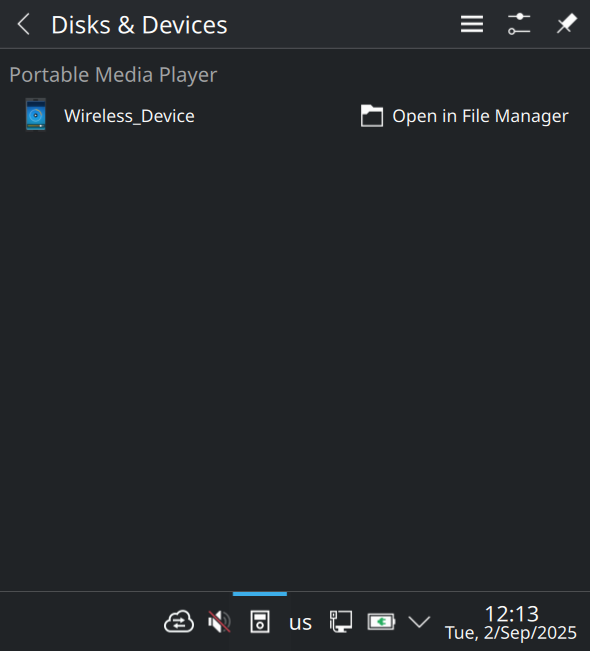
On my brand-new Lenovo Yoga 7 2-in-1 14ILL10 which shares similar hardware including the MediaTek Foxconn / Hon Hai Wireless_Device, I have MANJARO_KDE_2510 installed. Manjaro is a similar Arch derived distribution to EndeavourOS. The “Portable Media Player” shows up and is only a problem if I try to access any of it’s phantom exposed media.
To get everything else working or at least not showing warnings at boot time, I have concentrated on installing firmwares. Only the screen rotation sensor (not a Legion feature) needed to be imported from a Windows install. (https://dnsense.pub/posts/9-book5-sensor-hub/)
Note that the firmwares which installed, detected by the distribution install, should be correct and should not be removed. To get “mkinitcpio -P” to process the kernel packages for boot without warnings some other firmwares need to be found and installed. My current installed list is:
linux-firmware-amdgpu,20250917-1, linux-firmware-ath10k,20250917-1, linux-firmware-broadcom,20250917-1, linux-firmware-cirrus,20250917-1, linux-firmware-intel,20250917-1, linux-firmware-marvell,20250917-1, linux-firmware-mediatek,20250917-1, linux-firmware-meta,20250917-1, linux-firmware-nvidia,20250917-1, linux-firmware-other,20250917-1, linux-firmware-qcom,20250917-1, linux-firmware-qlogic,20250917-1, linux-firmware-radeon,20250917-1, linux-firmware-realtek,20250917-1, linux-firmware-whence,20250917-1, aic94xx-firmware,30-10,AUR, ast-firmware,501-1,AUR, wd719x-firmware,1-9,AUR.
Some firmwares are likely not used so should not cause any problems, just use a little disk space. The Mediatek firmware for the mt7925e loads and bluetooth works normally apart from this media drive issue.
Claude AI helped me write the udev and KDE solid rules and an instal script to manage both detection and kde/dolphin places. Your USB device ID may need to be changed and the device path(s) updated.
Now these phantom media locations are hidden avoiding user interaction and errors! Remember this is a fix, a firmware solution may solve this better upstream.
media_device_hide_fix.sh
#!/bin/bash
# Complete fix to hide MediaTek wireless adapter from ALL KDE device lists
# This includes: System Tray, Dolphin sidebar, Device Notifier, Solid device list

echo "========================================================================="
echo "Complete Fix: Hide MediaTek Wireless Adapter from KDE Device Lists"
echo "========================================================================="
echo ""
echo "This will hide the wireless adapter and its 3 interfaces from:"
echo "  • System tray (Portable Media Players)"
echo "  • Dolphin Places panel"
echo "  • Device Notifier widget"
echo "  • KDE Solid device list"
echo ""

# 1. Install udev rules
echo "Step 1: Installing udev rules..."
echo "----------------------------------------"

SCRIPT_DIR="$(cd "$(dirname "${BASH_SOURCE[0]}")" && pwd)"
RULES_FILE="$SCRIPT_DIR/99-hide-mediatek-wireless.rules"

if [ -f "$RULES_FILE" ]; then
    sudo cp "$RULES_FILE" /etc/udev/rules.d/
    echo "   ✓ Merged udev rule installed: 99-hide-mediatek-wireless.rules"
else
    echo "   ✗ Error: $RULES_FILE not found"
    echo "   Expected location: $SCRIPT_DIR/"
    exit 1
fi

# 2. Reload udev
echo ""
echo "Step 2: Reloading udev rules..."
echo "----------------------------------------"
sudo udevadm control --reload-rules
sudo udevadm trigger --subsystem-match=usb --action=change
echo "   ✓ Udev rules reloaded and applied"

# 3. Verify udev changes
echo ""
echo "Step 3: Verifying udev configuration..."
echo "----------------------------------------"
for iface in 3-6 3-6:1.0 3-6:1.1 3-6:1.2; do
    DEVICE_PATH="/sys/devices/pci0000:00/0000:00:14.0/usb3/3-6"
    if [ "$iface" != "3-6" ]; then
        DEVICE_PATH="$DEVICE_PATH/$iface"
    fi

    IGNORE=$(udevadm info --path="$DEVICE_PATH" 2>&1 | grep "UDISKS_IGNORE=1")
    MEDIA=$(udevadm info --path="$DEVICE_PATH" 2>&1 | grep "ID_MEDIA_PLAYER=1")

    if [ -n "$IGNORE" ] && [ -z "$MEDIA" ]; then
        echo "   ✓ $iface - Hidden"
    else
        echo "   ⚠ $iface - May still be visible"
    fi
done

# 4. Configure KDE Solid
echo ""
echo "Step 4: Configuring KDE Solid..."
echo "----------------------------------------"
if [ -f ~/.config/solid/devices.conf ]; then
    echo "   ✓ Solid devices.conf already configured"
else
    echo "   ⚠ Solid devices.conf not found (should have been created)"
fi

# 5. Configure Dolphin
echo ""
echo "Step 5: Configuring Dolphin..."
echo "----------------------------------------"
HIDDEN=$(kreadconfig5 --file dolphinrc --group "PlacesPanel" --key "HiddenItemsFromDevices" 2>&1)
if echo "$HIDDEN" | grep -q "3-6"; then
    echo "   ✓ Dolphin configured to hide devices"
else
    echo "   ⚠ Dolphin configuration may need manual adjustment"
fi

# 6. Restart KDE services
echo ""
echo "Step 6: Restarting KDE services..."
echo "----------------------------------------"
echo "   Stopping Dolphin instances..."
killall dolphin 2>/dev/null
echo "   Restarting Plasma Shell..."
kquitapp5 plasmashell 2>/dev/null
sleep 2
kstart5 plasmashell 2>/dev/null &
echo "   ✓ KDE services restarted"

# 7. Final verification
echo ""
echo "Step 7: Final verification..."
echo "----------------------------------------"
SOLID_COUNT=$(solid-hardware5 list 2>&1 | grep -c "3-6:")
if [ "$SOLID_COUNT" -eq 0 ]; then
    echo "   ✓ Devices successfully hidden from Solid"
else
    echo "   ⚠ $SOLID_COUNT device(s) still visible in Solid"
    echo "     (May require logout/login to fully apply)"
fi

echo ""
echo "========================================================================="
echo "Fix Complete!"
echo "========================================================================="
echo ""
echo "The wireless adapter should now be hidden from all device lists."
echo ""
echo "If devices still appear:"
echo "  1. Log out and log back in"
echo "  2. Check system tray and Dolphin sidebar"
echo "  3. Run: solid-hardware5 list | grep '3-6'"
echo ""
echo "To verify the fix worked:"
echo "  • Open Dolphin - check Places panel (no wireless device)"
echo "  • Check system tray - click Devices icon (no portable media players)"
echo ""
/etc/udev/rules.d/99-hide-mediatek-wireless.rules
==============================================================================

Complete udev rules to hide MediaTek wireless adapter from KDE device lists

==============================================================================

Device: MediaTek Inc. Wireless_Device (USB ID 0489:e111)

Location: Internal USB port 3-6

Purpose: Prevent internal Bluetooth/WiFi adapter from appearing as removable

media device in KDE system tray, Dolphin, and device notifier

==============================================================================

PARENT DEVICE (3-6)

Hide the main USB device from all device managers

SUBSYSTEM==“usb”, ENV{ID_VENDOR_ID}==“0489”, ENV{ID_MODEL_ID}==“e111”,
ENV{UDISKS_IGNORE}=“1”,
ENV{ID_MEDIA_PLAYER}=“”,
ENV{ID_MTP_DEVICE}=“”,
ENV{ID_GPHOTO2}=“”,
ENV{ID_INPUT}=“”,
ENV{SOLID_IGNORE}=“1”,
TAG+=“uaccess”, TAG-=“uaccess”

USB INTERFACES (3-6:1.0, 3-6:1.1, 3-6:1.2)

Hide all USB interfaces by matching vendor/product attributes

SUBSYSTEM==“usb”, ATTRS{idVendor}==“0489”, ATTRS{idProduct}==“e111”,
ENV{DEVTYPE}==“usb_interface”,
ENV{UDISKS_IGNORE}=“1”,
ENV{ID_MEDIA_PLAYER}=“”,
ENV{ID_MTP_DEVICE}=“”,
ENV{ID_GPHOTO2}=“”,
ENV{ID_INPUT}=“”,
ENV{SOLID_IGNORE}=“1”,
TAG+=“uaccess”, TAG-=“uaccess”

KERNEL NAME PATTERN MATCH

Additional rule to catch interfaces by kernel name pattern

SUBSYSTEM==“usb”, KERNEL==“3-6:*”,
ENV{UDISKS_IGNORE}=“1”,
ENV{ID_MEDIA_PLAYER}=“”,
ENV{ID_MTP_DEVICE}=“”,
ENV{ID_GPHOTO2}=“”,
ENV{ID_INPUT}=“”,
ENV{SOLID_IGNORE}=“1”,
TAG+=“uaccess”, TAG-=“uaccess”

SPECIFIC PORT MATCH

Catch any device on this specific USB port

SUBSYSTEM==“usb”, KERNELS==“3-6”,
ENV{UDISKS_IGNORE}=“1”,
ENV{ID_MEDIA_PLAYER}=“”,
ENV{ID_MTP_DEVICE}=“”,
ENV{ID_GPHOTO2}=“”,
ENV{SOLID_IGNORE}=“1”

==============================================================================

What these rules do:

- UDISKS_IGNORE=1        : Hide from UDisks2 (disk manager)

- ID_MEDIA_PLAYER=“”     : Remove media player identification

- ID_MTP_DEVICE=“”       : Remove MTP (Media Transfer Protocol) tag

- ID_GPHOTO2=“”          : Remove camera/photo device tag

- ID_INPUT=“”            : Remove input device tag

- SOLID_IGNORE=1         : Hide from KDE Solid device framework

- TAG-=“uaccess”         : Remove user access tag (prevents auto-mounting)

==============================================================================