Black screen w/ underscore on wayland login

Every time i try to log in specifically with my main user with plasma wayland, the screen goes black for a bit longer than usual, and im greeted by a black screen with an underscore in the top left corner. Im able to log into plasma wayland just fine with a different user, and plasma X11 with my main user, but specifically plasma wayland on my main user does not work. I have resorted to using a horrendous bandaid fix for the past couple of days by typing dbus-run-session startplasma-wayland into a tty because ive been quaking in my boots at the thought of making a post on here. Any ideas?

Heads up! Im incredibly new to this operating system, ive only used it for about a month or so, i might ask for elaboration on something that seems like a very simple task to do, im sorry in advance!

Hey snowcat, good to have you with us. :slight_smile:

Can you give us a little more information about your system? The below should do it.

inxi -Gaz

I’m going to assume you’re fully updated on your drivers (again assuming nVidia..) but if there’s anything else you can let us know, - such as whether you’ve tried using a fallback kernel, always good to know!

Hi! Heres what that command outputs:
Graphics:
Device-1:NVIDIA TU106 [GeForce GTX 1650]vendor:ASUSTeKdriver:nvidia
v:590.48.01alternate:nouveau,nvidia_drmnon-free:550-580.xx+
status:current (as of 2025-11; EOL~2026-12-xx)arch:Turingcode:TUxxx
process:TSMC 12nm FFbuilt:2018-2022pcie: gen:3speed:8 GT/s
lanes:16ports: active:noneoff:HDMI-A-1empty:DP-1,DVI-D-1
bus-ID:01:00.0chip-ID:10de:1f0aclass-ID:0300
Display:x11server:``X.Org``v:21.1.21with:Xwaylandv:24.1.9
compositor:kwin_x11driver: X: loaded:nvidiaunloaded:modesetting
alternate:fbdev,nouveau,nv,vesagpu:nv_platform,nvidia,nvidia-nvswitch
display-ID::0screens:1
Screen-1:0s-res:1920x1080s-dpi:92s-size:530x301mm (20.87x11.85")
s-diag:610mm (24")
Monitor-1:HDMI-A-1mapped:HDMI-0note:disabledmodel:MSI G241
serial:<filter>built:2021res:N/Adpi:93gamma:1.2
size:527x296mm (20.75x11.65")diag:604mm (23.8")ratio:16:9modes:
max:1920x1080min:640x480
API:EGLv:1.5hw: drv:nvidiaplatforms: device:0drv:nvidiadevice:2
drv:swrastgbm: drv:nvidiasurfaceless: drv:nvidiax11: drv:nvidia
inactive:wayland,device-1
API:OpenGLv:4.6.0compat-v:4.5vendor:nvidia mesav:590.48.01
glx-v:1.4direct-render:yesrenderer:NVIDIA GeForce GTX 1650/PCIe/SSE2
memory:3.91 GiB
API:Vulkanv:1.4.335layers:3device:0type:discrete-gpu
name:NVIDIA GeForce GTX 1650driver:nvidiav:590.48.01
device-ID:10de:1f0asurfaces:N/A
Info: Tools: api:clinfo, eglinfo, glxinfo, vulkaninfo
de:kscreen-console,kscreen-doctorgpu:nvidia-settings,nvidia-smi
wl:wayland-infox11: xdpyinfo, xprop, xrandr

I have tried booting into linux-lts (fallback initramfs) in grub? [if thats what you mean?] but to no avail

Drivers from arch repos do not support your card anymore. Please look for respective announcement and proceed accordingly. You need to install dkms drivers from AUR.

If this is not the case, I am having all sort of glitches and bugs with plasma wayland session on verity of hardware. So it is as expected.

Looks like your card isn’t fully supported on your current setup ; try

sudo pacman -S nvidia-installer-dkms
then pull from the AUR : 

yay -S nvidia-470xx-dkms

and install
nvidia-settings

Im sorry, but pacman is giving me this error?

error: target not found: nvidia-installer-dkms

Either way, i installed nvidia-470xx-dkms, it of course didnt do much, presumably because i didnt install half of what you asked me to. Thank you for your patience!

Hi @snowcat

There is a bug going around with ddcutils that freezes plasma right after login with wayland.

Downgrading ddcutils might fix this issue.

Have a look at this post

Not sure if it will help any, sudo pacman -Ss package-name the small s is search im not up on nvidia sorry.

Data

Downgraded ddcutil down to 2.2.3, and then 2.0.0 just to be sure, but sadly still nothing :confused:

Ill upgrade it back to 2.2.5, as it seems unrelated and might maybe possibly potentially cause issues in the future. Thank you for the suggestion though!

Yeah, I’m thinking this might actually be more similar to an issue I had to fix just about 12 hours ago. What’s the output of the following?

cat /etc/sddm.conf

Its, empty?? What did i DO??

Oh, wow. It should not be empty.

Try this:

sudo nano /etc/sddm.conf

Then paste the following into the file:

[General]
InputMethod=
Namespaces=
Numlock=on

[Theme]
DisableAvatarsThreshold=7
EnableAvatars=true
FacesDir=/usr/share/sddm/faces
ThemeDir=/usr/share/sddm/themes

[Users]
DefaultPath=/usr/local/sbin:/usr/local/bin:/usr/bin
HideShells=
HideUsers=
RememberLastSession=true
RememberLastUser=true
ReuseSession=true
MinimumUid=1000

[Wayland]
EnableHiDPI=true
SessionCommand=/usr/share/sddm/scripts/wayland-session
SessionDir=/usr/share/wayland-sessions
SessionLogFile=.local/share/sddm/wayland-session.log

[X11]
DisplayCommand=/usr/share/sddm/scripts/Xsetup
DisplayStopCommand=/usr/share/sddm/scripts/Xstop
EnableHiDPI=true
MinimumVT=1
ServerArguments=-nolisten tcp
ServerPath=/usr/bin/X
SessionCommand=/usr/share/sddm/scripts/Xsession
SessionDir=/usr/share/xsessions
SessionLogFile=.local/share/sddm/xorg-session.log
UserAuthFile=.Xauthority
XauthPath=/usr/bin/xauth
XephyrPath=/usr/bin/Xephyr

PS: I am not entirely sure about the last 3 lines, but the rest should be in there for sure. Scratch that. Did a check. Everything should be in it.

After this, please post the output of the following:

ps aux | grep dbus

Yep, here you go:

[Huh, couldve sworn i did exactly that, im sure it works now though? Im terribly sorry]

ps aux | grep dbus
dbus         899  0.0  0.0   8616  4448 ?        Ss   21:24   0:00 /usr/bin/dbus-broker-launch --scope system --audit
dbus         910  0.2  0.0   6196  4528 ?        S    21:24   0:00 dbus-broker --log 10 --controller 9 --machine-id 9d7e43afed8d4648a4421e81d5bd8a2c --max-bytes 536870912 --max-fds 4096 --max-matches 131072 --audit
lexi        1586  0.0  0.0   8024  3740 ?        Ss   21:24   0:00 /usr/bin/dbus-broker-launch --scope user
lexi        1590  0.3  0.0   5672  3992 ?        S    21:24   0:00 dbus-broker --log 11 --controller 10 --machine-id 9d7e43afed8d4648a4421e81d5bd8a2c --max-bytes 100000000000000 --max-fds 25000000000000 --max-matches 5000000000
lexi        1822  0.1  0.1 230872 27912 ?        Ssl  21:25   0:00 /usr/bin/gmenudbusmenuproxy
lexi        2059  0.0  0.0   8024  3648 ?        S    21:25   0:00 /usr/bin/dbus-broker-launch --config-file=/usr/share/defaults/at-spi2/accessibility.conf --scope user
lexi        2060  0.0  0.0   4188  2584 ?        S    21:25   0:00 dbus-broker --log 10 --controller 9 --machine-id 9d7e43afed8d4648a4421e81d5bd8a2c --max-bytes 100000000000000 --max-fds 6400000 --max-matches 5000000000
lexi        2235  0.0  0.0   2844  1916 ?        S    21:25   0:00 bwrap --args 41 – xdg-dbus-proxy --args=43
lexi        2236  0.0  0.0 308796  9628 ?        Sl   21:25   0:00 xdg-dbus-proxy --args=43
lexi        2372  0.0  0.0   2844  1916 ?        S    21:25   0:00 bwrap --unshare-all --die-with-parent --chdir / --ro-bind /usr /usr --dev /dev --ro-bind-try /etc/ld.so.cache /etc/ld.so.cache --ro-bind-try /nix/store /nix/store --tmpfs /tmp-home --tmpfs /tmp-run --clearenv --setenv HOME /tmp-home --setenv XDG_RUNTIME_DIR /tmp-run --setenv XDG_RUNTIME_DIR /run/user/1000 --symlink /usr/lib /lib --symlink /usr/lib /lib64 --seccomp 78 /usr/lib/glycin-loaders/2+/glycin-image-rs --dbus-fd 77
lexi        2373  0.0  0.0   2844  1380 ?        S    21:25   0:00 bwrap --unshare-all --die-with-parent --chdir / --ro-bind /usr /usr --dev /dev --ro-bind-try /etc/ld.so.cache /etc/ld.so.cache --ro-bind-try /nix/store /nix/store --tmpfs /tmp-home --tmpfs /tmp-run --clearenv --setenv HOME /tmp-home --setenv XDG_RUNTIME_DIR /tmp-run --setenv XDG_RUNTIME_DIR /run/user/1000 --symlink /usr/lib /lib --symlink /usr/lib /lib64 --seccomp 78 /usr/lib/glycin-loaders/2+/glycin-image-rs --dbus-fd 77
lexi        2374  0.0  0.0 211636  6444 ?        Sl   21:25   0:00 /usr/lib/glycin-loaders/2+/glycin-image-rs --dbus-fd 77
lexi        2477  0.0  0.0   2844  2044 ?        S    21:25   0:00 bwrap --unshare-all --die-with-parent --chdir / --ro-bind /usr /usr --dev /dev --ro-bind-try /etc/ld.so.cache /etc/ld.so.cache --ro-bind-try /nix/store /nix/store --tmpfs /tmp-home --tmpfs /tmp-run --clearenv --setenv HOME /tmp-home --setenv XDG_RUNTIME_DIR /tmp-run --setenv XDG_RUNTIME_DIR /run/user/1000 --symlink /usr/lib /lib --symlink /usr/lib /lib64 --ro-bind-try /etc/fonts/conf.d /etc/fonts/conf.d --ro-bind-try /etc/fonts/fonts.conf /etc/fonts/fonts.conf --ro-bind-try /home/lexi/.cache/fontconfig /home/lexi/.cache/fontconfig --ro-bind-try /home/lexi/.config/fontconfig/fonts.conf /home/lexi/.config/fontconfig/fonts.conf --ro-bind-try /home/lexi/.local/share/fonts /home/lexi/.local/share/fonts --ro-bind-try /var/cache/fontconfig /var/cache/fontconfig --bind-try /home/lexi/.cache/glycin/usr/lib/glycin-loaders/2+/glycin-svg /home/lexi/.cache/glycin/usr/lib/glycin-loaders/2+/glycin-svg --setenv XDG_CACHE_HOME /home/lexi/.cache/glycin/usr/lib/glycin-loaders/2+/glycin-svg --seccomp 109 /usr/lib/glycin-loaders/2+/glycin-svg --dbus-fd 108
lexi        2478  0.0  0.0   2844  1380 ?        S    21:25   0:00 bwrap --unshare-all --die-with-parent --chdir / --ro-bind /usr /usr --dev /dev --ro-bind-try /etc/ld.so.cache /etc/ld.so.cache --ro-bind-try /nix/store /nix/store --tmpfs /tmp-home --tmpfs /tmp-run --clearenv --setenv HOME /tmp-home --setenv XDG_RUNTIME_DIR /tmp-run --setenv XDG_RUNTIME_DIR /run/user/1000 --symlink /usr/lib /lib --symlink /usr/lib /lib64 --ro-bind-try /etc/fonts/conf.d /etc/fonts/conf.d --ro-bind-try /etc/fonts/fonts.conf /etc/fonts/fonts.conf --ro-bind-try /home/lexi/.cache/fontconfig /home/lexi/.cache/fontconfig --ro-bind-try /home/lexi/.config/fontconfig/fonts.conf /home/lexi/.config/fontconfig/fonts.conf --ro-bind-try /home/lexi/.local/share/fonts /home/lexi/.local/share/fonts --ro-bind-try /var/cache/fontconfig /var/cache/fontconfig --bind-try /home/lexi/.cache/glycin/usr/lib/glycin-loaders/2+/glycin-svg /home/lexi/.cache/glycin/usr/lib/glycin-loaders/2+/glycin-svg --setenv XDG_CACHE_HOME /home/lexi/.cache/glycin/usr/lib/glycin-loaders/2+/glycin-svg --seccomp 109 /usr/lib/glycin-loaders/2+/glycin-svg --dbus-fd 108
lexi        2479  0.0  0.1 339416 18792 ?        Sl   21:25   0:00 /usr/lib/glycin-loaders/2+/glycin-svg --dbus-fd 108
lexi        3233  0.0  0.0   9492  6068 pts/0    S+   21:25   0:00 grep dbus

This is a bit hard to read. Please edit your post, select all the text, delete it, then post it paste it again from the terminal. This time when you paste it in the site’s post editor, select all the text, and click the button indicate below.

Edit your post with this button:

Also, have you been receiving any error messages in the form or notifications or pop-up windows when logging in, specifically in relation to DBUS?

Oh no, i have not received any pop-up windows in kde on login, neither in X11 nor the horrid wayland bandaid fix.

Your wrong

And your wrong too. GTX 16xx series is fully supported!

@snowcat, 590 driver is okay :ok_hand:t2:

Please post the output of the following:

ls /run/user

If it only shows “1000”, please post the output of:

ls /run/user/1000

By the way, ls just lists files in a folder.

And for the earlier text I asked you to paste in sddm.conf, it is essential because SDDM is your login screen. I’m surprised you even had a login screen. At least, I am assuming you have one.

Yeah yeah i had a login screen before, somehow, heres the output of ls /run/user/1000 though:

app     dconf  iceauth_UcSJXh   p11-kit          pipewire-0-manager       rofi.pid
at-spi  doc    KSMserver__0     pipewire-0       pipewire-0-manager.lock  systemd
bus     gnupg  kwallet5.socket  pipewire-0.lock  pulse

Seems you’re missing wayland-0. It should be automatically created when you log into a Wayland session. List the same files again, but this time in this way:

la /run/user/1000

Also, since editing the sddm.conf file, have you rebooted?

You should be able to run the following, log in, then reboot and log in normally in a KDE Wayland session. That is, assuming the output of the above lists your username as the owner. If not, let us know.

export XDG_RUNTIME_DIR="/run/user/$(id -u)"

Quite a bit to unpack here:

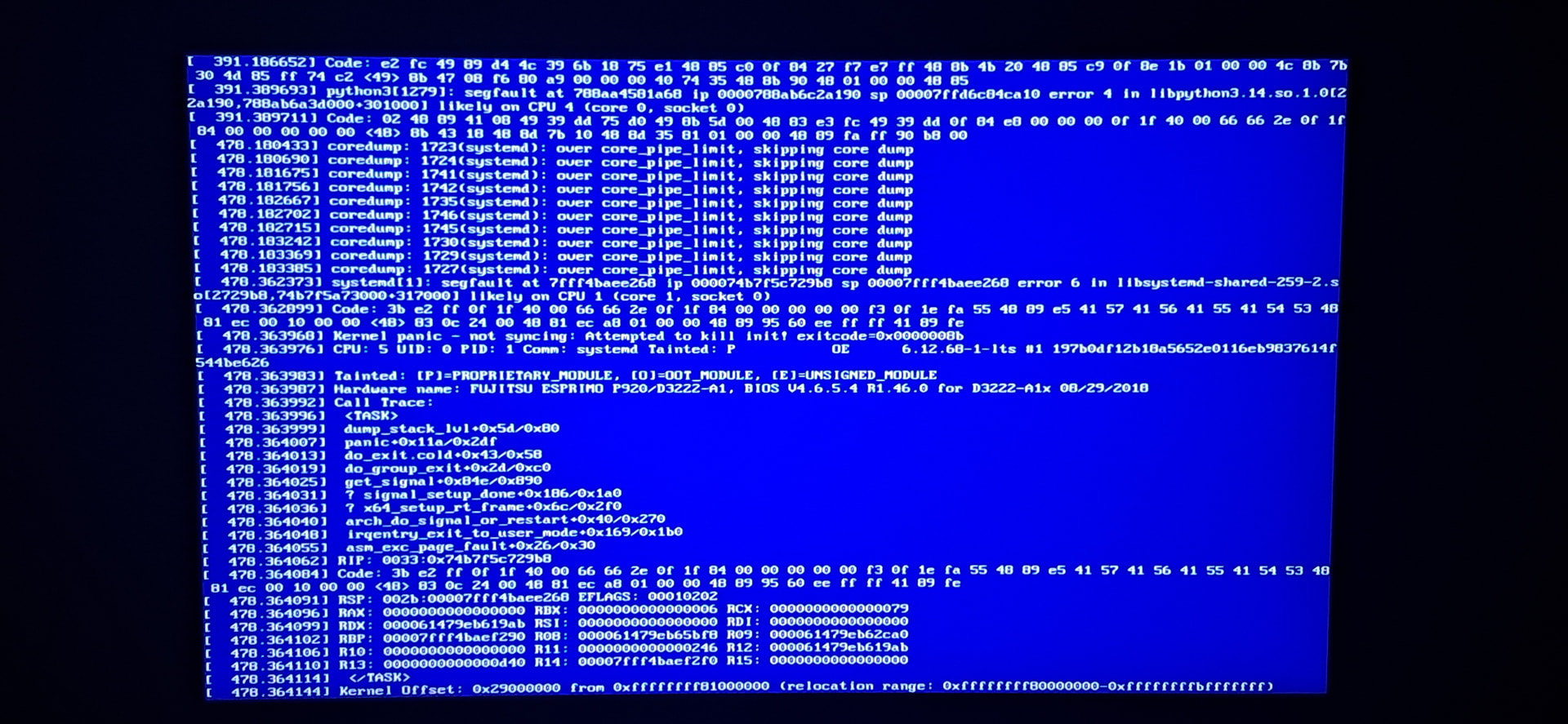
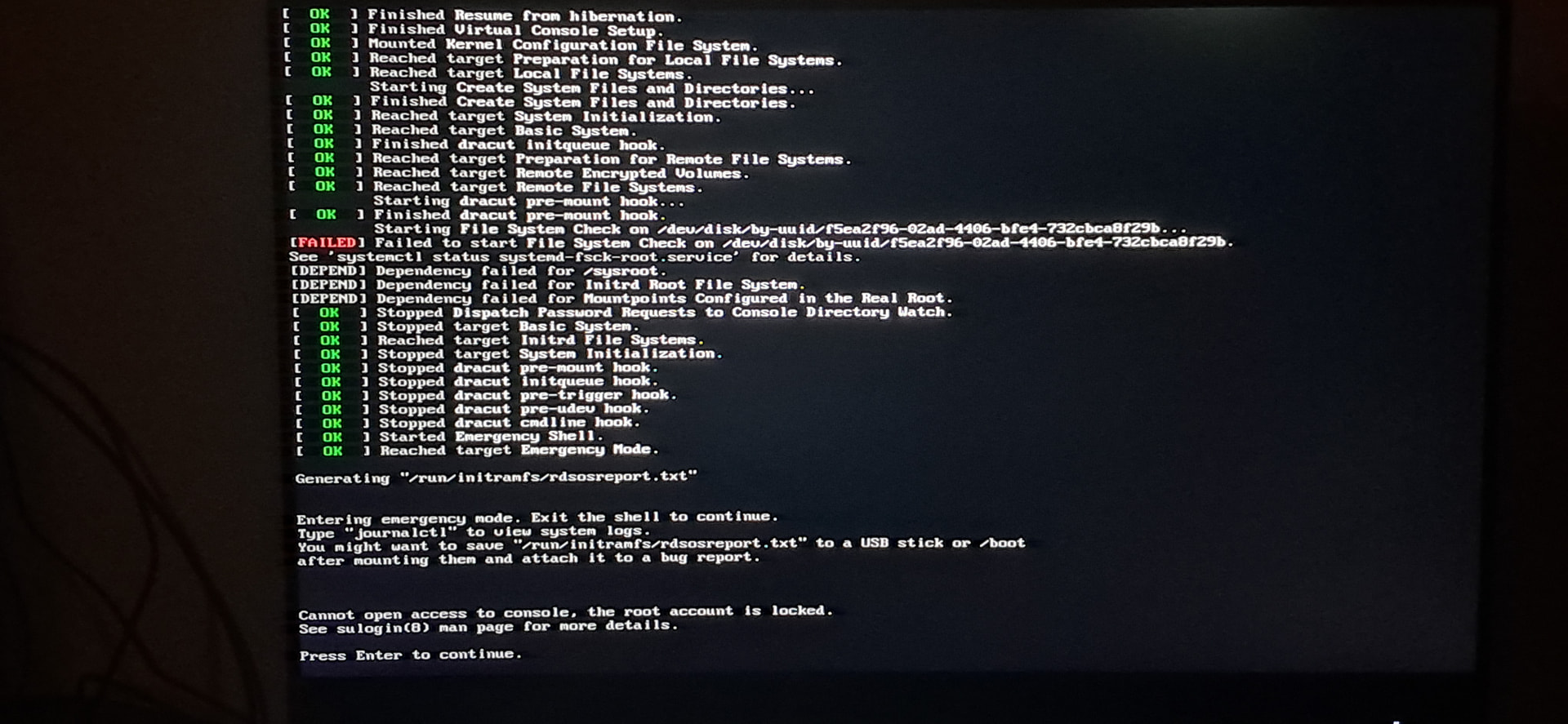
Sorry but la? my terminal doesnt recognize that command for some reason. I of course, in my infinite wisdom, blindly ran the other command anyway, because i didnt want to ask very small questions back and forth. Rebooted my computer and couldnt log into plasma wayland. I then tried to log into plasma X11 to report back, my computer froze on the splash screen. I forced a shutdown by holding the power button, rebooted to the file system check on boot failing? Uh oh! I have royally messed something up! I press enter on the screen showed in the second image (after having rebooted a couple of times, if thats any relevant), seemed to greet me like normal with the “Welcome to EndeavourOS!” splash, and then promptly bluescreened on me, as shown in the first image. Usually less intense weird behaviour like this seems to randomly go away after leaving my computer without power for 40 minutes or so, but im not sure if thats whats going on here. I understand if this is no longer in your area of expertise, thanks for the help though!