No. Stand by for your instructions 
You might as well run an update and see what happens since there is a new kernel.
1 Like
I also wanted to note that just an FYI. If you were going to ever reinstall i would use the default menu entry on the live ISO as that will install using nouveau. Then you would install the 580XX drivers from the AUR after. We are currently working on a new ISO to deal with these nvidia drivers. Hopefully it will get away from the issues that nvidia drivers have caused.
1 Like
In that case, I’ll wait for the new ISO. Thank you for all your help.
A new ISO won’t help in this case because it will only install nouveau just like it does now. You still have to install the legacy drivers from the AUR being the 580xx version. Obviously a new install should fix the issue if done properly. Currently the ISO installs noveau if you use the default menu option. Then you have to install the AUR packages after. The installer does not and will not install AUR packages.
Edit: Also not sure how long it will be before the new ISO will be ready but, we are working on it.
i wonder if its may needed to rebuild kernel images..
with systemd-boot: sudo reinstall-kernels
Grub: sudo dracut-rebuild
I was thinking that too but i have little knowledge of dracut and systemd-boot. I didn’t think about sudo dracut-rebuild on grub which i use mostly. I never have run into these issues needing to do this.
@frant
Are you using systemd-boot or grub bootloader? The default is systemd-boot on eos unless you chose to use grub.
If using systemd-boot try sudo reinstall-kernels
If using grub bootloader then you would do sudo dracut-rebuild
pacman -Q | grep -E "grub|dracut"
dracut 109_eos-1
eos-dracut 1.7-1
grub 2:2.14rc1.r54.g29f3131a-2
Means Grub is installed.
I ran `sudo dracut-rebuild` and there’s nothing better.
Thank you anyway.
1 Like
Noticed you have both nvidia 580xx and vulkan-nouveau installed. The latter should be uninstalled, but probably that doesn’t make much difference since the nvidia utils package blacklists nouveau. Still worth uninstalling anyway.
Could you show the output of command
cat /proc/cmdline
?
Hello !
I plan to reinstall using `pacman -Qqe > pkglist.txt` then `pacman -S --needed - < pkglist.txt`. Do you see any package (driver) that shouldn’t be included in the list to avoid any issues?
In your previous list there were two that I noticed:
opencl-nvidia 580.119.02-1
vulkan-nouveau 1:25.3.1-2
Remove them and install
opencl-nvidia-580xx
from the AUR.
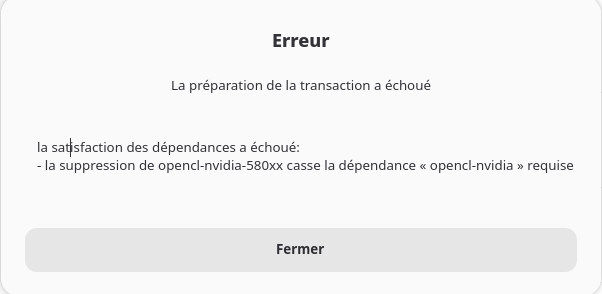
OK, then uninstall only vulkan-nouveau first.
Then simply install opencl-nvidia-580xx since it will replace opencl-nvidia.
They both should provide the same “service” for other packages.
opencl-nvidia-580xx is already installed and vulkan-nouveau58
It has already been uninstalled and reinstalled, but that doesn’t change anything.
Thanks to everyone who helped me, but sometimes there’s no choice, you have to reinstall… I installed with the “nouveau” drivers and then installed the 580s from AUR, everything seems to be working. So, I’ve decided to put a Windows SSD back in my tower. I’ll be able to easily install BIOS updates.  Bye
Bye
You’re hitting a legacy NVIDIA situation, not a random misconfiguration.
Important correction first:
Since Dec 20, 2025, there is no nvidia-dkms anymore on Arch/EOS.
It was replaced by nvidia-open-dkms, which ONLY works for RTX 20xx (Turing) and newer GPUs.
Your GTX 970 (Maxwell) is not supported by nvidia-open-dkms.
That explains your inxi output:
driver: N/A- fallback to
modesetting / llvmpipe - no Vulkan
- only one monitor detected
So right now:
 No proprietary NVIDIA driver is loaded at all
Correct options for GTX 970 (Maxwell)
You have two realistic choices:
 Option 1: Legacy NVIDIA (AUR)
Use the legacy branch, e.g.:
nvidia-580xx-dkmsnvidia-580xx-utilslib32-nvidia-580xx-utils(if needed)
Make sure:
- kernel headers for your running kernel are installed
- DKMS builds successfully
- you reboot after installation
Then verify with:
nvidia-smi
 Recommendation: use X11, not Wayland
(Maxwell + legacy NVIDIA is unreliable on Wayland, especially multi-monitor)
Option 2: Nouveau
Works out of the box, but with limitations:
- no Vulkan
- limited reclocking
- multi-monitor can be flaky
- lower performance
Good for basic desktop use, not great for gaming.
Why the live USB works
Live ISOs often:
- use different kernel versions
- ship prebuilt modules
- or fall back more gracefully
That does not mean your installed system is broken — just mismatched.
TL;DR
nvidia-open-dkmsdoes NOT support GTX 970.
You currently have no NVIDIA driver loaded.
Usenvidia-580xx-dkms(AUR) + matching headers + reboot, preferably on X11 — or accept nouveau’s limits.
I think you haven’t read the whole thread, but the problem has been identified.
The solution you proposed was implemented unsuccessfully. The system has been reinstalled and is now functional.
Indeed, strange things happen under Wayland, but it seems stable under X11.
I disagree as I have nvidia (GTX 1060) under Wayland without issue.
Fair enough 
But then please show the output of:
nvidia-smi
If that reports correctly and you have multi-monitor, hardware acceleration, and no llvmpipe fallback — great, then your Wayland + GTX 1060 setup is genuinely working.
If not, then it’s “works for me” in the Wayland sense 
Legacy NVIDIA + Wayland can work, but it’s still very dependent on driver branch, compositor, and workload. X11 remains the safer baseline for most users.