Hi all,
My 2nd gaming notebook (my wifes) has a issue when the notebook is off for a day (sometimes it takes days). When she boots it up the next day or the day after the screen becomes black. Normally she can ctrl+alt+delete and the notebook would reboot. Since a week she cannot use this combo and she needs to force shut down the notebook. This is the only notebook in this household that had a bit of issues during boot, when i switched to linux back in 2021 this was already a symptom in Pop! OS. But now it is getting worse because she needs to use the power button.
What logs can i provide to check what is going on ? I would appreciate any help.
[shalaina@shalaina-predatorg9793 ~]$ inxi -Fxxc0z
System:
  Kernel: 6.17.8-arch1-1 arch: x86_64 bits: 64 compiler: gcc v: 15.2.1
  Desktop: KDE Plasma v: 6.5.3 tk: Qt v: N/A wm: kwin_wayland dm: SDDM
    Distro: EndeavourOS base: Arch Linux
Machine:
  Type: Laptop System: Acer product: Predator G9-793 v: V1.14
    serial: <superuser required> Chassis: type: 10 serial: <superuser required>
  Mobo: Acer model: Challenger2_SKS v: V1.14 serial: <superuser required>
    part-nu: Predator G9-793_1177_1.14 UEFI: Insyde v: 1.14 date: 03/02/2018
Battery:
  ID-1: BAT0 charge: 69 Wh (99.5%) condition: 69.3/90 Wh (77%) volts: 17.37
    min: 14.8 model: AS15B3N serial: N/A charging: status: charging cycles: N/A
CPU:
  Info: quad core model: Intel Core i7-7700HQ bits: 64 type: MT MCP
    arch: Kaby Lake rev: 9 cache: L1: 256 KiB L2: 1024 KiB L3: 6 MiB
  Speed (MHz): avg: 3738 min/max: 800/3800 cores: 1: 3738 2: 3738 3: 3738
    4: 3738 5: 3738 6: 3738 7: 3738 8: 3738 bogomips: 44798
  Flags-basic: avx avx2 ht lm nx pae sse sse2 sse3 sse4_1 sse4_2 ssse3 vmx
Graphics:
  Device-1: NVIDIA GP104BM [GeForce GTX 1070 Mobile]
    vendor: Acer Incorporated ALI driver: nvidia v: 580.105.08 arch: Pascal
    pcie: speed: 8 GT/s lanes: 16 ports: active: eDP-1
    empty: DP-1,DP-2,HDMI-A-1 bus-ID: 01:00.0 chip-ID: 10de:1be1
  Device-2: Realtek HD WebCam driver: uvcvideo type: USB rev: 2.0
    speed: 480 Mb/s lanes: 1 bus-ID: 1-9:4 chip-ID: 0bda:57f3
  Display: wayland server: X.org v: 1.21.1.20 with: Xwayland v: 24.1.9
    compositor: kwin_wayland driver: X: loaded: nvidia unloaded: modesetting
    alternate: fbdev,nouveau,nv,vesa gpu: nvidia,nvidia-nvswitch display-ID: 0
  Monitor-1: eDP-1 model: AU Optronics 0x109b res: 3840x2160 hz: 60 dpi: 255
    diag: 438mm (17.2")
  API: EGL v: 1.5 platforms: device: 0 drv: nvidia device: 2 drv: swrast
    gbm: drv: nvidia surfaceless: drv: nvidia wayland: drv: nvidia x11:
    drv: nvidia inactive: device-1
  API: OpenGL v: 4.6.0 compat-v: 4.5 vendor: nvidia mesa v: 580.105.08
    glx-v: 1.4 direct-render: yes renderer: NVIDIA GeForce GTX 1070/PCIe/SSE2
    display-ID: :0.0
  API: Vulkan v: 1.4.328 surfaces: N/A device: 0 type: discrete-gpu
    driver: nvidia device-ID: 10de:1be1
  Info: Tools: api: clinfo, eglinfo, glxinfo, vulkaninfo
    de: kscreen-console,kscreen-doctor gpu: nvidia-settings,nvidia-smi
    wl: wayland-info x11: xdpyinfo, xprop, xrandr
Audio:
  Device-1: Intel CM238 HD Audio vendor: Acer Incorporated ALI
    driver: snd_hda_intel v: kernel bus-ID: 00:1f.3 chip-ID: 8086:a171
  Device-2: NVIDIA GP104 High Definition Audio vendor: Acer Incorporated ALI
    driver: snd_hda_intel v: kernel pcie: speed: 8 GT/s lanes: 16
    bus-ID: 01:00.1 chip-ID: 10de:10f0
  API: ALSA v: k6.17.8-arch1-1 status: kernel-api
  Server-1: PipeWire v: 1.4.9 status: active with: 1: pipewire-pulse
    status: active 2: wireplumber status: active 3: pipewire-alsa type: plugin
    4: pw-jack type: plugin
Network:
  Device-1: Qualcomm Atheros QCA6174 802.11ac Wireless Network Adapter
    vendor: Rivet Networks Killer Wireless-n/a/ac 1535 driver: ath10k_pci
    v: kernel pcie: speed: 2.5 GT/s lanes: 1 bus-ID: 02:00.0
    chip-ID: 168c:003e temp: 25.0 C
  IF: wlan0 state: up mac: <filter>
  Device-2: Qualcomm Atheros Killer E2400 Gigabit Ethernet
    vendor: Acer Incorporated ALI driver: alx v: kernel pcie: speed: 2.5 GT/s
    lanes: 1 port: 3000 bus-ID: 03:00.0 chip-ID: 1969:e0a1
  IF: enp3s0 state: down mac: <filter>
Bluetooth:
  Device-1: Qualcomm Atheros QCA61x4 Bluetooth 4.0 driver: btusb v: 0.8
    type: USB rev: 2.0 speed: 12 Mb/s lanes: 1 bus-ID: 1-7:3 chip-ID: 0cf3:e300
  Report: btmgmt ID: hci0 rfk-id: 2 state: down bt-service: disabled
    rfk-block: hardware: no software: no address: N/A
RAID:
  Hardware-1: Intel 82801 Mobile SATA Controller [RAID mode] driver: ahci
    v: 3.0 bus-ID: 00:17.0 chip-ID: 8086:282a
Drives:
  Local Storage: total: 3.64 TiB used: 898.3 GiB (24.1%)
  ID-1: /dev/nvme0n1 vendor: Samsung model: SSD 980 1TB size: 931.51 GiB
    speed: 31.6 Gb/s lanes: 4 serial: <filter> temp: 39.9 C
  ID-2: /dev/sda vendor: SanDisk model: SSD G5 BICS4 size: 931.51 GiB
    speed: 6.0 Gb/s serial: <filter>
  ID-3: /dev/sdb vendor: Samsung model: SSD 870 QVO 2TB size: 1.82 TiB
    speed: 6.0 Gb/s serial: <filter>
Partition:
  ID-1: / size: 930.51 GiB used: 164.42 GiB (17.7%) fs: btrfs dev: /dev/sda2
  ID-2: /home size: 930.51 GiB used: 164.42 GiB (17.7%) fs: btrfs
    dev: /dev/sda2
  ID-3: /var/log size: 930.51 GiB used: 164.42 GiB (17.7%) fs: btrfs
    dev: /dev/sda2
Swap:
  ID-1: swap-1 type: file size: 4 GiB used: 10.2 MiB (0.2%) priority: -2
    file: /swap/swapfile
Sensors:
  System Temperatures: cpu: 54.0 C pch: 42.0 C mobo: N/A
  Fan Speeds (rpm): N/A
Info:
  Memory: total: 32 GiB available: 31.28 GiB used: 2.72 GiB (8.7%)
  Processes: 276 Power: uptime: 36m wakeups: 0 Init: systemd v: 258
    default: graphical
  Packages: pm: pacman pkgs: 1196 Compilers: gcc: 15.2.1 Shell: Bash
    v: 5.3.3 running-in: konsole inxi: 3.3.39
Logs:
journalctl -k -b -0 | eos-sendlog
https://0x0.st/KOub.txt
journalctl -b -0 | grep fail | eos-sendlog
https://0x0.st/KOuc.txt
journalctl --since "2025-11-20 11:00:00" --until "2025-11-20 13:10:00" | eos-sendlog
https://0x0.st/KOu3.txt
journalctl --since "2025-11-21 09:30:00" --until "2025-11-21 09:37:00" | eos-sendlog
https://0x0.st/KO2V.txt
journalctl -b -0 | grep fail | eos-sendlog
https://0x0.st/KO2W.txt
journalctl --since "2025-11-21 10:00:00" --until "2025-11-21 10:05:00" | eos-sendlog
https://0x0.st/KO2v.txt
Video of what is happening: After systemd boot (everything passed green)

I noticed this error but i am not sure if it is related to it.
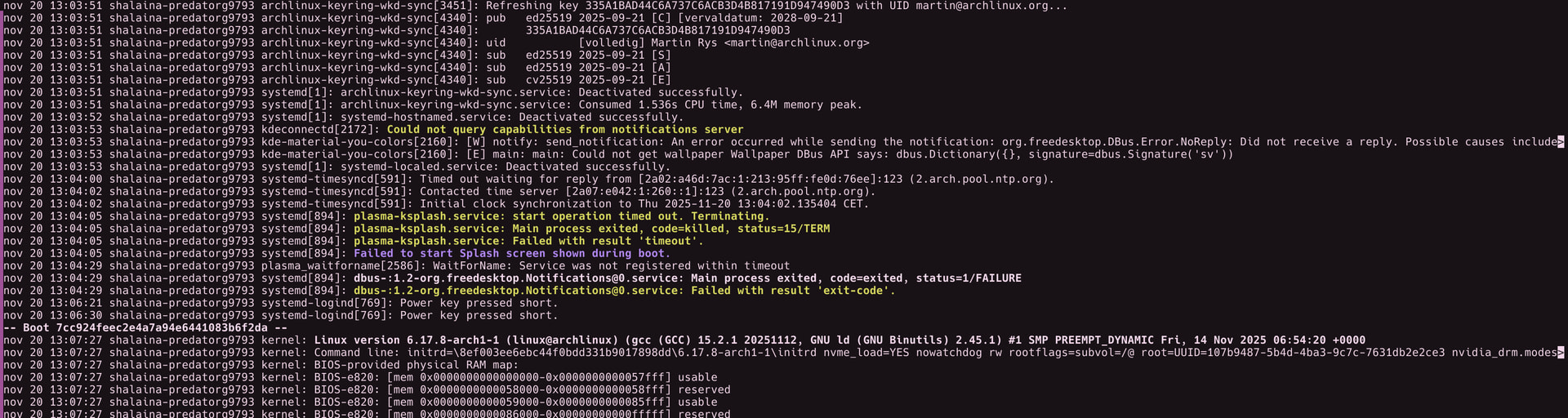
My kernel parameters are as follow:
nvme_load=YES nowatchdog rw rootflags=subvol=/@ root=UUID=107b9487-5b4d-4ba3-9c7c-7631db2e2ce3 nvidia_drm.modeset=1

