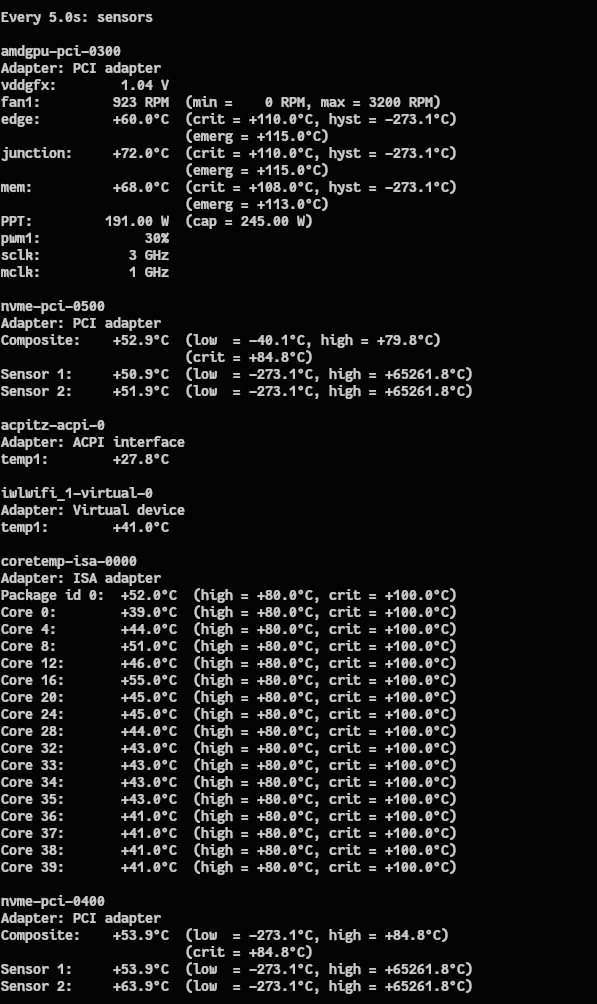
So I just installed a new 9070 16gb graphics card and was monitoring sensors while running Black Myth Wukong benchmark at 1280x720@60hz. The game was getting 240fps and smooth as silk. Sensors were all looking great, however I was getting system beep tone like I would get when it was running. For the life of me I have not idea what the bios is bitching about. Here is what sensors looked like in the middle of the benchmark.
That may avoid the beeping, but it doesn’t answer the question of why it was beeping. It’s a curious issue and I wonder if it’s trying to tell you something.
If the system when under load surpasses a threshold of some sort, it may be something that needs addressing.
So I ran AMD GPU Top and when it pulls 245W it beeps. Probably some threshold alarm.
On a side note I ran Qwen3-coder model using llama-cpp and gave it a huge prompt and it didn’t think long and start popping out code. No alarms then and it was offloading to the AMD card
There should be documented codes for that then, that’ll hopefully help identify the issue, or at least hone in on it a bit more.
1. Power Light is ON, “One short beep” from speaker but nothing shows on monitor
One short beep from the speaker means the device boots normally. Please confirm the monitor is working and correctly connected to the device.
2. Power Light is ON, “No beep” from speaker
Please check that the CPU and memory are installed correctly and there’s no oxidation on the connection parts. If there is any oxidation, please try to wipe the oxidized part with an eraser. If it still cannot be turned on properly, please clean it with contact cleaner and re-install.
3. “One long and two short beeps” from speaker
An anomaly is detected in memory. Please confirm that the memory is correctly installed.
Please refer to the Motherboard manual for related instructions about memory.
4. “One long and three short beeps” from speaker
An anomaly is detected in the graphic card. If the graphic card needs an extra power supply, please ensure the power supply can provide enough wattage.
5. “One long and four short beeps” from speaker
An anomaly is detected on CPU Fan Error or CPU Over Temperature Error or CPU Over Voltage Error
Please ensure your CPU and CPU Fan is installed correctly. If it still fails, please enter BIOS to load default BIOS or clear CMOS to try again
usually signals an overload, a failed or low battery, or an internal fault, indicated by the specific LED lights and beep pattern (e.g., solid red means overheating, flashing green often means low battery). To fix it, try reducing connected devices (overload), letting it charge overnight (low battery), or disconnecting everything to see if the beep stops (fault/battery issue). If it persists after these steps, the internal battery likely needs replacement or the unit requires service/replacement