Hi!
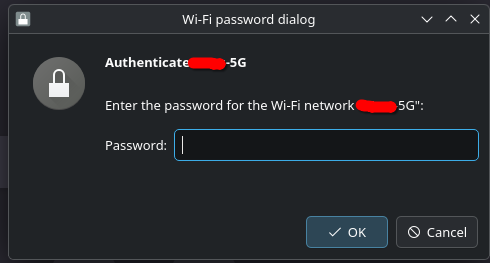
I recently updated my Endeavour to latest, for some reason I am being asked for my WiFi password whenever I even sleep my system and come back.
I am on Plasma 6.5.4
Hi and welcome to the forum @bkj !
I was told that
KDE does not store passwords for 5GHz and 2.4GHz Wi-Fi networks differently.
kwallet-pam 6.5.4-1 is installed by default here.
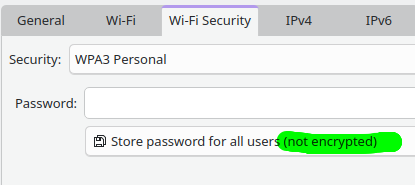
Do you see the stored wifi password when you right-click onto Networks (in Panel)
and click on Wifi-Security tab?
I have been using kwallet for months in my hyprland and mangowc installs with no issues.
I rebooted earlier and I was getting issues. I have had to swap to gnome-keyring. I cannot see anything that updated that could cause this… Baffled!
I have been having a simular issue, but it happens randomly whenever the connection cuts out then reconnects. I have also been having an issues when the screen unlocks which I am going to post a thread about now. Might be Wayland or a Plasma issue. I might switch over to X11 for a while and see if it happens on there.
In the Wi-Fi & Networking settings for your connection, select Store password for all users from the (new?) drop down
I was experiencing the same issues, and this did the trick for me.
Note that root users will be able to see the passwords with:
grep -r ‘^psk=’ /etc/NetworkManager/system-connections/
Classic security vs. convenience tradeoff for now, because that was annoying! 
I suspect a secret agent is unavailable or unable to do its job storing/reading encrypted passwords/keyring.
Fixed if for me. Thanks, I was starting to give up and try another WM.