Hello EndeavourOS, I installed EOS on my Asus UP6502ZD laptop instead of Windows, and I’m very happy with it. Everything works perfectly, except for high power consumption, which drains the battery in less than an hour. This is because my dGPU remains constantly active, increasing the overall power consumption to 20W. My integrated graphics are an Intel Iris XE and the dGPU is an Arc370M, both controlled by the i915 driver. I wanted to test the XE driver, but it crashes the boot process. The only effective way to reduce power consumption is to disable the dGPU with the command echo 1 | sudo tee /sys/bus/pci/devices/0000:XX:XX.X/remove, and the consumption drops to around 10W. Is there another way to manage this problem? Should I install XE? Any help would be greatly appreciated.
What desktop environment are you using? Some lean on the GPU quite a lot, such as KDE Plasma under Wayland.
Hi Bink
I’m under KDE and wayland,
But when i manually deactivate the dGPU i dont see any difference, only 10w less.
And nvtop indicate only activity on iGPU
There’s a couple of things I can suggest you try. The first is to have a play with the different power profiles (under Power Management, or via icon in your system tray), to see if they get you closer to your target.
The other thing you might try is a little more experimental. It’s a mode I use quite a lot as it allows me to use my workstation GPU for workstation tasks, without Plasma hogging the resources. Performance wise I see no noticeable difference, but it does reduce the load on my GPU.
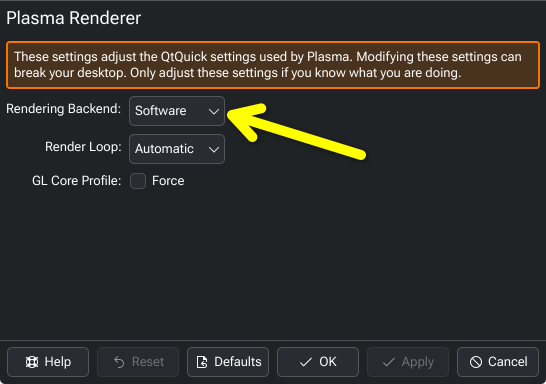
Open up Plasma Renderer, and set the “Rendering Backend” to Software, then restart and monitor the power usage. If you change your mind, you can always return it back to Automatic.
There have been very rare occasions when an update conflicted with this setting (well… just once comes to mind), requiring some intervention to log in to Wayland. I’ve been using this setting for a long while though, without any issue.
Different hardware, but the constant use of monitoring tools (widgets, applets, what-nots) was the culprit here:
Just in case.
Does disabling KDE monitoring widgets (i.e. “plasmoids”) help you, @Bearout?
Hello,
thank you for your suggestions.
I don’t have any widgets installed or running; apparently, it’s a driver issue.
I’m using an Intel i915, and I’d like to use the XE driver, which is available (lspci) and should handle power problems.
I tried force-probeing at boot, but the system won’t start.
Does anyone know anything specifically about this subject? How can this kind of problem be resolved?