That is why I haven’t noticed this problem, I have wired USB keyboard and mouse.
If this does not affect USB wired or BlueTooth keyboards and mice, we need to put this in.
We don’t want to fix a problem for one group and create a problem for another group.
Let me add this to the cmdline.txt on my RPi 4b KDE with USB wired mouse and see what happens
I tried this with usbhid.mousepoll=6 and usbhid.mousepoll=8.
I did not see any noticeable difference in mouse smoothness, but I didn’t have a problem with that to start with.
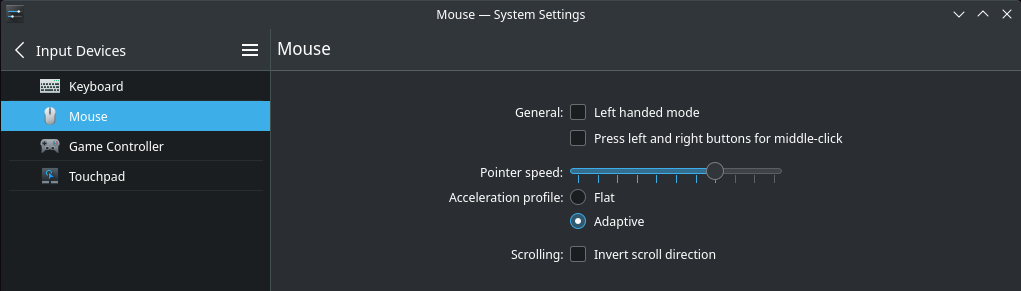
I did see a difference in mouse speed. At 6 I had to slow down the mouse, and shown here with 8 I had to speed up the mouse.
Shown above is with 8.
With 6 I had to go one click to the left past the middle setting.
I also have a gaming mouse on the RPi 4. I am not a gamer and it is a long story, don’t ask. The point being, there is a little button right behind the scroll wheel that changes the DPI I think they called it, and that really changes the mouse speed. So there are a lot of variables here.
I don’t know of anyone who uses a bluetooth keyboard & mouse to get feedback for bluetooth,
From what I can see, change it if it helps some people,
EDIT:
For now, only change it for RPi 4 stuff and leave Odroid N2 as is until further investigation.
I guess i would have to experiment. Right now I’m just kind of getting to understand how to make it Arm work on this Pi 400. I’m getting same on sd card and ssd on kde. I think the cursor acceleration is too fast? Not sure. It doesn’t seem to move or follow correctly.
Edit: When i get set up better I’ll reinstall KDE again. I’ve been trying different Arm images.
Budgie runs really well on the RPi 4 and USB SSD. I really like the optional AppMenu as shown in Post 54 of this Topic. It has a similar graphic presentation of the APPS like gnome, but the screen isn’t shifting size, and other distracting presentation.
The only thing I miss with Budgie, is Dolphin, Konsole, and especially KATE.
FYI I replaced the gaming mouse with a cheap $8 ONN wired mouse from Wal-Mart.
It works fine also with your usbhid.mousepoll=8 setting. So I don’t see it hurting anything.
I will fix this now. I want to start with 8 as the first URL suggested.
I can’t test this. You can play around with it and if 8 works good, great. If not we can go to 6.
Ive never had an issue with using this drive except now on the pi 400. I have a WD 500 GB ssd in another computer. I’ll swap it out and see if it makes any difference when i get the time. I haven’t been able to get the pi 400 to boot on any usb jump sticks either. Using the kernel parameter has worked on the ssd drive but i haven’t been able to set one up on a usb stick. Trying to load the arm image from booting on a usb stick to another usb stick doesn’t work well.