Well I’d appreciate some intuitive way to use it.
Have a text file like I do with prompts you use commonly or make aliases for it.
Text file with prompt is basically same but save the dev from having to do this or try do this.
Just my opinion on it and I do get your point also.
Now the gui is still in the tool, you could you can also use.
$ sudo archcanary-gui --no-gui
I need some time to think about the gui.
The trouble is the output in the yad gui. The output only shows when all output is generated, so the gui looks empty in that time.
That is the reason why there is no output in the beginning and it looks frozen.
For me the lynis output is corrupted.
This is the main command one wants to use.
$ sudo archcanary --refresh --full
I don’t really know how yad works but instead of output is it possible to have it show a screen that say processing or simliar? (I think gui is overkill still but understand those who want it, termial can be scary at first)
Like my Uncle than ya actually meet him and he cool as
Thank you! I just switched from Git to AUR.
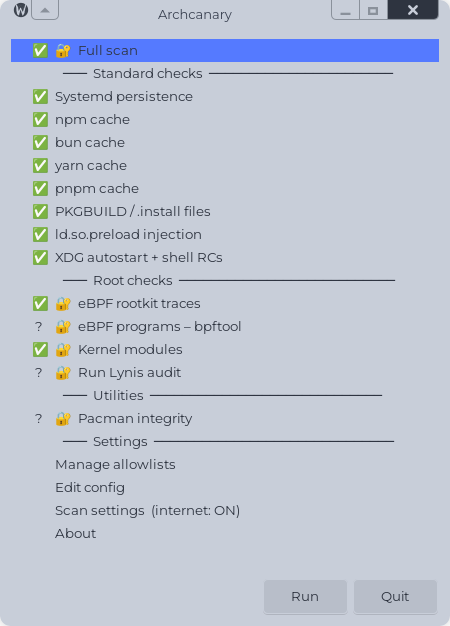
Edit:
Because @swh showed the result in the terminal, I MUST follow the same. 
Check summary
 ───────────────────────────────────────────────────────
 [1]  Package list (2452 pkgs)             ✅  clean
 [2]  pacman.log history                   ✅  clean
 [3]  Systemd persistence                  ✅  clean
 [4]  eBPF rootkit traces                  ✅  clean
 [5]  npm cache                            ✅  clean
 [6]  bun cache                            ✅  clean
 [6b] yarn cache                           ✅  clean
 [6c] pnpm cache                           ✅  clean
 [7]  PKGBUILD obfuscation scan            ✅  clean
 [8]  eBPF programs (bpftool)              ✅  clean
 [9]  ld.so.preload injection              ✅  clean
 [10] XDG autostart + shell RCs            ✅  clean
 [11] Kernel modules (DKMS)                ✅  clean
 [12] Lynis hardening                      ⚠   skipped (not installed)
 [13] Package integrity                    ✅  clean
 ───────────────────────────────────────────────────────
============================================================
 RESULT: CLEAN - No indicators found.
============================================================
❯ sudo archcanary --refresh --full
[sudo] Passwort für swh:
Fetching infected package list...
Updating /home/swh/.config/archcanary/package_list.txt...
Fetching malicious npm list...
Updated /home/swh/.config/archcanary/malicious_npm_packages.txt (4 entries)
Fetching CHAOS RAT list...
Updated /home/swh/.config/archcanary/chaos_rat_packages.txt (7 entries)
Fetching Russian spam list...
Updated /home/swh/.config/archcanary/malicious_russian_spam_packages.txt (75 entries)
Fetching community reports list...
Updated /home/swh/.config/archcanary/community_reports.txt (93 entries)
Fetching aur-audit black list...
Updated /home/swh/.config/archcanary/aur_audit_black.txt (103 entries)
Fetching aur-audit red list...
Updated /home/swh/.config/archcanary/aur_audit_red.txt (238 entries)
============================================================
 Archcanary v0.1.30
 Scanned: 2026-08-26 12:51

....

heck summary
 ───────────────────────────────────────────────────────
 [1]  Package list (2452 pkgs)             ✅  clean
 [2]  pacman.log history                   ✅  clean
 [3]  Systemd persistence                  ✅  clean
 [4]  eBPF rootkit traces                  ✅  clean
 [5]  npm cache                            ✅  clean
 [6]  bun cache                            ✅  clean
 [6b] yarn cache                           ✅  clean
 [6c] pnpm cache                           ✅  clean
 [7]  PKGBUILD obfuscation scan            ✅  clean
 [8]  eBPF programs (bpftool)              ✅  clean
 [9]  ld.so.preload injection              ✅  clean
 [10] XDG autostart + shell RCs            ✅  clean
 [11] Kernel modules (DKMS)                ✅  clean
 [12] Lynis hardening                      ✅  clean
 [13] Package integrity                    ✅  clean
 ───────────────────────────────────────────────────────
============================================================
 RESULT: CLEAN - No indicators found.
============================================================
Brave and heroic the only 2 left from AUR in my packages, heroic and brave
why did I repeat myself here? good thing I get to see the doc tomorrow
I’d skip the part about repeating yourself and go straight into the the replying and answering yourself in public 
new version 1.31
NOTIFICATION.

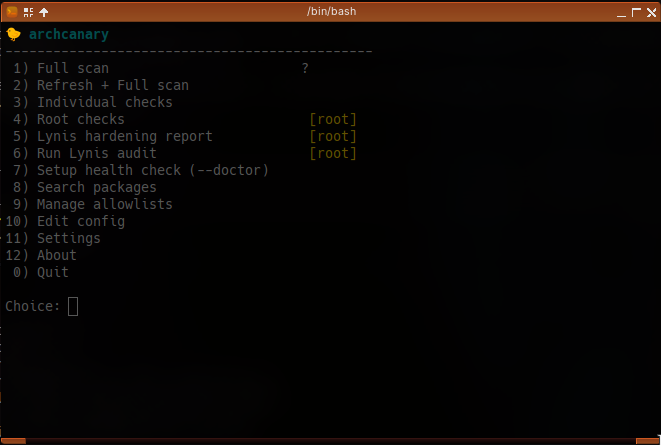
The GUI is replaced for a bash menu.

archcanary-tui
🐤 archcanary
----------------------------------------------
 1) Full scan                        ✅
 2) Refresh + Full scan
 3) Individual checks
 4) Root checks                       [root]
 5) Lynis hardening report            [root]
 6) Run Lynis audit                   [root]
 7) Setup health check (--doctor)
 8) Search packages
 9) Manage allowlists
10) Edit config
11) Settings
12) About
 0) Quit

Choice: 2

$ archcanary --refresh --full
(sudo may prompt for your password)

Have you been following me on youtube? lol
Have a habit of commetnting early then repkying to that and reply to that etc lol
Are they together or if 1 installs 1 gets all?
sorry but this probably a dumb q as i could look at it, but maybe the anser can hellp someone
I’ve never used the GUI. For me, the entire asrchcanary process is done through the terminal.
it nice aplication but i wait for maybe it go to arch repositries instead off aur i did compleet new install just for have no more aur… onboard so… 
There is NOTHING wrong with the AUR or using packages from the AUR. Simply read the PKGBUILD. Nothing to fear. AUR packages are just as safe as packages in the repo as long as you do YOUR part.
that’s exactly why i not use it anymore
(edit) i like eos very much and the way it works even i not understand too much about some things and read a package build is not for me yet or never will be ? but am good for i can use all i want to use… thanx for the heads up anyway “thefrog” maybe one day…
what this?
if this the case yer I out not gonna argue dumb things like this