Some days ago, a Ventoy bug happened which impacted the launching of my Clonezilla isos from my Ventoy disk.
The Ventoy author issued a correction immediately which seems to be successful. However, I am at a loss how to enable it. I need step to step explanations…
Here is the topic. At the end you’ll see the correction published bt the author (38213641710) and the user telling that he successfully applied it..
opened 11:13AM - 11 Oct 26 UTC
### Official FAQ
- [x] I have checked the official FAQ.
### Ventoy Version
1.… 1.18
### What about latest release
Yes. I have tried the latest release, but the bug still exist.
### Try alternative boot mode
Yes. I have tried them, but the bug still exist.
### BIOS Mode
UEFI Mode
### Partition Style
GPT
### Disk Capacity
64GB
### Disk Manufacturer
Kingston/Intenso
### Image file checksum (if applicable)
Yes.
### Image file download link (if applicable)
https://downloads.sourceforge.net/project/clonezilla/clonezilla_live_alternative_testing/20261006-resolute/clonezilla-live-20261006-resolute-amd64.iso?ts=gAAAAABqy27CLdrYEk9y3MlsCX4iZYuiQlaplsvUVspPh5Ng43fnwbyMM0Kq3AMWuxk3YvsUgunl5skQ0HMeLbJEaD-LLZh6bA%3D%3D&r=https%3A%2F%2Fsourceforge.net%2Fprojects%2Fclonezilla%2Ffiles%2Fclonezilla_live_alternative_testing%2F20261006-resolute%2Fclonezilla-live-20261006-resolute-amd64.iso%2Fdownload%3Fuse_mirror%3Dmaster
### What happened?
<html><body>
<html><head></head><body><h1><span>Ventoy 1.1.18 regression: Clonezilla ISO fails in GRUB2 mode with "double free" / "unaligned pointer"</span></h1><h2><span>Description</span></h2><p><span>After upgrading from Ventoy 1.1.17 to Ventoy 1.1.18, Clonezilla Live testing ISOs fail to boot in </span><strong><span>GRUB2 mode</span></strong><span>.</span></p><p><span>The Clonezilla splash screen appears, but GRUB aborts before displaying the Clonezilla boot selection menu.</span></p><p><span>The issue is reproducible on two different computers.</span></p><p><strong><span>The same Clonezilla ISO boots successfully in GRUB2 mode with Ventoy 1.1.17.</span></strong></p><h2><span>Environment</span></h2><ul><li><p><span>Ventoy versions tested: 1.1.17 and 1.1.18</span></p></li><li><p><span>Partition style: GPT (both versions)</span></p></li><li><p><span>Boot mode: UEFI</span></p></li><li><p><span>Secure Boot: Enabled on the Lenovo ThinkPad</span></p></li><li><p><span>Computer 1: Lenovo ThinkPad L15 Gen 2 (20X300PLGE)</span></p></li><li><p><span>BIOS: R1JET75W (1.75), dated 2026-08-11</span></p></li><li><p><span>Computer 2: Another computer (model not specified)</span></p></li><li><p><span>Clonezilla Live: Testing releases dated 2026-10-05 and 2026-10-06</span></p></li></ul><h2><span>Error messages</span></h2><p><span>The following errors were observed:</span></p><pre><code><span>double free at 0x49e6af20</span></code></pre><p><span>and, on another computer:</span></p><pre><code><span>unaligned pointer 0x5d20007370696d
Aborted. Press any key to exit.</span></code></pre><p><span>Both errors occur before the Clonezilla boot selection menu is displayed.</span></p><h2><span>Test results</span></h2>
Configuration | Result
-- | --
Ventoy 1.1.17 + Clonezilla testing 2026-10-06 + GPT + GRUB2 mode | Works
Ventoy 1.1.18 + Clonezilla testing 2026-10-06 + GPT + GRUB2 mode | Fails
Ventoy 1.1.18 + Clonezilla testing 2026-10-05 + GRUB2 mode | Fails
Ventoy 1.1.18 + Clonezilla + normal mode | Works
Ventoy 1.1.18 on a second computer + GRUB2 mode | Fails
<h2><span>Steps to reproduce</span></h2><ol start="1"><li><p><span>Install Ventoy 1.1.18 on a USB drive using GPT partitioning.</span></p></li><li><p><span>Copy the Clonezilla Live testing ISO dated 2026-10-06 to the USB drive.</span></p></li><li><p><span>Boot the computer in UEFI mode.</span></p></li><li><p><span>Select the Clonezilla ISO in Ventoy.</span></p></li><li><p><span>Select </span><strong><span>Boot in GRUB2 mode</span></strong><span>.</span></p></li><li><p><span>Observe the Clonezilla splash screen and the subsequent memory-related error.</span></p></li></ol><p><span>The Clonezilla boot selection menu is never displayed.</span></p><h2><span>Expected behavior</span></h2><p><span>Clonezilla should display its GRUB2 boot menu and boot normally, as it does with Ventoy 1.1.17.</span></p><h2><span>Actual behavior</span></h2><p><span>GRUB aborts with a memory-related error (</span><code><span>double free</span></code><span> or </span><code><span>unaligned pointer</span></code><span>).</span></p><h2><span>Additional information</span></h2><p><span>The problem was initially suspected to be related to a Lenovo UEFI firmware update. However, Ventoy 1.1.17 still boots the same Clonezilla ISO successfully after the firmware update.</span></p><p><span>Both Ventoy versions were also tested using GPT partitioning, ruling out an MBR/GPT difference in the direct comparison.</span></p><p><span>This strongly suggests a regression introduced in Ventoy 1.1.18 or an incompatibility in its GRUB2 boot path.</span></p><p><span>Please investigate. Thank you!</span></p></body></html>
</body>
</html>
pled
October 22, 2026, 8:31am
2
Hi,
If I am correct, the fix has been merged into master branch, but you have no release yet available.
That means you have to download Master branch (https://github.com/ventoy/Ventoy/tree/refs/heads/master ), then follow the “Compile instructions”.
Or wait for the next Release…
Thanks for your explanation. I had seen that the user in this file had solved the problem without understanding how he did it.
So, I’ll wait for Ventoy 1.1.19.
The releases of Ventoy are coming roughly on a three month basis. If the author does not release the new version before november, I’ll just downgrade the package to 1.1.17. which worked well for me.
Anilin
October 22, 2026, 8:26pm
5
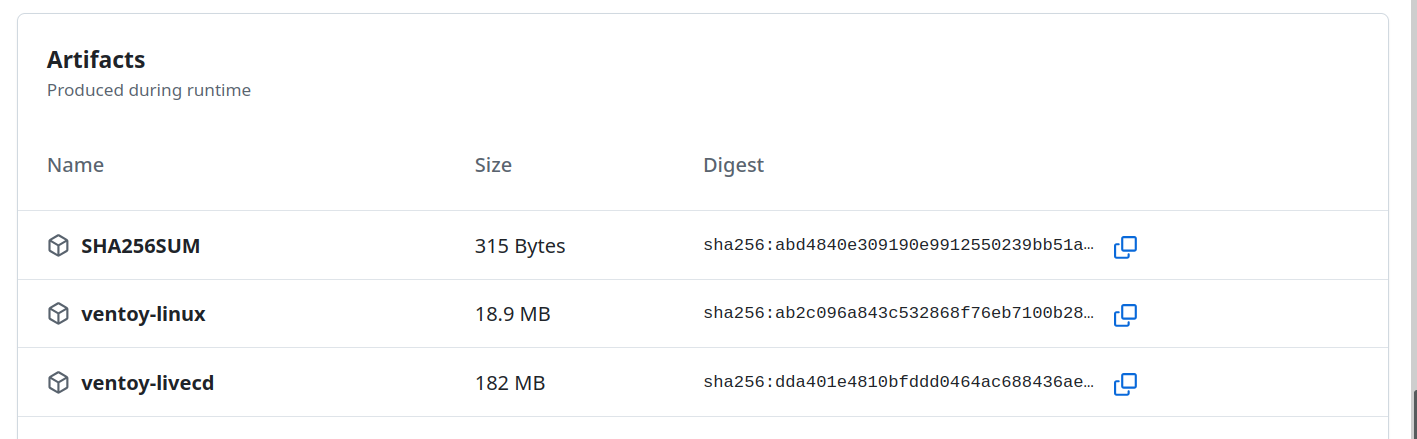
I think using the CI branch is as easy as downloading the ventoy-linux artifact, extracting and running the executable and updating your USB Drive to it.
This is just what I do not know how to do. Could you give me the commands?
Anilin
October 23, 2026, 1:20pm
7
Go into the link ventoy has sent you, scroll down to the Artifacts section and click the download button on the right of the ventoy-linux package.
Thanks.
I went there. 5 Artifacts, among them a ventoy-linux of 18 MB. That I can only “copy” not download and which is an html file, probably to be compiled. Or I miss something?
Anilin
October 23, 2026, 3:11pm
9
There’s a download icon on the right.
Anilin
October 23, 2026, 6:01pm
11
That’s because you don’t have a Github account.
roger64
October 24, 2026, 8:25am
13
Thanks again to Anilin and all of you.
This is the easiest way to solve this. I now have a Ventoy usb disk which opens again my clonezilla isos.
I do not understand why the author of Ventoy does not publish it and still knowingly let users fall in the 1.1.18 trap. Anyway…