I need help converting .ani to xcursor, I have tried using win2xcur yet it didnt work, i tried reinstalling it but with pipx and pipx cant be installed for some reason, so I don’t know if someone could either help me convert it myself or could do me a favour and convert it for me and send me the cursor
Hello @kainess and welcome to forum! 
Simpliest way to convert a cursor is to create a python virtual enviroment (venv) and run pip install win2xcur and then run either python3 -m win2xcur pathtocursor/cursorname.ani -o output_path
or win2xcur pathtocursor/cursorname.ani -o output_path
As an alternative you can use AUR Package - ani2xcursor
Or download directly from author’s GitHub - GitHub Repo
hi! tysm for answering, I did try what you suggest but win2xcur kept on saying “win2xcur: command not found”
and when I tried installing ani2xcursor I just couldn’t download it
it also says this: WARNING: “The scripts inspectcur, win2xcur, win2xcurtheme, x2wincur and x2wincurtheme are installed in ‘/home/usuario/.local/bin’ which is not on PATH.
Consider adding this directory to PATH or, if you prefer to suppress this warning, us e–no-warn-script-location.”
I don’t know if this is the reason why it didn’t work
What exactly happens when you try to download it?
Try to install win2xcur using commands below:
python3 -m venv .venv

source .venv/bin/activate

pip install win2xcur
and finally:
win2xcur
I did exactly what you said and when I type win2xcur it answers with “win2xcur: command not found”
Try to enter - .venv/bin/win2xcur --help
said:
bash: .venv/bin/win2xcur: The file or directory does not exist.
Strange, in which directory did you create your .venv? And in what working directory are you in right now?
P.S: Last one can be checked with pwd
im working in /home/user/ and venv is in /home/user/
Can you list contents of .venv/bin/ with ls -a?
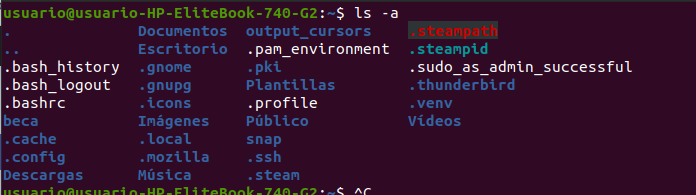
Do this:
cd .venv/binls -a
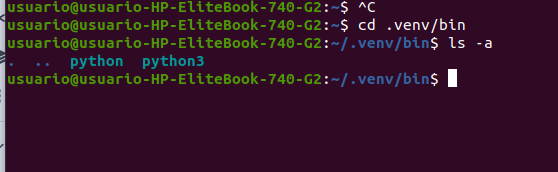
cd in python and python3 folder and check their contents

Strange. Sadly, I don’t know much about how Ubuntu treats pip packages 
I will try to do some research but maybe other members of our forum could help you.
Or you can ask on Ubuntu forums about this problem
Try this:
sudo apt update
sudo apt install pipx

pipx ensurepath

pipx install win2xcur
and then post results of those commands
tysmm!! i will try right now what you suggested