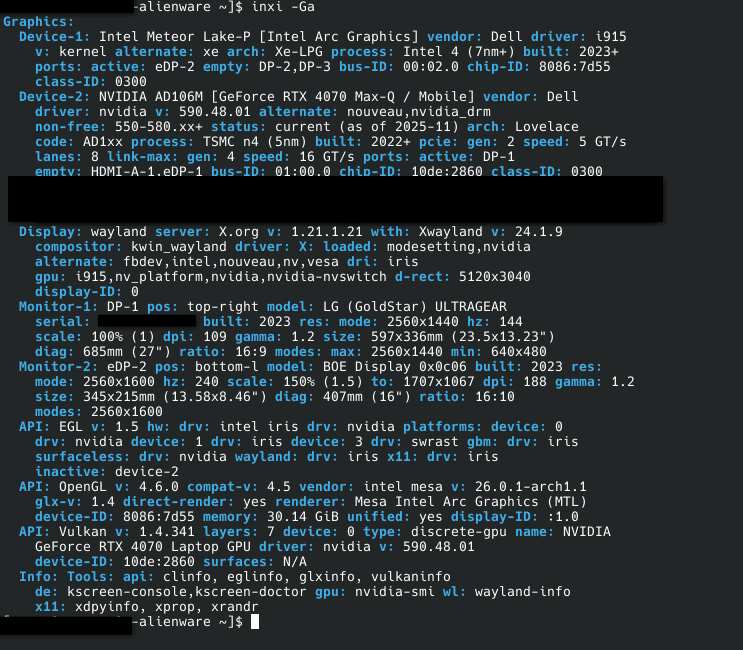
Hey, I’ve got a trouble with my recent(n’first) install of EndeavourOS. Every time the system goes to sleep, or shuts the screen of due to screen-off timeout, the primary laptop screen fails to wake up, but the secondary does so well. Issue appears once in 2-3 tries, not consistent.
I tried expanding swap from 500M to 16G and the issue persists.
My solution so far was to open settings/console on the second screen and disable, enable the screen, it works from 1st/2nd try. I have LUKS encryption and BTRFS on the system drive.
I did run some commands to try and get some diagnostic data to vibe-fix it, but didnt have guts to:
~]$ journalctl -b 0 -p 3..4 |grep -iE “nvidia|drm|display|wayland”
Mar 02 03:43:36 xxxUSERNAME kwin_wayland[2467]: Failed to delay sleep: The operation inhibition has been requested for is already running
Mar 02 03:43:37 xxxUSERNAME org_kde_powerdevil[2720]: [ 2876] (dw_remove_display_by_businfo) No Display_Ref found for i2c bus: 16
Mar 02 03:43:37 xxxUSERNAME kwin_wayland[2467]: Atomic modeset test failed! Permission denied
Mar 02 17:03:03 xxxUSERNAME kwin_wayland[2467]: Could not delete render time query because no context is current
Mar 02 17:03:05 xxxUSERNAME org_kde_powerdevil[2720]: [ 2876] (dw_remove_display_by_businfo) No Display_Ref found for i2c bus: 3
Mar 02 17:03:06 xxxUSERNAME kwin_wayland[2467]: KWin::LayerShellV1Window doesn’t support setting maximized state
Mar 02 17:03:06 xxxUSERNAME kwin_wayland[2467]: KWin::LayerShellV1Window doesn’t support setting fullscreen state
Mar 02 17:03:19 xxxUSERNAME kwin_wayland[2467]: 0x500: GL_INVALID_ENUM error generated. Invalid .
Mar 02 17:03:19 xxxUSERNAME kwin_wayland[2467]: Failed to create framebuffer: Invalid argument
Mar 02 17:03:19 xxxUSERNAME kwin_wayland[2467]: Failed to create framebuffer: Invalid argument
#Line 7-10 repeats 5 more times every 13 seconds or so.
Mar 02 17:04:07 xxxUSERNAME kwin_wayland[2467]: Failed to find a working output layer configuration! Enabled layers:
Mar 02 17:04:07 xxxUSERNAME kwin_wayland[2467]: src KWin::RectF(0,0 2560x1600) → dst KWin::Rect(0,0 2560x1600)
Mar 02 17:04:07 xxxUSERNAME kwin_wayland[2467]: Bad link status detected on connector eDP-2
Mar 02 17:04:07 xxxUSERNAME kwin_wayland[2467]: Bad link status detected on connector eDP-2
Mar 02 17:04:08 xxxUSERNAME kwin_wayland[2467]: 0x500: GL_INVALID_ENUM error generated. Invalid .
Mar 02 17:04:08 xxxUSERNAME kwin_wayland[2467]: Failed to create framebuffer: Invalid argument
Mar 02 17:04:08 xxxUSERNAME kwin_wayland[2467]: Failed to create framebuffer: Invalid argument
From what I found so far there may be multiple different causes of this issue, and i could’ve used AI. Being honest I’m not an expert, and i don’t want to run/change something i dont understand or something that comes from a prediction machine(AI), so I rather trust experienced folk.
I apologise if I’ve written anything wrong, Its my first time on the forum, and I’m not sure how to behave. Thank you.
System Specifications
-
Laptop: Alienware m16 r2
-
OS: EndeavourOS (KDE Plasma)
-
Kernel: 6.12.74-1-lts (I just noticed. In grub i always choose the latest release, instead of lts, but uname returned this this time. not sure if it may be relevant)
-
GPU: NVIDIA GeForce RTX 4070 Laptop
-
Display Server: Wayland
-
Disk Setup: BTRFS with LUKS Encryption (Multi-drive dual boot with Win11 on another disk)
The first question is do you have the right drivers installed. You should be using the 590xx version. Can you post the output for inxi -Ga
Also do you have the services set up for
nvidia-suspend.service
nvidia-hibernate.service
nvidia-resume.service
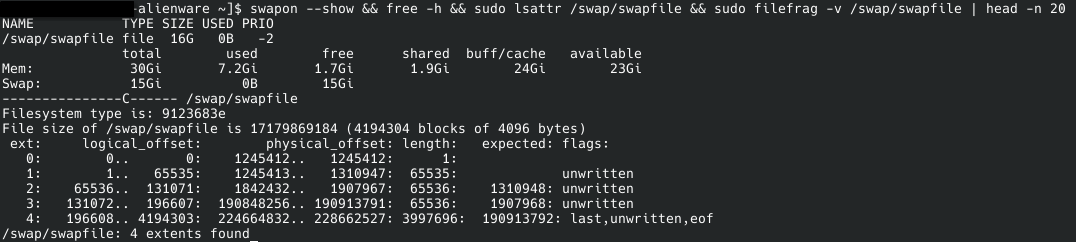
Do you have the proper swap space, partition or swap file? You may also need the following parameter NVreg_PreserveVideoMemoryAllocations=1
Edit: I don’t think you can control these things with power devil although it may help with other things.
Edit: https://wiki.archlinux.org/title/NVIDIA/Tips_and_tricks#Preserve_video_memory_after_suspend
Thanks for helping. Here is the return you asked for, and the suspend, hibernate and resume services are active. I’ll attach another screenshot at the end.
I have a swap file. It used to be 500Mb. I’ve resized it to 16Gb recently while trying to troubleshoot this issue.
Do you have the proper swap space, partition or swap file? You may also need the following parameter NVreg_PreserveVideoMemoryAllocations=1
I’m not sure how to do this(adding a parameter), sorry. I will look up what it is and how to do this now.
I will check the links you attached now, thank you
EDIT:
I hope this will be at help. Also, I have a BTRFS file system, and the drive is LUKS encrypted.
EDIT:
I found this after running “# sort /proc/driver/nvidia/params“: PreserveVideoMemoryAllocations: 1, and TemporaryFilePath: “/var/tmp”.
I suspect this is not the cause of the issue, then?
It may have that paramater automatically now with the newer 590xx series drivers. I see it’s rendering on the intel gpu. Are you using some method to switch to the nvidia gpu? Otherwise it’s suspending and resuming on the intel gpu.
I’m really not. I am not aware that I can and I don’t know how to yet…
The only things i know is that i can only run the secondary monitor off the dGPU(nvidia) due to the way the DP port is made in the laptop, but I never looked into switching the built-in screen to the dGPU. Do I understand that correctly, that you think i should switch my laptop built-in screen to run off the dGPU, or like make the whole system run on the it? And avoid using the iGPU completely then? I didn’t really consider this as an option because i thought it will just put additional load on the dGPU that can be handled by the iGPU.
I’m sorry, I wish I could understand you faster… I can get some general terms, but I’m not aware of how things run in-depth…
P.S. Monitor-2 is the built-in screen, and Monitor-1 is secondary
Okay so I’m not understanding exactly. Is the secondary monitor the one staying black? It does work though? When you have it plugged in and it is working what does inxi -Gaz show? I want to see if it is automatically outputting using the nvidia gpu on that port?
I was referring to the first uploaded screenshot when I said Monitor-1/2, this is how they are named there.
In my case “Monitor-1” is the secondary monitor on that screenshot, its the one running on dGPU, it is also wide 2K 2560x1440.
”Monitor-2” is the built-in monitor, the one that runs on the iGPU, and this one is 2560x1600.
Sorry for confusion. They are likely named like this because I recently(before your first reply) selected the auxiliary monitor as primary in settings in hopes that it might fix the issue, but it didn’t. I still keep it as primary tho.
So is the problem only that the internal monitor stays black after suspend but normally it’s working on boot and both displays are working at the same time?
Yep. Sometimes after sleep internal monitor turns on sometimes it doesnt. About once in 2 wakes it has trouble. The secondary monitor always works properly.
EDIT: The manual fix i use is, once in KDE, disable the internal monitor and then turn it back on. Sometimes it takes two or more tries before it fires up.
And when i say that the screen doesnt work its not that its disbled(off, including the backlight), but instead the backlight stays on, but the screen is black
Are you using grub or systemd-boot?
Edit: If using grub do you have this kernel parameter in the grub command line?
nvidia_drm.modeset=1
If not you could try adding it in /etc/default/grub and then run the grub update command
sudo grub-mkconfig -o /boot/grub/grub.cfg
~$ sudo cat /sys/module/nvidia_drm/parameters/modeset
Y
Do you think i still should try to add it, Im just making sure? I read that with most recent drivers it is on by default
Okay if that’s the case then that’s okay. I’m no expert with this nvidia stuff. I have less issues because I don’t have a hybrid laptop. I’m not sure what else to try. I mean i don’t think it will hurt if you want to try it. If nothing changes you would just remove it and run the grub update command again once you take it out of the grub command line.
I’ll try to add the parameter you recommended in, and see how it goes.
I saw an option to disable the hybrid system in the BIOS, do you think I should try to enable it?
Sure. Because that is probably what makes it automatically switch to the dedicated on the other monitor. But I’m not positive it does. Won’t hurt to try it.