Alacritty Weirdness (No typing after launch)

This is new. Starting today. Not sure if update related. Rebooted and still persists.

steps:

1

^ launch alacritty from plank

^ try to type. it can’t be typed in. App unresponsive.

^ instead the alacritty output mutates into some strange text box in the lower right of my screen, on top of the task bar.

Truly a WTH situation.

If I launch Alacritty then click inside it, I can use it…this double move is new.

When I rebooted goofy lower right box went away. But still can’t open a type yay (for instance) without the double-move

Sanity check–

launch gedit, type stuff immediately, success

launch libre-writer, type stuff immediately, success

launch Alacritty, type stuff immediately, fail

Right now I’d call this mosquito-level annoyance; small potatoes. But anyone have any ideas?

Thanks if you do

Use another terminal, like xfce4-terminal, to launch alacritty to see if it shows any errors. Also, do you have an Nvidia card? Updated today?

launched clean from xterm meaning no output whatsoever.

no Nvidia card just some old thinkcentre integrated card

why not remove alacritty from plank and then re add it.

Also are you aware of plank-reloaded?

yay -Syu plank-reloaded

1 Like

that did not work.

I’m reading about the other plank right now, thank you.

I’m curious how you are connecting Alacritty launching inactive with the dock, however? it’s interesting

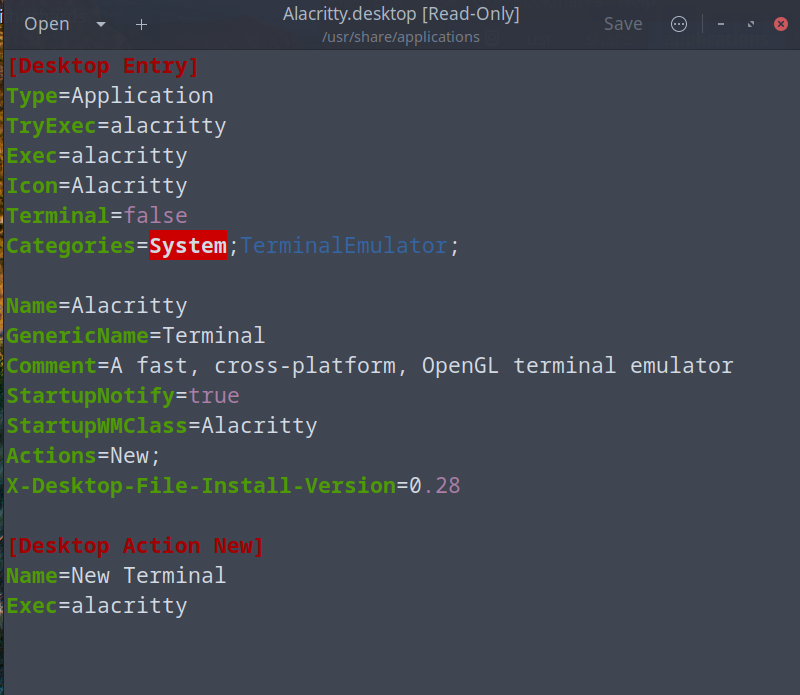
can you post the contents of you alacritty.desktop file
maybe even post the contents of the alacritty.dockitem

I don’t understand your question here? I didn’t do anything special to add alacritty to my plank.

When I launch the app from Cinnamon menu or plank, it cannot be written in. It opens dead. You have to touch it with the mouse to use it. It used to be just open the terminal and type.

For me That is how it still works for me. So maybe you have a setting issue with Cinnamon? do you have another account to test?

1 Like

ahh–a setting is the most likely. will make another identity and test that out. after dinner and beers.

If it comes alive with a new user, then there’s a problem in my regular identity.

If Alacritty stays dead with the new user then I don’t know what that means.

May -Rns and then -S later as well. Thanks for this idea. If there’s an AUR version I could test it as well.

Also you were on to something with the .desktop file the tiniest of glitches start there, too.

Will report back.

1 Like

I tried a few things but no luck. Didn’t see jack sh*% about this strange problem in DDG. Spun my wheels long enough.

For now the mysterious case of The-Alacritty-Terminal-Emulator-that-Launches-but-can’t-be-Typed-in-Right-Away remains a mystery.

1 Like

I was drinking a beer thinking…”I will bet this is startupWMclass class crap….”

I bet one of these Capital A’s is wrong,

Still sleuthing

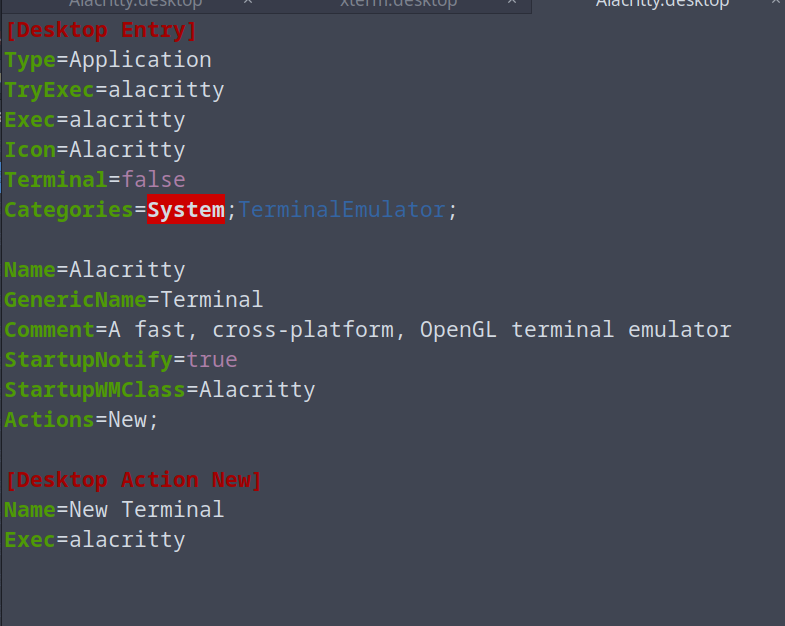
functioning Alacritty in Solus:

see the difference? solus does not have the one line about version #. It can’t be that easy as deleting that line, can it?

will be back to edit upon inevitable test failures..EDIT: that was FAIL. had to re-install.

nothing changes with all my .desktop moves except 1) me making alacritty inoperable 2) uninstalling 3)reinstalliing. rinse repeat

it launches grayed out and not ready to use. I have to touch it to activate it…

it just is not making it to the top layer of the desktop is the best way I can describe it

sleuth on

It really looks like alacritty just lost it’s focus directly after launch (or never got it), so maybe it’s cinnamon-related (see @thefrog). Maybe there were changes at the last updates for cinnamon? Something that affected not every program, but a few ones, like apps build with a special builder, or they need special new flag during build? I will install Alacritty on my Cinnamon-installtion and see what happens there.

1 Like

Just installed it under cinnamon, same behavior. Changed in alacritty.desktop-file two lines (StartUpNotify from true to false and deleted StartupWMClass=Alacritty), afterwards restart cinnamon, nothing changed, so I put the old entries back. Next try was to start cinnamon with wayland, and everything works as it should. The problem seems to be related to x11/cinnamon.

1 Like

thanks for confirming. cinnamon/X11 is the problem, somewhere, but I can exclude the .desktop. Once you start deleting/changing stuff the game is afoot.

tomorrow’s another day. I really appreciate both (@thefrog ) of your helps!

2 Likes

The next update isn’t that far anymore :wink:
I wish you nice days and a spare terminal without that ‘feature’. Maybe you can give kitty a try. @DenalB loves it because it can display pictures, and it’s fast, too: https://wiki.archlinux.org/title/Kitty

2 Likes

Yes, I do. But how do you know that? :thinking:

the XDG and Cinnamon updates did not fix this. It’s been about a week.

I guess I’m moving on from the terminal, I really liked it.

I will check out kitty. I loved alacritty—what’s similar besides kitty? thanks

Distrotube had once done a video https://www.youtube.com/watch?v=TTzP2zYJn2k about kitty and alacritty, maybe it’s helpful.