Hello, I’m having trouble adding a Windows 10 entry to the systemd-boot menu at boot after a fresh reinstall of EndeavourOS. I had used grub in the past to manage my dual-boot, but I defaulted to systemd-boot for this fresh install.
The Windows 10 install was untouched during this reinstall and is on a different disk from my EndeavourOS install.
I cannot boot into Windows using my motherboard as it seems to be undetected there. I cannot ensure if Windows 10 is in EFI mode in the System Information.
i don’t know if you have a typo or your copy paste has an error but there is no / in front of efi so the copy command probably created the file elsewhere.
Ah, the typo was the solution to getting the file in the right place.
The issue I’m running into now is not being able to find the appropriate PARTUUID through sudo blkid | grep vfat. The output only lists my efi partition for EndeavourOS.
I have checked the full list without filtering for vfat and I do see my disk that has my Windows installation. /dev/sdc1: PARTLABEL=“Microsoft reserved partition” PARTUUID=“280dd225-b773-4c2d-87e1-36f34ec9c24f”
I cannot however see it listed as a FS Alias when I’m in the EFI shell. Maybe that means Windows was not set on EFI mode?
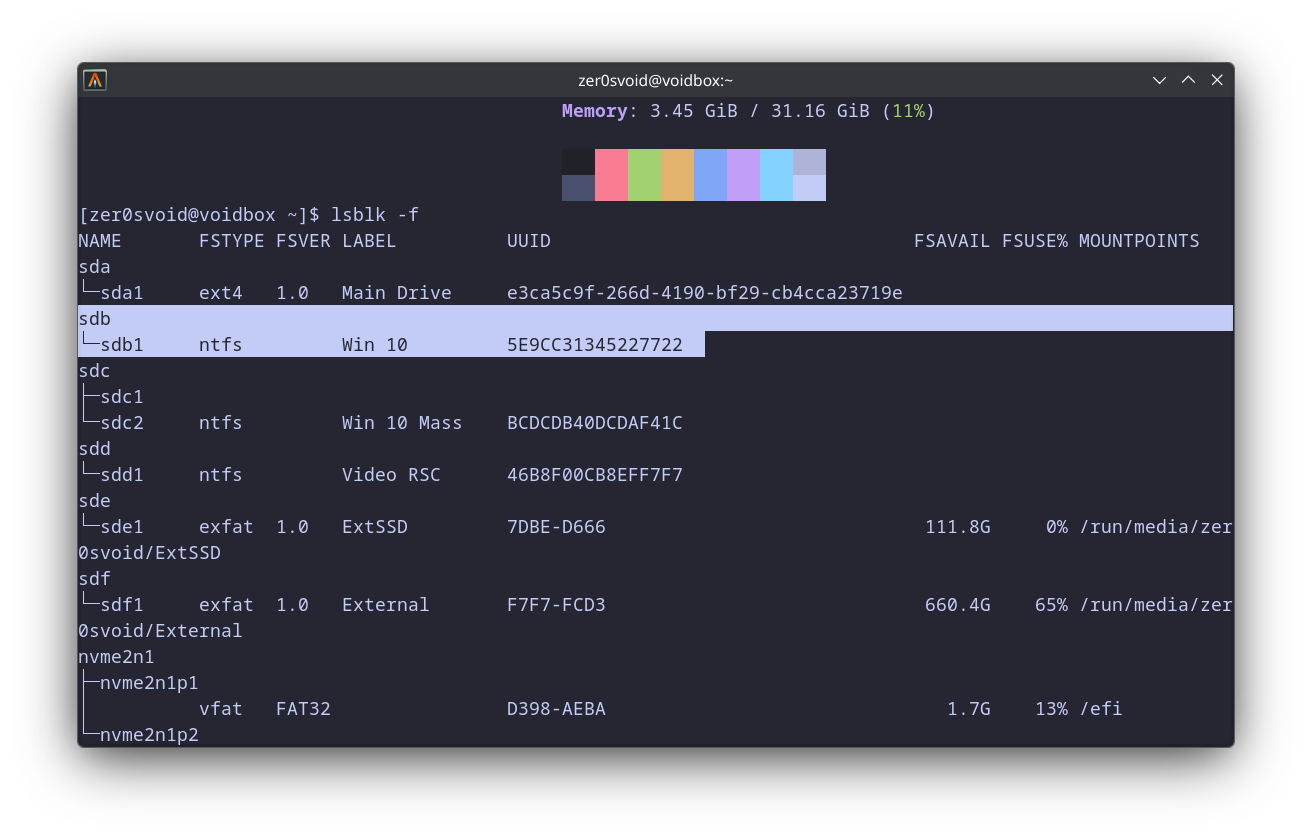
Running lsblk -f looks like there isn’t an efi partition for my Windows 10 disk.
I wonder if there’s a workaround to get systemd-boot to recognize Windows 10 or I may have to reinstall Windows 10 with an efi partition.