A start job is running for /dev/disk/<uui> running for 5min+

Today when booting my EndeavourOS I got the following message for the first time:

A start job is running for /dev/disk/by-uuid/a7e82811-f7ea-4d44-a54e-9e2dafdd38b8 (no limit)

That uuid corresponds to my external ssd of my EndeavourOS installation. (I should mention that ever since installing it a year ago I’ve had the problem of my PC not shutting down correctly, like the screens would turn off but the PC fans would keep spinning, so I manually need to hold the power off button for it to shut it down completely, although I assume that is not relevant?)

I’m using systemd-boot & I did a sudo pacman -Syu yesterday before shutting down.

Here a few outputs:

cat /etc/kernel/cmdline

nvme_load=YES nowatchdog rw root=UUID=a7e82811-f7ea-4d44-a54e-9e2dafdd38b8 rw root=UUID=a7e82811-f7ea-4d44-a54e-9e2dafdd38b8

(I’ve noticed the ssd appears twice, I don’t know why but I assume that is not part of the problem?)

lsblk -f

NAME   FSTYPE   FSVER            LABEL       UUID                                 FSAVAIL FSUSE% MOUNTPOINTS
loop0  squashfs 4.0                                                                              
sda                                                                                              
├─sda1 ntfs                      Data        406E7D8C6E7D7B8A                                    
└─sda2 ntfs                      Recover     28482A47482A145A                                    
sdb                                                                                              
├─sdb1 vfat     FAT32                        8892-6D69                                           
├─sdb2                                                                                           
├─sdb3 ntfs                      Boot        8CB29201B291F046                                    
├─sdb4 ntfs                                  96DC9263DC923D85                                    
└─sdb5 vfat     FAT32            PRC_RP      90EE-302C                                           
sdc                                                                                              
├─sdc1 vfat     FAT32                        BC53-DB39                                           
└─sdc2 ext4     1.0              endeavouros a7e82811-f7ea-4d44-a54e-9e2dafdd38b8  605.9G    29% /
sdd                                                                                              
├─sdd1 vfat     FAT32            NO_LABEL    3195-3F46                                           
└─sdd2 ntfs                      Sandisk     82687F1C687F0DE3                                    
sde                                                                                              
sdf    iso9660  Joliet Extension EOS_202511  2025-11-24-21-31-18-00                              
├─sdf1 iso9660  Joliet Extension EOS_202511  2025-11-24-21-31-18-00                              
└─sdf2 vfat     FAT32            ARCHISO_EFI 6924-CEA6                                           
sr0  
cat /etc/fstab

# /etc/fstab: static file system information.
#
# Use 'blkid' to print the universally unique identifier for a device; this may
# be used with UUID= as a more robust way to name devices that works even if
# disks are added and removed. See fstab(5).
#
# <file system>             <mount point>  <type>  <options>  <dump>  <pass>
UUID=BC53-DB39                            /efi           vfat    fmask=0137,dmask=0027 0 2
UUID=a7e82811-f7ea-4d44-a54e-9e2dafdd38b8 /              ext4    noatime    0 1
tmpfs                                     /tmp           tmpfs   defaults,noatime,mode=1777 0 0
UUID=406E7D8C6E7D7B8A                     /mnt/data      ntfs-3g defaults,nofail,uid=1000,gid=1000,dmask=0022,fmask=113 0 0
UUID=82687F1C687F0DE3                     /mnt/sandisk   ntfs-3g defaults,nofail,uid=1000,gid=1000,dmask=0022,fmask=113 0 0

efibootmgr -v

BootCurrent: 0008
BootOrder: 0002,0000,0005,0007,0004,0009,0008

Boot0000* Windows Boot Manager  HD(...)/\EFI\MICROSOFT\BOOT\BOOTMGFW.EFI
Boot0002* Linux Boot Manager    HD(...)/\EFI\SYSTEMD\SYSTEMD-BOOTX64.EFI
Boot0004* Manjaro               HD(...)/\EFI\MANJARO\GRUBX64.EFI
Boot0005* UEFI OS               HD(...)/\EFI\BOOT\BOOTX64.EFI
Boot0007* Windows Boot Manager  HD(...)/\EFI\MICROSOFT\BOOT\BOOTMGFW.EFI

(I shortened the hex dumps a bit)
I can confirm this with an external usb disk.

Oh so you mean it might not actually be my disk or system, but actually a general bug that was introduced recently?

I wanted to test virtual keyboard on physical disk today and the updated image seems to have bugs.

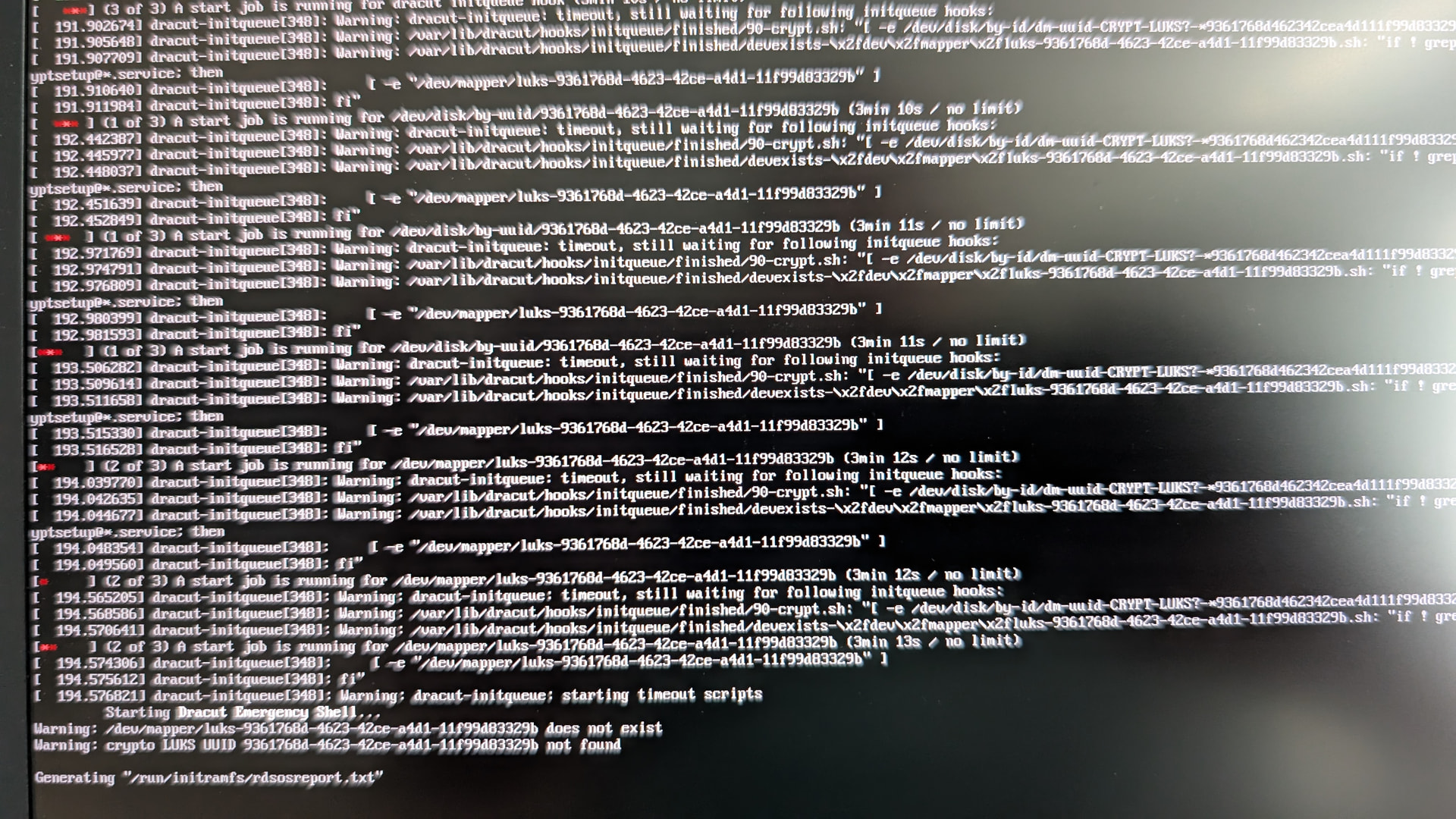
wanted to give dank and niri a try and installed a “No desktop” version with a new ISO downloaded today. Installed to an external USB-SSD to test stuff and get same hanging boot process. Now after 2 or more minutes errors scrolling through. Hard to read. But after two more miutes I finally reached the login prompt. I tried an installation with and without encrypted USB disk.

Error was like Warning: dracut initqueue still waiting for following initqueue hooks:

…90-crypt.sh…

…devexists…

Enter root password for system maintenance.

Will add a “screenshot” in a minute…

<1 minute later…>

I can confirm the issue:

After updating my installation (on 27.07.) the same error showed up today.

I’m also using an USB-SSD with BTRFS-Partitions for Endeavour. Since I’m actively using the btrfs-snapshots i reverted back to 27.07. prior doing pacman -Syu. System is now booting again.

Can confirm this. System installed on external USB-SSD? Btrfs systemd encrypted.

Problem appeared after pacman -Syu few days ago.

dracut initqueue still waiting for following initqueue hooks timeout. /dev/mapper etc does not exist and get thrown in emergency shell

I tried reinstall with and with no encryption Btrfs and ext4.

Problem persists (after pacman -Syu). If I don’t update with pacman -Syu (ie state system after calamares initial install ) system works.

LuksOpen and Chrooting works.

For anyone still fighting with this, I just fixed it by forcing a few drivers to be available during boot, please don’t @ me if your pc explodes:

arch-chroot into your system, create a /etc/dracut.conf.d/usb-boot.conf with the drivers you need, in my case:
force_drivers+=" uas usb_storage xhci_hcd xhci_pci "

Then rebuild and check if the modules are actually listed:
sudo dracut-rebuild

lsinitrd /efi/*/*/initrd | grep -E "uas|usb_storage|xhci"

Reboot

Do we know the root cause of this issue? Which package is the culprit? I’m asking because I encountered the same problem today but I’m not using external SSD, nor am I using BTRFS.

I also tested by reinstalling a refresh system - old school EXT4 on internal storage. Still, it fails to boot. I used online installation, so I assume the culprit package got updated to the latest and caused the failure.

I had that happen yesterday on an old laptop, too. I couldn’t figure it out, so I replaced it with Endeavour. I’ll have to check right away to see what’s going on with my other EOS PCs.

I tried your suggestion, did a pacman -Syu … And it worked! :tada:

Except my images are stored under /boot (initramfs-linux.img and initramfs-linux-fallback.img) instead of /efi

I tried other combinations of modules to add to dracut before, but must have missed the crucial one.

Thank you for sharing the solution :slightly_smiling_face: