Now Kress, some people need warning labels that say stuff like that (don’t bang head on wall, it causes headaches and may cause mortality). 
“Warning using Wayland causes outbreaks of headbanging which may lead to severe headaches or possibly worse”! 
So Rick, I took your advice and put KDE Plasma on. Gnome is still there as I will probably do a clean KDE install soon. So far KDE Plasma is fast and light. I see there are plenty of customizations, but my needs are simple.
Michael
I like KDE and use it mostly. I do also like most of the other desktops and find on my hardware i have no issues unless there are some specific software issues that create them. Such as on v-box or qemu because of mesa or virtualbox modules or some other software. I have run into some issues like that on vm occasionally. For some time though everything has been working great.
Good to know as I use mesa driver.
Well I’m using amdgpu and mesa is part of the whole picture and sometimes virtual box modules are not updated with kernels and such so things can go south sometimes. It’s been really good though for quite a while. I’ve been sticking with vmware and virtualbox for a long time.
I think my laptop would only handle Qemu  .
.
Do you use Kate in the KDE applications? I am fairly impressed with it, but someone posted a link to an old guide on it and I can’t find it in here, so if you know about it, I would appreciate the link. I onhave the officialy see the official handbook
Michael
I don’t know why you say your laptop would only handle Qemu. I’ll be honest I’ve used Qemu but i find it harder to set up and use than vmware or virtualbox. It also gave me a lot of graphics issues too. But as i say those problems with software have seemed to iron themselves out on virtualbox and vmware and i haven’t tried virt-manager (Qemu) in some time since. I don’t like using vm in boxes. It has to be the same resolution as my screen or there abouts fitting in the window that it provides so that i have access to my host also. Otherwise i won’t use it. With v-box and vmware i can do that easily.
I will give virtualbox another go.
Michael
Plasma is a great DE.
Reached that conclusion years ago.
Customizability. Check. ( Plasma usually gains features while Gnome seems to keep losing them in the name of easier to use interface or some such garbage )
Lightweight. Check.
Sleek-looking. Check.
Easy-to-use. Check.
Filemanager ( important for me ). Check. Has by far and away the 2 best filemanagers in any platform. Dolphin and Krusader.
Native QT/KDE Apps. Check. Most of my favourite apps are Qt/KDE apps which makes things hard in other DEs ( inconsistent theming and all )
2 Likes
I have just come to the same conclusion. Plasma 5.24 looks amazing and runs very smooth–no lags on my vintage laptop.
Without going under the hood too much, the Desktop Overview with the Super+W is the standout for producivity. People will actually start to use virtual desktops more with this at the ready.
I will look at Krusader next.
Michael
Don’t forget that Plasma KDE also has a feature built in where you can tile windows with using the super key and the mouse with left click and right click to drag and resize windows. Drag all the way to right or to left or top and it automatically tiles. Or you can install a real tiling manager kwin-bismuth or kronkite.
1 Like
Wow, that kwin-bismuth looks to be above my pay grade Rick, but will be sure try it out in the vbox, where I can’t break anything.
I am just happy to finally have the perfect integrated file manager and terminal. So powerful yet easy to use. Sure I am probably only using 10% of what it can do, but it’s already lifted my keyboard productivity.
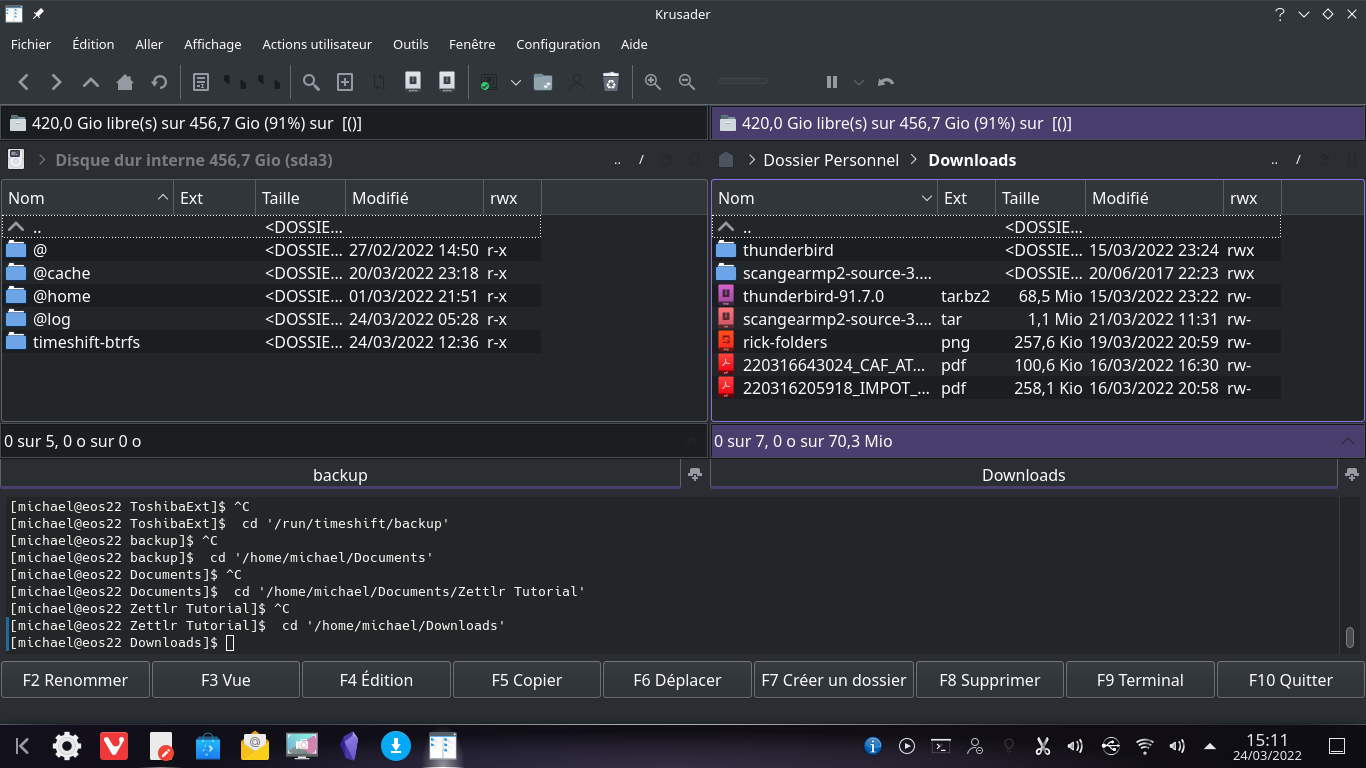
Plasma is my new friend.
Michael
Thanks for the tip on Krusader. It’s a game changer.
Michael
1 Like
I’m glad you like it.
Some would say Krusader’s biggest faults are 1) It’s ugly compared to Dolphin. I don’t care about looks as long as it’s extremely functional which Krusader is. 2) It’s TOO complicated. I say there is no such thing. 
Only thing in Krusader that I miss and that’s in Dolphin is the image/video metadata. Tell me if you find a workaround for that ( maybe using custom User-Action ?? ). Krusader is extremely powerful and customizable. The only limit is one’s imagination.
Ugly is subjective. Krusader looks very comprehensive and yes complicated, until I wrap my head around it.
I will look at it as soon as I get the basics.
Have you seen any good video tutorials or web sites on Kate?
Michael
On Kate? I haven’t looked. Others in this Forum might have.