If you use multiple monitors, open System Settings and navigate to Display, by default you can configure the main display, and it has this slider:
Next to the numerical value (of 100% in my case) there are the up- and down arrow buttons. However, they don’t work (do nothing when hovered over).
The same buttons for other displays work.
If you refresh this settings page by any means (doing something and clicking reset, going to another page and back, etc), these buttons work.
It’s like that on my PC (two monitors) and my laptop (built-in screen + external monitor).
And one more, also on the display page:
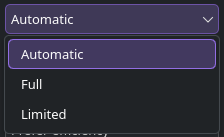
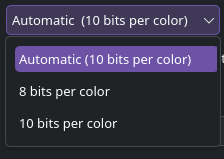
There are some drop-downs on that page. Some of them look like this:
I wasn’t able to replicate the scale up and down issue on all three displays on my workstation.
I can confirm though, that the Colour profile dropdown on mine had a slightly different style. Not as rounded, no outline, less translucent when active (essentially as you’ve presented it).
@MyNameIsRichard, @Bink thanks for confirming different outline style, also I have more details about up/down arrows.
If I enter Display configuration “the normal way” (side panel), everything works.
But if I use a shortcut in “Most used pages” of Quick Settings, then it’s broken.
It’s broken even on my laptop without external monitor, so I guess “multiple monitors” is outdated.
I’d appreciate someone testing that way to open display config too.
Furthermore, this bug seems to be 6.6.5+ only, I tested it on EOS Titan Neo and Fedora 44 KDE Live ISOs (both on 6.6.4) and it didn’t appear, but I tried 6.6.5 on my laptop, my desktop, EOS VM and Fedora VM and 6.6.90 Beta on EOS VM and in all of them this bug happens