I am trying to do, what I thought was a simple, install of eos with fde on a usb external HD as a test for a future install on my laptop.
I am using a usb memory stick with the latest eos iso. I boot to the iso and then do an install to the usb ssd drive. It only allows manual install of fde.
I GPT the disk, then partition one is mount point efi with boot flag and fat 32. Partition 2 is ext4 encrypted luks2 passphrase added mount point /. I used a root flag and tried not using a root flag on partition 2 for the os. I tried all day multiple times, nothing worked. It does work if I do not encrypt it.
When it tries to boot it gets stuck in a loop looking for luks and the gives me a dracut error.
What am i doing wrong? I followed several YT vids and several websites step by step and failure.
@ogi
choosing systemd-boot or Grub as bootloader?
Also set ESP/EFI-boot partition to what mountpoint? for systemd-boot we need /efi and for Grub we need /boot/efi
External USB drives are also problematic it can work but will not work in all cases. several issues can happen with the system firmware (Bios) or issues with handling USB (power saving options / reloading)
It says also it can not find the LUKS partition at all.. could be you need to add usb-storage driver to be available in early state
Add USB drivers to initramfs
If the drivers are missing, you need to ensure they are added to your initramfs so they load early.
Boot into a “Live” EndeavourOS USB stick (the one you used to install it).
"External USB drives are also problematic External USB drives are also problematic " Based on this I tried a usb C memory stick install. It went well and rebooted to the system after asking the passphrase. So I guess its the hard drive. Now I need to enroll my two Yubikeys + pin and unenroll the passphrase.
So with AI’s help I was able to enrol 1 yubikey in slot one and test it, all worked ok. Tomorrow I will un-enroll the passphrase.
I have to say that after AI gets the bugs worked out forums will go the way of the beepers and typewriters. I can get every question answered instantly and it even gives me command lines to make changes, then command lines to test the change. I cant see how help forums can last after that happens. AI could even make a video on how to fix your car or boat, once the bugs are worked out.
Thanks to everyone that helped out.
I’m assuming that the luks2 install worked on memory type media and not spinning platters that my laptop with memory media install will go OK.
For some reason, and I bet I know why, the programmers have it purge its memory every time it works with someone. So if I tell it you need to use sudo for that command line, when it did not have it, it will not remember that.
If AI was given ALL of mans knowledge and allowed to remember everything, including what works and what doesnt. LOOK OUT! Skynet would look like a toy.
I had AI write me an app for my phone and it was done in like 7 seconds, and it worked.
If AI was given all the books, videos, manuals, training etc. It could solve a crap-ton of medical problems in a few seconds.
They had an AI sandboxed and air gaped and told it to try and get out. It did and it started hacking other AI’s and no one knew.
Like giving me outdated advise from my own tutorial and doubling down on it?
AI is a handy tool but if you just blindly copy what it says it is useless.
And with things that get regular updates it will often get things wrong, because like a search engine it will look for the most viewed etc results first.
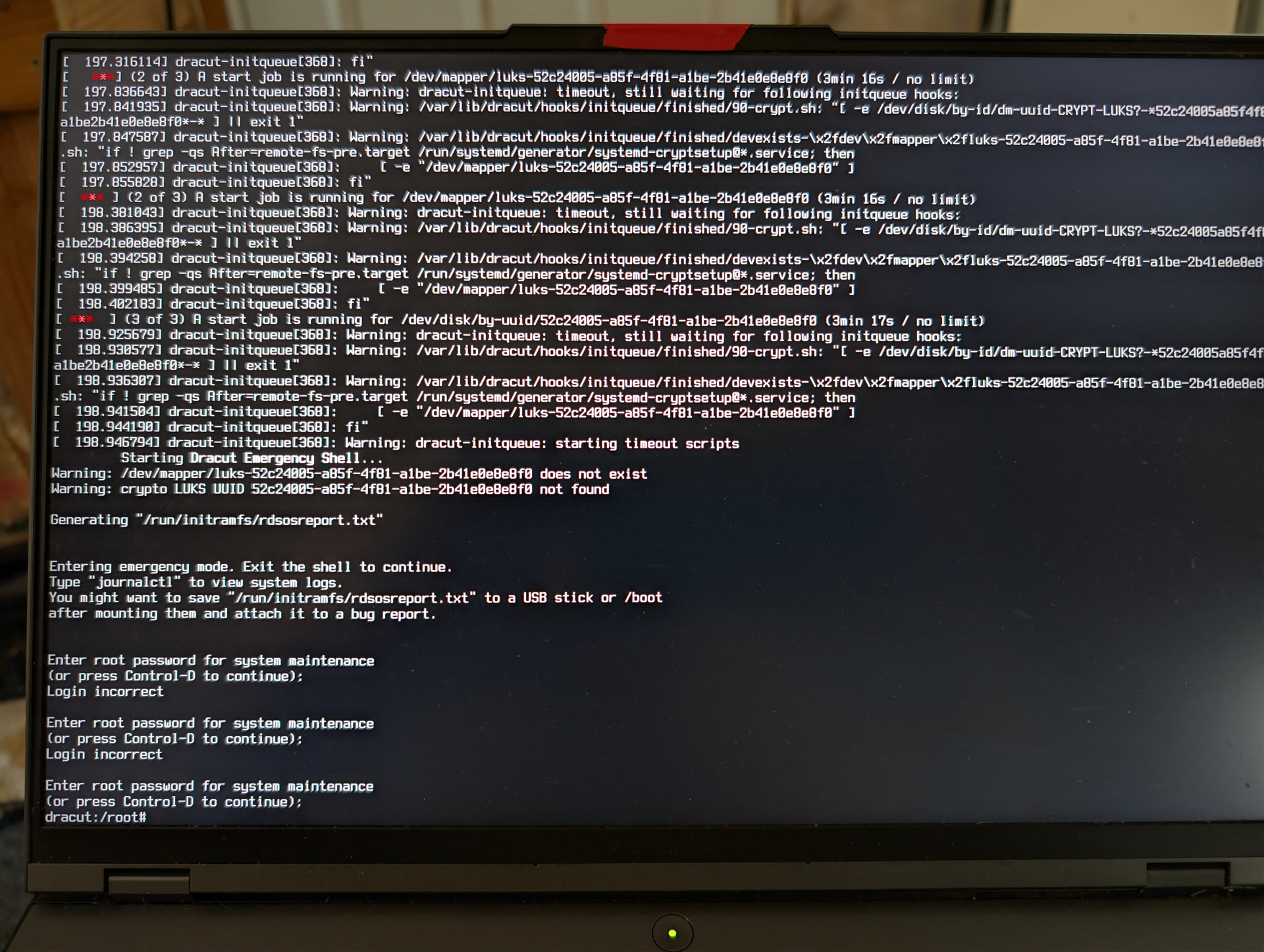
 The original drive was an external SSD:
 But its only a tool. and it needs the forum to find the solution in the first place