Zram vs swap partition vs swapfile

What does that mean? You configure all your RAM as zram swap?

EDIT:

Just seeing your swap usage now:

You have all your RAM configured as zram swap. That explains why your PC swaps 25 GiB. That is a huge amount. I am not sure if that makes sense. Why dont you just assign a fraction of your RAM as zram swap?

What is the journal saying?

journalctl -b | grep zram

journalctl -b | grep zram
Mar 29 10:45:35 archlinux kernel: zram: Added device: zram0
Mar 29 10:45:35 archlinux kernel: zram: Added device: zram1
Mar 29 10:45:35 archlinux systemd[1]: Created slice Slice /system/systemd-zram-setup.
Mar 29 10:45:35 archlinux systemd[1]: Expecting device /dev/zram0...
Mar 29 10:45:35 archlinux systemd[1]: Expecting device /dev/zram1...
Mar 29 10:45:35 archlinux systemd[1]: Found device /dev/zram0.
Mar 29 10:45:35 archlinux systemd[1]: Found device /dev/zram1.
Mar 29 10:45:35 archlinux systemd[1]: Starting Create swap on /dev/zram0...
Mar 29 10:45:35 archlinux systemd[1]: Starting Create swap on /dev/zram1...
Mar 29 10:45:35 archlinux kernel: zram0: detected capacity change from 0 to 8388608
Mar 29 10:45:35 archlinux kernel: zram1: detected capacity change from 0 to 8388608
Mar 29 10:45:35 archlinux systemd-makefs[657]: /dev/zram1 successfully formatted as swap (label "zram1", uuid b1f844c6-7d73-4147-a359-dc7ee3538a60)
Mar 29 10:45:35 archlinux systemd-makefs[655]: /dev/zram0 successfully formatted as swap (label "zram0", uuid 062cd4dd-13fb-4f6c-af42-b73cc837a79e)
Mar 29 10:45:35 archlinux systemd[1]: Finished Create swap on /dev/zram0.
Mar 29 10:45:35 archlinux systemd[1]: Finished Create swap on /dev/zram1.
Mar 29 10:45:35 archlinux systemd[1]: Activating swap Compressed Swap on /dev/zram0...
Mar 29 10:45:35 archlinux systemd[1]: Activating swap Compressed Swap on /dev/zram1...
Mar 29 10:45:35 archlinux kernel: Adding 4194300k swap on /dev/zram0.  Priority:100 extents:1 across:4194300k SS
Mar 29 10:45:35 archlinux systemd[1]: Activated swap Compressed Swap on /dev/zram0.
Mar 29 10:45:36 archlinux kernel: Adding 4194300k swap on /dev/zram1.  Priority:100 extents:1 across:4194300k SSDsc
Mar 29 10:45:36 archlinux systemd[1]: Activated swap Compressed Swap on /dev/zram1.

Thanks @mbod!

Basically I copied it from https://github.com/CachyOS/CachyOS-Settings/blob/master/usr/lib/systemd/zram-generator.conf

Regarding the second compression value and type=huge you can find here https://docs.kernel.org/admin-guide/blockdev/zram.html a paragraph

recompression

With CONFIG_ZRAM_MULTI_COMP, zram can recompress pages using alternative (secondary) > compression algorithms. The basic idea is that alternative compression algorithm can
provide better compression ratio at a price of (potentially) slower
compression/decompression speeds. Alternative compression algorithm can,
for example, be more successful compressing huge pages (those that default algorithm
failed to compress). Another application is idle pages recompression - pages that
are cold and sit in the memory can be recompressed using more effective algorithm
and, hence, reduce zsmalloc memory usage.

Thanks! That explains it! I never thought that zram was so intricate. Fascinating!

Though I couldn’t see any “double configuration” of zram on my system before, I redid the whole thing and just created a new /etc/systemd/zram-generator.conf.

[zram0]
zram-size = 8192
compression-algorithm = lzo-rle

After reboot:

swapon -s
Filename				Type		Size		Used		Priority
/dev/zram0                              partition	8388604		0		100
/swap/swapfile                          file		16777212	0		-2
journalctl -b | grep zram
Mar 29 16:37:56 archlinux kernel: zram: Added device: zram0
Mar 29 16:37:56 archlinux systemd[1]: Created slice Slice /system/systemd-zram-setup.
Mar 29 16:37:56 archlinux systemd[1]: Expecting device /dev/zram0...
Mar 29 16:37:56 archlinux systemd[1]: Found device /dev/zram0.
Mar 29 16:37:56 archlinux systemd[1]: Starting Create swap on /dev/zram0...
Mar 29 16:37:56 archlinux kernel: zram0: detected capacity change from 0 to 16777216
Mar 29 16:37:56 archlinux systemd-makefs[674]: /dev/zram0 successfully formatted as swap (label "zram0", uuid 2ceb0b82-5566-4d57-a589-32eb0355903c)
Mar 29 16:37:56 archlinux systemd[1]: Finished Create swap on /dev/zram0.
Mar 29 16:37:56 archlinux systemd[1]: Activating swap Compressed Swap on /dev/zram0...
Mar 29 16:37:56 archlinux kernel: Adding 8388604k swap on /dev/zram0.  Priority:100 extents:1 across:8388604k SSDsc
Mar 29 16:37:56 archlinux systemd[1]: Activated swap Compressed Swap on /dev/zram0.

This was better.

I have to admit that I am not sure about the display of swapon. Better is to look at zramctl which shows

NAME       ALGORITHM DISKSIZE  DATA COMPR TOTAL STREAMS MOUNTPOINT
/dev/zram0 zstd         30,6G  5,6G  1,7G  1,8G      16 [SWAP]

This makes much sense

  • DATA: 5,6G uncompressed data is in zram
  • COMPR: which is 1,7G compressed

zram-size=ram is a fairly common configuration. Some distros like Fedora or Garuda use it as the default. Keep in mind that due to the compression of zram, it typically uses only a third of the RAM that it would be uncompressed.

https://wiki.archlinux.org/title/Zram#Usage_as_swap

Initially the created zram block device does not reserve or use any RAM. Only as files need or want to be swapped out, they will be compressed and moved into the zram block device. The zram block device will then dynamically grow or shrink as required.

Even when assuming that zstd only achieves a conservative 1:2 compression ratio (real world data shows a common ratio of 1:3), zram will offer the advantage of being able to store more content in RAM than without memory compression.

Note:

  • When configuring zram, the size of the zram device controls the maximum uncompressed amount of data it can store, not the maximum compressed size. You can configure the zram’s size to be equal to or even greater than your system’s physical RAM capacity, as long as the compressed size on physical RAM will not exceed your system’s physical RAM capacity.

When you configure zram, the zram block device is created, but it only starts to use RAM when data needs to be swapped out. If your system is actively using its RAM and there are no memory pressures or situations that require swapping, then the zram device will remain unused.

In other words, if you have 16 GB of RAM and 16 GB of zram for swap, you can have all 16 GB of RAM in use with no zram being used if nothing is swapping yet; the zram does not reserve or otherwise occupy RAM, or prevent it from being used normally.

Interesting! Zram is really treated as a filesystem by the kernel with its own UUID and formatted as swap.

lsblk /dev/zram0 
NAME  MAJ:MIN RM SIZE RO TYPE MOUNTPOINTS
zram0 253:0    0   8G  0 disk [SWAP]

Almost as if it was a swap partition?

Well, technically zram is exactly this - a block device like any ssd, hdd and so on - but stored in memory then on an actually “disk” (or drive).
There are much more use cases besides using zram partition as a swap device.

Thank you for the explanation. That makes me wonder why it makes sense to reduce the zram-size to only half or even a quarter of the RAM? To me it sounds like zram-size=ram is the one size that fits all.

You’re using a RAM swap partition + a swap file ?

No.

Is only zram but it is treated by the kernel as a proper partition, with its own UUID etc . Or a block device as mentioned by @apollo above.

See my post here: Zram vs swap partition vs swapfile - #49 by cactux

This is indeed a swapfile. I have it for those rare cases when I hibernate this system.

Keep in mind that there is usually a cap.

For example, I think Fedora is using zram-size=ram up to a max of 8GB. I am not sure it makes sense to have a massive amount of zram unless you have a specialized use case that warrants it.

I do not allow write-backs. Just because something isn’t compressable, doesn’t mean I want it on slower storage.

I would only enable this in situations where I was memory constrained.

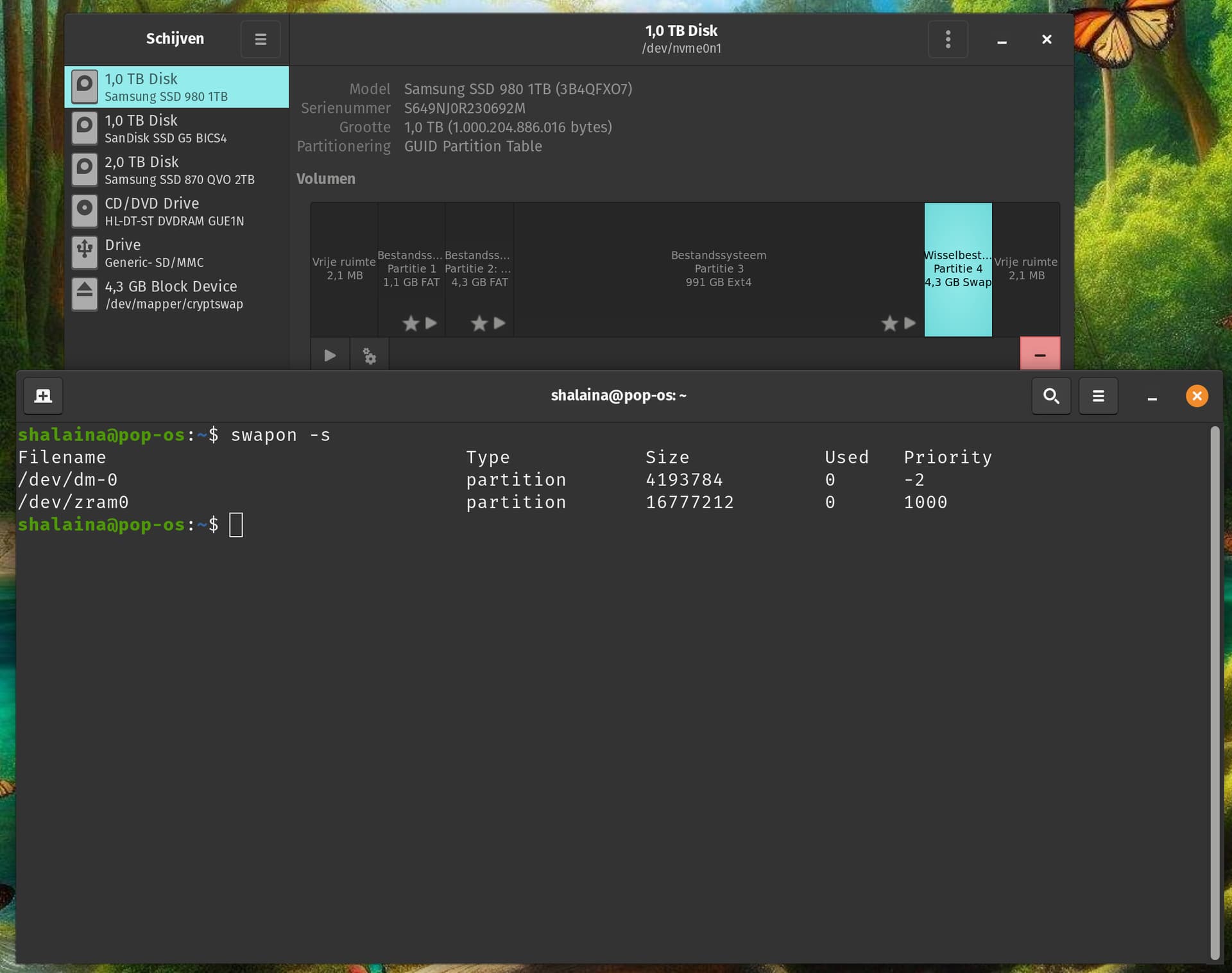
Pop! OS uses zram + swap which i already said this would not be advised at all. This article already says the same. It’s either Swap or Swap file or Zram or Zswap.

From Pop! OS 22.04: zram will not show as swap on disc, picture below you see zram activated and a swap partition on disc.


!

Zram doesn’t support hibernation so in that case you would have to use two methods of swap if you only had zram setup.

I don’t hibernate at all, only sleepmode when i am away from keyboard.

At others: what steps did you follow to install zram ? I used the arch wiki 1.2 and 2.3 step.

Same here but if you have a laptop there is a high chance someone would want to be able to hibernate their laptop.

I have 3 notebooks :joy:. Never hibernated, i even turned it off in the days of windows.

This is not entirely correct.
You cannot have zswap at all without the backing of a swap device. Be it a partition or file.
Zram however can work without such backing.

The difference compared to zram is that zswap works in conjunction with a swap device while zram with created swap on top of it is a swap device in RAM that does not require a backing swap device.

From: https://wiki.archlinux.org/title/Zswap

Also, you could use zram, in conjunction with a swapfile (as I do) or a swap partition if you want to configure hibernation on your system as I have done for this laptop.

On the running system, you can set a value for the priority of your swap spaces to determine which one is going to be prioritized by the kernel. The priority for zram is 100 by default and for swap file or partition -2. The higher priority indicates which one is to be used first.