Yes, every time I try booting EOS, first there is a black screen with only a few white lines written on it. Those prompt to “enter passphrase” for LUKS. If done wrongly, it enters “emergency mode”. If typed flawless, “GNU GRUB Version […]” with purple background appears, compare images in post # 30.
There I can choose between EOS, EOS’ sub-entries (fallback, recovery, vanilla Linux kernel), Ubuntu-based distri and going (back) to UEFI-BIOS.
.
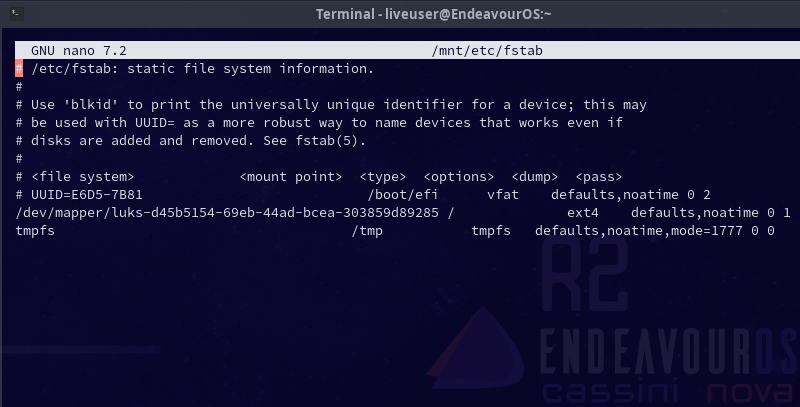
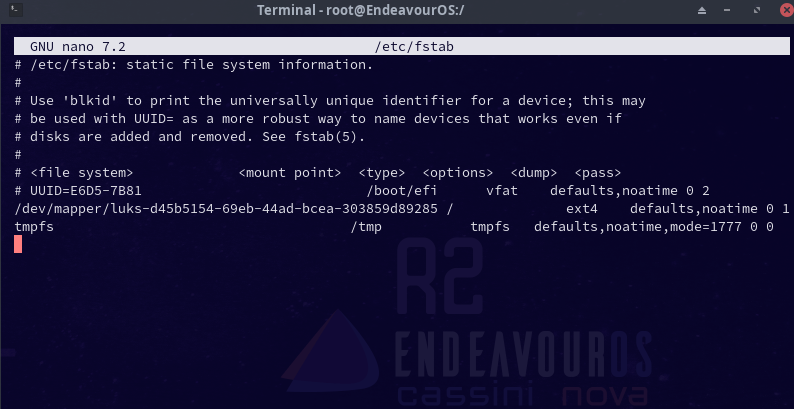
Is “#” not the correct symbol to comment a line out? To me it seems there are only 2 valid lines remaining in fstab file.
.
There is only 1 encrypted OS/partition on the whole PC. (There are 2 EOS partitions, but one of them is without encryption and would be very strange to have the exact same boot failure as its younger copy with its fateful yay system update applied.)
On that Saturday the boot failure first took place, there were only 3 partitions on the PC: esp sda1, EOS sda2, still functioning Ubuntu-based sda3. Hence on Saturday only the correct (defective) EOS could be started or the still operative sda3.
So I can not figure what else GRUB could be trying to boot.
.
How can I check?
.
Could bootctl output be helpful?
sudo arch-chroot /mnt >-> sudo bootctl – broad emphasis intended
[liveuser@eos-2023.05.28 ~]$ sudo arch-chroot /mnt
[root@EndeavourOS /]# sudo bootctl
systemd-boot not installed in ESP.
System:
Firmware: UEFI 2.70 (American Megatrends 5.17)
Firmware Arch: x64
Secure Boot: disabled (setup)
TPM2 Support: no
Boot into FW: supported
Current Boot Loader:
Product: systemd-boot 253.4-1-arch
Features: ✓ Boot counting
✓ Menu timeout control
✓ One-shot menu timeout control
✓ Default entry control
✓ One-shot entry control
✓ Support for XBOOTLDR partition
✓ Support for passing random seed to OS
✓ Load drop-in drivers
✓ Support Type #1 sort-key field
✓ Support @saved pseudo-entry
✓ Support Type #1 devicetree field
✗ Enroll SecureBoot keys
✗ Retain SHIM protocols
✗ Boot loader sets ESP information
lines 1-24…skipping…
systemd-boot not installed in ESP.
System:
Firmware: UEFI 2.70 (American Megatrends 5.17)
Firmware Arch: x64
Secure Boot: disabled (setup)
TPM2 Support: no
Boot into FW: supported
Current Boot Loader:
Product: systemd-boot 253.4-1-arch
Features: ✓ Boot counting
✓ Menu timeout control
✓ One-shot menu timeout control
✓ Default entry control
✓ One-shot entry control
✓ Support for XBOOTLDR partition
✓ Support for passing random seed to OS
✓ Load drop-in drivers
✓ Support Type #1 sort-key field
✓ Support @saved pseudo-entry
✓ Support Type #1 devicetree field
✗ Enroll SecureBoot keys
✗ Retain SHIM protocols
✗ Boot loader sets ESP information
ESP: n/a
File: └─/EFI/BOOT/BOOTX64.EFI
Random Seed:
System Token: not set
Exists: no
Available Boot Loaders on ESP:
ESP: /boot/efi (/dev/disk/by-partuuid/cf8425d2-904a-4ef7-9d6f-1beb6f9d7a19)
File: └─/EFI/BOOT/bootx64.efi
Boot Loaders Listed in EFI Variables:
    Title: endeavouros
       ID: 0x0000
   Status: active, boot-order
Partition: /dev/disk/**by-partuuid**/cf8425d2-904a-4ef7-9d6f-1beb6f9d7a19
     File: └─/EFI/ENDEAVOUROS/GRUBX64.EFI

    Title: ubuntu
       ID: 0x0001
   Status: active, boot-order
Partition: /dev/disk/**by-partuuid**/cf8425d2-904a-4ef7-9d6f-1beb6f9d7a19
     File: └─/EFI/UBUNTU/SHIMX64.EFI

    Title: rEFInd Boot Manager
       ID: 0x0004
   Status: active, boot-order
Partition: /dev/disk/**by-partuuid**/cf8425d2-904a-4ef7-9d6f-1beb6f9d7a19
     File: └─/EFI/REFIND/REFIND_X64.EFI
Boot Loader Entries:
$BOOT: /boot/efi (/dev/disk/by-partuuid/cf8425d2-904a-4ef7-9d6f-1beb6f9d7a19)
token: endeavouros
Default Boot Loader Entry:
type: Reported by Boot Loader
title: archiso-x86_64-linux.conf
id: archiso-x86_64-linux.conf
source: /sys/firmware/efi/efivars/LoaderEntries-4a67b082-0a4c-41cf-b6c7-440b29bb8c4f
lines 10-63/63 (END)