Wireshark is for packet capture. That is orders of magnitude more low level than opensnitch.
With Opensnitch I mostly see what appears as a pop-up message to figure out where the application is trying to reach. For some applications I initially keep them in a blocked or reject rule so I can view the events taking place to see what it tries to reach and then decide if I need to make a more fine tuned rule for it later, you can also monitor an allowed rule the same way.
Something I should mention is I set reject rules rather than deny for applications. For example with OnlyOffice, if a block rule is set it will take 10+ seconds to open since it will keep trying to make a connection until successful, with a reject rule it will load up instantly since the application will be informed the connection was rejected and won’t keep trying to connect.
For block lists I have some in UBO as some domains I would rather block within the web browser itself rather than the system through hosts (And I don’t like to marge multiple hosts files together for the hosts file). Both UFW and Opensnitch can create rules in iptables as a frontend for it.
For my global list I have mostly just been adding domains I see appear in opensnitch events so I guess it’s more customised to the applications I use. In theory the format for the blocklist is the same as the hosts file so a list from Github can be used by Opensnitch but I haven’t tried this.
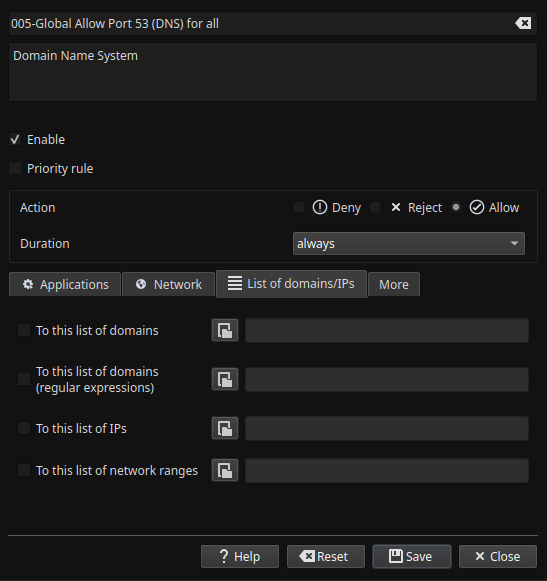
Regarding the global rules make sure they are at the top of Opensnitch as much as possible as firewalls will check against rules from top to bottom and this will make the firewall efficient as it won’t be checking the connection against multiple rules to find a match. At least in Opensnitch you can list the rules in an order in the name column, by adding a number at the front, so for me my global block list rule starts with 000-, and then my global allow list is 001-, and then it goes on with the rest of the rules. Some other global rules I have is allowing port 53 for DNS for example as 005- rule so I won’t be pestered with messages every time a piece of software wants to use port 53.
Regarding Wireshark this is a packet analysis tool and it lets you dive in to packets details as well as capture packets for period of time for future analysis. It’s good for troubleshooting issues and checking tests but it cannot manage the traffic like a firewall can.
thank you for the thorough response, I love the little details. It’s those that talk the loudest to me at least. Especially for the thought behind the fine tuning.
It’s interesting your split blocking strategies i.e, delegation of this to different apps.
I always feel I am probably too generous with what comes in and goes out (firewalld and ufw is it between OS’s) and have not rolled up my sleeves to do the dirty work yet, I thank you again,
No problem, I try my best to be helpful, I have my own notes on opensnitch but gathered them through trial and error and the OpenSnitch github page. I will admit my blocking method may or may not be the best but it’s what I done so far and I modify or adjust how I do it as I learn or figure out more.
With firewalld and UFW they should block all incoming connections by default, except port 22 for SSH, unless they were modified.
There is another detail that may be useful for some applications you come across in Opensnitch. An image is easier to explain for this one but with YT-DLP, for example, you will need to set this rule (preferably during the pop-up window) as “run from command line” and also tick the box for regular expression.
With YT-DLP every time it’s used with a new video it will pop up a new window, and this is because it’s a new Youtube ID in the URL each time and Opensnitch will think it’s a new “application” since the full path of the command doesn’t match. So what I done is place a * at the end so then it will work no matter what video you are downloading. YT-DLP needs to be done this way because if the rule is set only to “from this executable” it will actually be applying the rule to python3.13 and this rule will affect any application that uses python3.13 rather than just YT-DLP.
YT-DLP is just an example I used for this, but this could be useful to know for other applications too especially if the rule involves blocking as this would block python3.13 for everything if “from this executable” is checked. Same goes for some other applications where they are shared. Also I don’t have 200+ rules, I have 38, the rule in the image only says 206 as I kind of have groups of rules, it’s not necessary but just something I do to categorise.

Also check apparmor + https://github.com/roddhjav/apparmor.d | AUR officially maintained by the repo owner
SELinux is definitely insane to configure for general users and not officially supported by ArchLinux anyway.
And https://github.com/netblue30/firejail . I always run browsers in Firejail, especially Tor browser
this is an app I use a lot. I’d like to download what I want to download (99% rock and roll) without cookies/referers being part of this transaction…but I’m not sure that’s my right,.and I don’t really see –help or man being opaque about this enough for my intellect…so I’m really starting to see this app in line with my way of thinking. The * asterisk and python is really good strategy. Boolean is really under-appreciated for these tasks.
SELinux was way too chatty for me for my Great Fedora Expedition (2021-2022)–I would get a “we caught an app writing to something it should not be writing to” several times a day sometimes and I had a stock install. Like a ClamAV-like false-positive machine, SE ended that year long stint for me …too weird to have it in my computing life. AppArmor quieter for sure.
Thanks this is helpful.
This is a great tip. Will keep this in mind.
Is it possible for malicious software/trojan/etc to make a request to a remote server port 53 and that request is not a DNS request? Wont Wireshark be helpfull in those scenarios? Though it can become tedious.
You don’t need to, you can filter with a cache DNS such as Dnsmasq or Unbound, I’m doing it with Dnscrypt-proxy.
It is possible there could be a malicious intent on port 53 but this is where I have to have a certain trust level with the software I before using it, I check if the application is safe but even if I allow port 53 the developer could modify that software with an update any time and turn this port in to malicious use after I already allowed it.
If it’s a new software it could be placed in block rule that is above the priority of my allow port 53 rule temporarily to see what it connects to, Opensnitch has an events page so you can see what applications try to reach.
Or I haven’t tried it yet but in the Global allow rule for port 53 I can attach a list of domains like in the attached image, so if I monitored which DNS domains my applications connects to I could add the ones I am fine with here (as all my applications don’t use too many domains in total and mostly access the same ones), so if a malicious software tries to reach somewhere else it should get flagged or blocked, but this still wouldn’t stop the developer suddenly making their application malicious. For other applications where it’s not clear what domains they are going to reach to add them in a list, such as peer-to-peer software, I can just add the application to a temporarily allow rule for 1 hour or one time access.
Wireshark can be useful for this scenario but the malicious application would already be allowed to make the connection at this point and not blocked.
My method may not be entirely perfect but I adapt and change it over time as I figure things out.
I can take a look in to this since I currently have an empty hosts file, other than localhost addresses. I can take a look in to this method too. Eventually I want to have DNS managed on a separate server but haven’t got around to sorting this yet.
There was a time I had my own DNS server in my machine with Unbound, but for using DoH, you need some 3rd party server.
Thanks, this is good to know, I will take a look in to it.