Perhaps my bad decision buying Kingston
He means format the terminal output so it’s easy to read.
You want terminal output
to look like this
if you expect anyone to read through it
There are multiple ways to do it. Here are 3 of them:
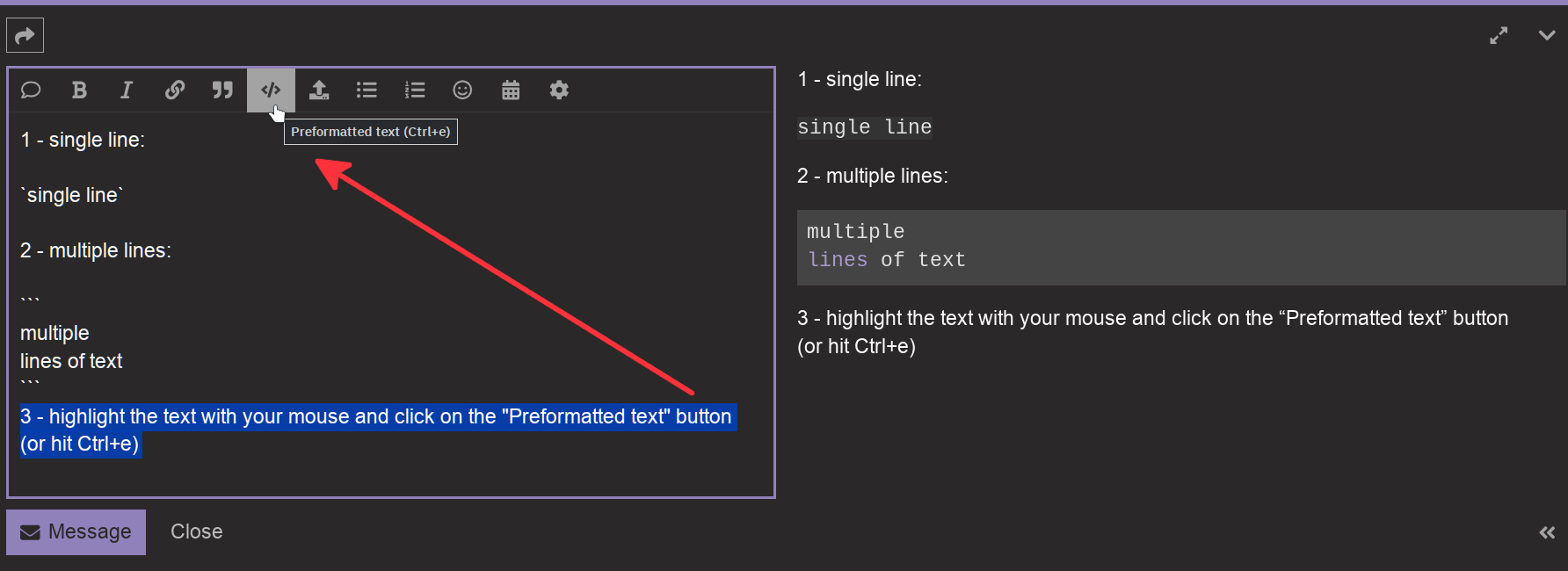
1 - for a single line of text, you can enclose it between 2 backtick marks (`) aka “grave accent” symbol - for US/UK keyboards, the backtick mark is on the same key as the tilde symbol (~).
2 - For multiple lines of text, put 3 backtick marks above and 3 backtick marks (```) below the text (this works with a single line of text, too).
3 - Use your mouse to highlight the text, and click on the “Preformatted text” button in the “Reply” toolbar (or use Ctrl + e). This will add the backtick marks for you.
You can see the results in the Reply preview pane on the left side, to verify that you have done it correctly before posting.
Here is a visual representation of what to do. The last method (highlight + “preformatted text” button) doesn’t show in the preview pane because the action was not completed, in order to show the highlighting:
Now pretty please, with a cherry on top - format your goddam terminal output when you paste it here.
4 Likes
Can u run this command first?
I am not sure what ur objective is here. I’m trying to help u pin point the boot log that had apparently driven u into a state of panic. I’ve been trying to do this since a few hours ago.
2 Likes
I admire your patience bro!
1 Like
Thanks for explaining and everything but I no longer have a working installation of endeavour, I’m back at win10
There was things I could not resolve, hardware acceleration within browsers was just the most important one, had to reformat the SSD
I might return to this community some day, but for now I thank you all for your patience and dedication
Gotta fade for now
If you ever want to go back to Linux one day, install Mint. 
5 Likes
This topic was automatically closed 2 days after the last reply. New replies are no longer allowed.