Post a screenshot of the scan result? A fresh pair of eyes, perhaps.
I only have 2 games downloaded, both not more than a gig.
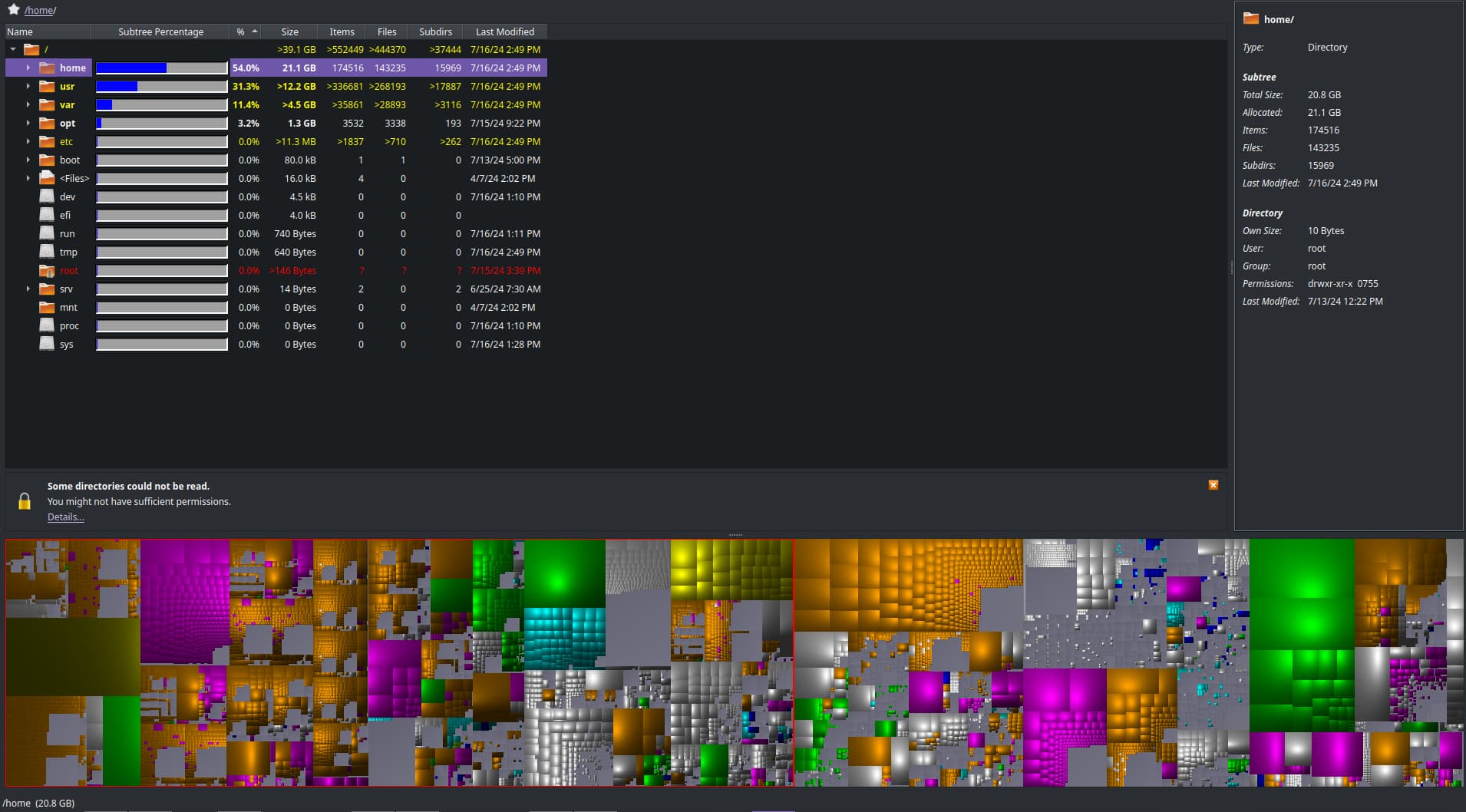

Install ncdu.
Run: sudo ncdu /
Also have a look at: df -h
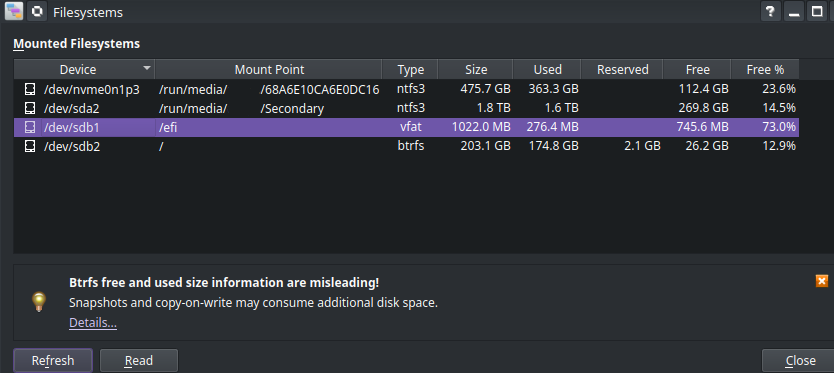
I would put money on BTRFS being the culprit here with its weird and wonderful ways of doing things.
Unfortunately I’ve avoided using it for this very reason so my limited knowledge runs out here, but I believe pebcak is onto it with this one 
df -h returns a multitude of TMPFS system which I am not sure what they exactly are, there are 5 /dev/sbd2 entries mounted in different places:
/
/home
/var/cache
/var/log
and the last at /run/media/user/Secondary which is my 2TB HDD independent of Linux, which I also am not sure why there are entries for my other drives in the /run folder.
ncdu is still scanning but says there was an error scanning /run/user/1000/doc if that matters.
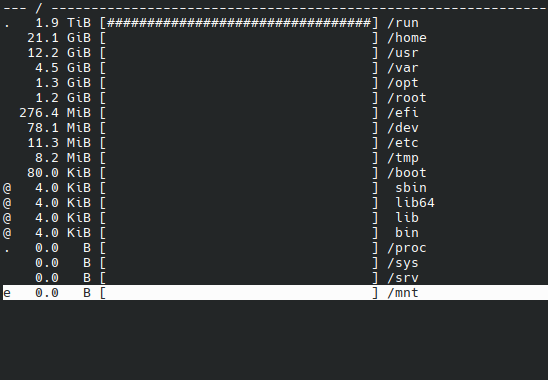
The entries are, as you can see in the image, are mostly taken up by /run but other than that nothing seems too out of place, certainly not 100GB out of place
Linux file system has no secret mystery caves. Everything can be found.
IMHO, it seems the problem starts from user misconception of technical terminology.
We could explain better after we find the actual mystery cave  .
Please post (in text only, no images) terminal output of these (including the commands):
lsblk -fo +SIZE
cat /etc/mtab
sudo find /run -iname "*" -size +5k -exec ls -Gg '{}' \; 2>/dev/null
sudo find $HOME/.cache -iname "chrom*" -size +10M -exec ls -Gg '{}' \; 2>/dev/null | grep -c .
If the last command does not give a huge number (of found files, larger than 10 MiB), you might want to run it after removing the last part (| grep -c .), for more details.
This is just a start of an investigation. Depending on the results, it can go further. Imagination is the limit. My  is the Guide.
You need to run qdirstat as root. To see nicely everything. From terminal: sudo qdirstat
Thanks for the replies guys, I’ll make sure to try your suggestions in the morning. Been having some stormy weather so power has been sketch.
Running qdirstat as root didn’t change much, the directories all total only 42.1 GB still.
The 3rd command outputs so much the start of it doesn’t exist, but while it was running it was mainly showing /run/media/myuser/68A6E10CA6E0DC16 which is my Windows C drive.
lsblk -fo +SIZE output:
NAME        FSTYPE FSVER LABEL       UUID                                 FSAVAIL FSUSE% MOUNTPOINTS                         SIZE
sda                                                                                                                          1.8T
├─sda1                                                                                                                        16M
└─sda2      ntfs         Secondary   50D6F7DDD6F7C0F0                      392.8G    79% /run/media/denys/Secondary          1.8T
sdb                                                                                                                        238.5G
├─sdb1      vfat   FAT32             8F57-D3D0                             745.6M    27% /efi                                  1G
├─sdb2      btrfs        endeavouros a2463f0b-beb5-4fb4-930d-fe3efe9f66ed   24.6G    87% /home                             203.1G
│                                                                                        /var/log
│                                                                                        /var/cache
│                                                                                        /
└─sdb3      swap   1     swap        64a008cc-eeec-4a12-8f8b-28210e07cc68                [SWAP]                             34.4G
nvme0n1                                                                                                                    476.9G
├─nvme0n1p1 vfat   FAT32             9666-3B3A                                                                               100M
├─nvme0n1p2                                                                                                                   16M
├─nvme0n1p3 ntfs                     68A6E10CA6E0DC16                      112.9G    76% /run/media/denys/68A6E10CA6E0DC16 475.7G
├─nvme0n1p4 ntfs                     3A523C34523BF2ED                                                                        635M
└─nvme0n1p5 ntfs                     E284BC5784BC2FC1                                                                        509M
cat /etc/mtab output:
dev/sdb2 / btrfs rw,noatime,compress=zstd:3,ssd,discard=async,space_cache=v2,subvolid=265,subvol=/@ 0 0
devtmpfs /dev devtmpfs rw,nosuid,size=4096k,nr_inodes=4080390,mode=755,inode64 0 0
tmpfs /dev/shm tmpfs rw,nosuid,nodev,inode64 0 0
devpts /dev/pts devpts rw,nosuid,noexec,relatime,gid=5,mode=620,ptmxmode=000 0 0
sysfs /sys sysfs rw,nosuid,nodev,noexec,relatime 0 0
securityfs /sys/kernel/security securityfs rw,nosuid,nodev,noexec,relatime 0 0
cgroup2 /sys/fs/cgroup cgroup2 rw,nosuid,nodev,noexec,relatime,nsdelegate,memory_recursiveprot 0 0
pstore /sys/fs/pstore pstore rw,nosuid,nodev,noexec,relatime 0 0
efivarfs /sys/firmware/efi/efivars efivarfs rw,nosuid,nodev,noexec,relatime 0 0
bpf /sys/fs/bpf bpf rw,nosuid,nodev,noexec,relatime,mode=700 0 0
configfs /sys/kernel/config configfs rw,nosuid,nodev,noexec,relatime 0 0
proc /proc proc rw,nosuid,nodev,noexec,relatime 0 0
tmpfs /run tmpfs rw,nosuid,nodev,size=6550808k,nr_inodes=819200,mode=755,inode64 0 0
systemd-1 /proc/sys/fs/binfmt_misc autofs rw,relatime,fd=34,pgrp=1,timeout=0,minproto=5,maxproto=5,direct,pipe_ino=7387 0 0
tracefs /sys/kernel/tracing tracefs rw,nosuid,nodev,noexec,relatime 0 0
mqueue /dev/mqueue mqueue rw,nosuid,nodev,noexec,relatime 0 0
debugfs /sys/kernel/debug debugfs rw,nosuid,nodev,noexec,relatime 0 0
hugetlbfs /dev/hugepages hugetlbfs rw,nosuid,nodev,relatime,pagesize=2M 0 0
tmpfs /run/credentials/systemd-journald.service tmpfs ro,nosuid,nodev,noexec,relatime,nosymfollow,size=1024k,nr_inodes=1024,mode=700,inode64,noswap 0 0
tmpfs /run/credentials/systemd-udev-load-credentials.service tmpfs ro,nosuid,nodev,noexec,relatime,nosymfollow,size=1024k,nr_inodes=1024,mode=700,inode64,noswap 0 0
tmpfs /run/credentials/systemd-tmpfiles-setup-dev-early.service tmpfs ro,nosuid,nodev,noexec,relatime,nosymfollow,size=1024k,nr_inodes=1024,mode=700,inode64,noswap 0 0
fusectl /sys/fs/fuse/connections fusectl rw,nosuid,nodev,noexec,relatime 0 0
tmpfs /run/credentials/systemd-sysctl.service tmpfs ro,nosuid,nodev,noexec,relatime,nosymfollow,size=1024k,nr_inodes=1024,mode=700,inode64,noswap 0 0
tmpfs /run/credentials/systemd-tmpfiles-setup-dev.service tmpfs ro,nosuid,nodev,noexec,relatime,nosymfollow,size=1024k,nr_inodes=1024,mode=700,inode64,noswap 0 0
tmpfs /run/credentials/systemd-vconsole-setup.service tmpfs ro,nosuid,nodev,noexec,relatime,nosymfollow,size=1024k,nr_inodes=1024,mode=700,inode64,noswap 0 0
tmpfs /tmp tmpfs rw,noatime,inode64 0 0
/dev/sdb2 /var/cache btrfs rw,noatime,compress=zstd:3,ssd,discard=async,space_cache=v2,subvolid=258,subvol=/@cache 0 0
/dev/sdb2 /var/log btrfs rw,noatime,compress=zstd:3,ssd,discard=async,space_cache=v2,subvolid=259,subvol=/@log 0 0
/dev/sdb2 /home btrfs rw,noatime,compress=zstd:3,ssd,discard=async,space_cache=v2,subvolid=263,subvol=/@home 0 0
/dev/sdb1 /efi vfat rw,relatime,fmask=0137,dmask=0027,codepage=437,iocharset=ascii,shortname=mixed,utf8,errors=remount-ro 0 0
binfmt_misc /proc/sys/fs/binfmt_misc binfmt_misc rw,nosuid,nodev,noexec,relatime 0 0
tmpfs /run/credentials/systemd-tmpfiles-setup.service tmpfs ro,nosuid,nodev,noexec,relatime,nosymfollow,size=1024k,nr_inodes=1024,mode=700,inode64,noswap 0 0
tmpfs /run/user/1000 tmpfs rw,nosuid,nodev,relatime,size=3275400k,nr_inodes=818850,mode=700,uid=1000,gid=1000,inode64 0 0
portal /run/user/1000/doc fuse.portal rw,nosuid,nodev,relatime,user_id=1000,group_id=1000 0 0
/dev/sda2 /run/media/denys/Secondary ntfs3 rw,nosuid,nodev,relatime,uid=1000,gid=1000,iocharset=utf8 0 0
/dev/nvme0n1p3 /run/media/denys/68A6E10CA6E0DC16 ntfs3 rw,nosuid,nodev,relatime,uid=1000,gid=1000,iocharset=utf8 0 0
And the last command returned 0 with grep and didn’t return anything without it.
Sorry if the formatting is screwed I don’t know how to make this clean and readable.
Your screenshots was saying:
Snapshots and copy-on-write may consume additional disk space
for your disk which is BTRFS
During update some big snapshot happened?
Not that I know of. I will check my snapshots once I finish my work for today and will write back if I find anything.
So I checked my snapshots, I have 4 of them (despite having it set to only keep 2?) and after a scan they total to 273 GB which I dont know how that is even possible because my drive is 256 GB. They are in the /run/timeshift/ folder, and they don’t show up in qdirstat or dolphin, which makes no sense to me. Additionally, I don’t know if this has to do with me installing ntfs-3g (in order to fix a different issue I had with seperate drives) but my root folder now has the folders, @, @cache, @home, @log, and timeshift-btrfs, and the ones that would normally show up in root are in the @ folder. Deleting an old timeshift entry (I made sure that I don’t need it) did nothing.
As I said,
It could be related to btrfs subvolumes, on which I can’t help.
Nevertheless, you may use the find command with proper filters (for file size) on folders you suspect the secret cave is. Please, read man find to help you use the command efficiently, apart from the examples I proposed in my previous post.
Unless you are lucky and someone notices the loophole in your reports, it needs some time from your side to investigate. Only you have access to the computer. 
So this stuff should display correctly size on BTRFS partition:
https://wiki.archlinux.org/title/btrfs#Displaying_used/free_space
And this display size of snapshots:
So you just need to figure out how to delete data from snapshots  Or why, when you delete, they aren’t removed
EndeavourOS ships with a pastebin tool
per example:
cat /etc/mtab | eos-sendlog