Normally i’m do but i’m still only in my first month (i think) of this linux thing and i’m still kind of a dumbass and in the “making mistakes” era. Thank you all for the assistance
1 Like
The eos update functions work again so i’m gonna do everyone here a favor and shut this down as the original issue will be solved by waiting for the right package updates (i think) thank you for your time and sorry for the troubles
actually wait no the topic wasn’t solved i still do actually genuinely want to uninstall huion because the software it uses boots up on startup everytime and it’s kind of obnoxious and i still find it weird sudo pacman -R doesn’t work even though i should clearly have it installed
What does pacman -Qs huion return?
it returns nothing
That means that there are no packages on your system that contain the term huion.
Unless you manually installed the package under certain conditions, that is.
Did you download a compressed package directly from the Huion website, extract the contents, enter that directory, and run an install.sh script to install it?
Or did you install it with yay -S huiontablet?
I dont remember exactly but i’m pretty sure it was with Yay. and i dont know how it says nothing like it exists when this is literally right here and is what i’ve relied on for my tablet to function properly. and it didn’t come with my OS installation which is why i have it to begin with
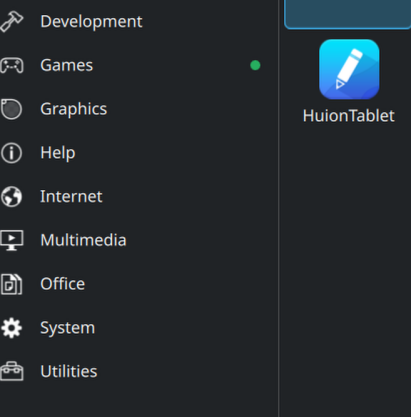
I think you’d remember if you manually installed it, so yes, you probably used yay to install the huiontablet AUR package. It appears that you have removed the package successfully.
Have you rebooted?
I’ve rebooted several times since this conversation started and this software is still on my computer, and i’m inclined to believe its still installed because it still functions and doesn’t just crash on startup.
So in general i dont really know what is or isn’t real
As @xircon mentioned in an earlier post, the libwacom package provides a number of Hurion drivers.
What does this return:
pacman -Qi libwacom
Name : libwacom
Version : 2.17.0-1
Description : Library to identify Wacom tablets and their features
Architecture : x86_64
URL : ``https://github.com/linuxwacom/libwacom/wiki``
Licenses : MIT
Groups : None
Provides : None
Depends On : glib2 libevdev libgudev glibc
Optional Deps : python-libevdev: for libwacom-show-stylus
python-pyudev: for libwacom-show-stylus
Required By : libinput plasma-desktop
Optional For : None
Conflicts With : None
Replaces : None
Installed Size : 1596.37 KiB
Packager : Andreas Radke <``andyrtr@archlinux.org``>
Build Date : Wed 12 Nov 2025 10:56:22 AM PST
Install Date : Sat 13 Dec 2025 02:26:34 PM PST
Install Reason : Installed as a dependency for another package
Install Script : No
Validated By : Signature
here you go cant exactly get rid of this because this effects more than just this crummy software and the plasma desktop is reliant on it
1 Like
Is the tablet currently connected? Does that still show when the tablet is disconnected?
here it is while its connected into the PC
Name : libwacom
Version : 2.17.0-1
Description : Library to identify Wacom tablets and their features
Architecture : x86_64
URL : ``https://github.com/linuxwacom/libwacom/wiki``
Licenses : MIT
Groups : None
Provides : None
Depends On : glib2 libevdev libgudev glibc
Optional Deps : python-libevdev: for libwacom-show-stylus
python-pyudev: for libwacom-show-stylus
Required By : libinput plasma-desktop
Optional For : None
Conflicts With : None
Replaces : None
Installed Size : 1596.37 KiB
Packager : Andreas Radke <``andyrtr@archlinux.org``>
Build Date : Wed 12 Nov 2025 10:56:22 AM PST
Install Date : Sat 13 Dec 2025 02:26:34 PM PST
Install Reason : Installed as a dependency for another package
Install Script : No
Validated By : Signature
I meant does this still show when the tablet is disconnected?
oh yes, it auto launches every time on startup (which i used to be able to disable on windows 11 but not here) and the application is always available to click on, i can close it but it still exists
You mean you have an icon on the desktop that provides a shortcut? Yes, that’s going to be present unless you delete the icon.
Is it set to autostart in System Settings > System > Autostart? If it is, and you don’t want it to autostart, remove it from there.
I have to go do something now, so I will be away from the computer for a while, so I won’t see your reply right off. Sorry.
It is not set to autostart in the KDE plasma settings, and no i have no icons on the dekstop that provide a shortcut, it is in the applications menu in the bottom left like every other app i have installed is, and deleting the shortcuts do not delete the application
also good luck out there
If pacman cannot trace the installed package (yay also uses pacman to install the built package) then it is impossible that you have used the “conventional” method to install this package.
Since you don’t remember exactly how you installed the package, I suspect that you most probably have followed the instruction from Huion site, here:
Therefore, if that is the case, you should be using the uninstall script provided by Huion to uninstall this package.
I thought that was in the Application Menu but then i second guessed myself and said wait, could that be a desktop icon sitting beside the application menu? 
So try what @cactux just posted, if you manually installed the package after all then running the uninstall.sh script should take care of it.
1 Like
alright i’ll give it a try and report back
1 Like