Thanks!
Almost forgot i said id give you this reference @anon59358842
heres my .desktop (im using developer edition)
Exec=env MOZ_ENABLE_WAYLAND=1 /usr/lib/firefox-developer-edition/firefox %u
Icon=firefox-developer-edition
Terminal=false
X-MultipleArgs=false
Type=Application
MimeType=text/html;text/xml;application/xhtml+xml;x-scheme-handler/http;x-scheme-handler/https;application/x-xpinstall;application/pdf;application/json;
StartupNotify=true
StartupWMClass=firefoxdeveloperedition
Categories=Network;WebBrowser;
make sure to change it for each Exec in the file (there are 3)
1 Like
Thanks @Echoa! 
I simply inserted the change in the wrong place. My mistake. Strangely enough this worked until the restart. I saved the modified firefox.desktop as a sample. I just have to get used to the fact that Firefox now always starts maximized. Wasn’t wanted that way before. Ok, it can only get better …
Hello!
This is my first post here (and I’m rather new to EnOS), so please bear with me. I find this whole forum (where I read already a lot) very useful, and the people are very friendly and helpful - thanks a lot for this. 
I have just a minor remark for those other users that might come here (despite it’s almost 1 year ago). It should be /usr/share/ and not /user/share/ in the mentioned paths (but maybe this has/will become obvious to others anyway.  )
)
Again, I would like to emphasize that this whole thread and @Echoa 's solution is very helpful (and IMO more elegant that using a global environment variable for this purpose - but that of course might also depend on personal flavour).
Cheers! 
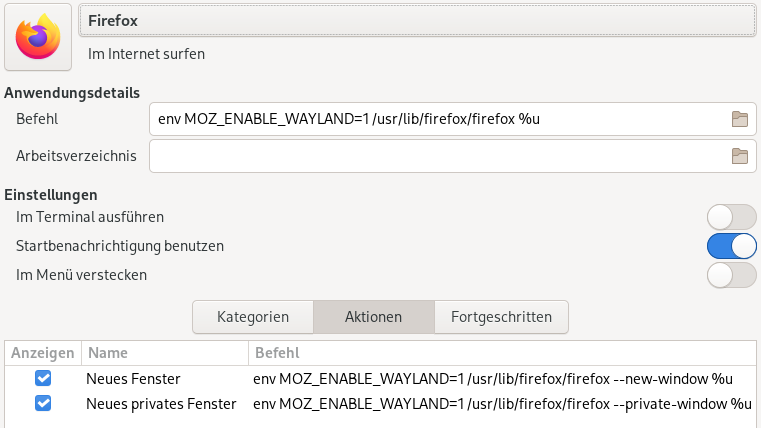
PS for interested people who use menulibre to edit .desktop files via GUI, here is what it looks like after manually editing .local/share/applications/firefox.desktop (sorry that it’s in German, but it should be self-explanatory):