The system is loaded correctly so don’t worry too much. It’s now just a matter of getting it to load. These integrated graphics are a bit tricky.
Edit: Let me look over some stuff and see. I’m more familiar with Nvidia desktop cards as i have GTX 1060.
What desktop are you running?
Can you be more specific? I use laptop.
What did you install? Xfce? or something else?
What version of the package do you have installed? I thought this had been fixed with version 2.4.5-1?
He just installed using sudo nvidia-installer-dkms -b and it is okay. I think the database tool still has some issue. I’m just now trying to get optimus set up.
Edit: His card is GTX 1050 mobile according to what he posted.
Try installing the Optimus then you have to do some other things so install this first and then reboot.
yay -S optimus-manager-qt
warning: optimus-manager-qt-1.5.3-1 is up to date -- reinstalling
Rebooting…
Once you have that installed and rebooted run this.
systemctl status optimus-manager
Then this
sudo systemctl enable --now optimus-manager
● optimus-manager.service - Optimus Manager Commands Daemon
     Loaded: loaded (/usr/lib/systemd/system/optimus-manager.service; enabled; vendor preset: disabled)
     Active: active (running) since Sat 2020-09-05 08:15:35 WIB; 2min 9s ago
    Process: 809 ExecStartPre=/usr/bin/python3 -u -m optimus_manager.hooks.pre_daemon_start (code=exited, status=0/S>
    Process: 995 ExecStartPre=/usr/bin/python3 -u -m optimus_manager.hooks.pre_xorg_start (code=exited, status=0/SUC>
   Main PID: 1011 (python3)
      Tasks: 1 (limit: 18998)
     Memory: 28.5M
     CGroup: /system.slice/optimus-manager.service
             └─1011 /usr/bin/python3 -u -m optimus_manager.daemon

Sep 05 08:15:35 AN515 python3[995]: [923] INFO: Unloading modules ['nvidia_drm', 'nvidia_modeset', 'nvidia_uvm', 'nv>
Sep 05 08:15:35 AN515 python3[995]: [959] INFO: Loaded extra Intel Xorg options (0 lines)
Sep 05 08:15:35 AN515 python3[995]: [959] INFO: Loaded extra Intel Xorg options (0 lines)
Sep 05 08:15:35 AN515 python3[995]: [960] INFO: Writing to /etc/X11/xorg.conf.d/10-optimus-manager.conf
Sep 05 08:15:35 AN515 python3[995]: [960] INFO: Writing state {'type': 'pending_post_xorg_start', 'switch_id': '2020>
Sep 05 08:15:35 AN515 python3[995]: [960] INFO: Xorg pre-start hook completed successfully.
Sep 05 08:15:35 AN515 systemd[1]: Started Optimus Manager Commands Daemon.
Sep 05 08:15:35 AN515 python3[1011]: [2] INFO: # Commands daemon
Sep 05 08:15:35 AN515 python3[1011]: [2] INFO: Opening UNIX socket
Sep 05 08:15:35 AN515 python3[1011]: [2] INFO: Awaiting commands
I already have the service enabled.
Now switch to Nvidia GPU, right-click on the Tray and select “Switch to Nvidia“
Edit:
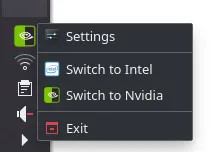
But there is no panel. I don’t even have prime-select in my terminal. Only prime-switch and prime-offload
Did you try this before because we just installed the qt version for kde?
Are you looking in the task bar? Not the menu!
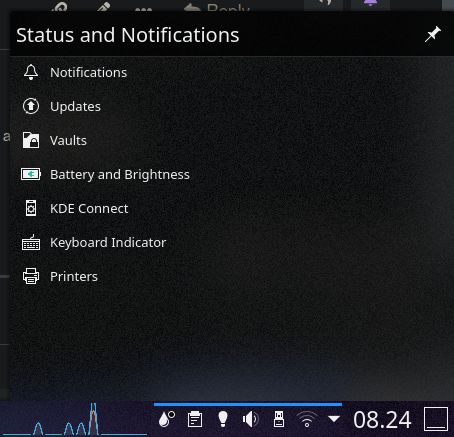
All my info are actual unless stated otherwise.
Maybe reboot again just to make sure. As far as i can see Nvidia and Bumblebee installed correctly and so did the Optimus manager.
Done rebooting again, optimus-manager service is running but there is no graphic switch tray.
You might have to disable the bumblebeed.service also.