Backup completed, because my backup only includes PDF and images, so it was done.
Now, final step is remaining: converting NTFS to Ext4.
how should I proceed ?
Backup completed, because my backup only includes PDF and images, so it was done.
Now, final step is remaining: converting NTFS to Ext4.
how should I proceed ?
NAME   MAJ:MIN RM   SIZE RO TYPE MOUNTPOINTS
sda      8:0    0 465.8G  0 disk
├─sda1   8:1    0  97.6G  0 part /run/media/deweshk/a86c5980-4773-4932-90ef-ad0a97610e83
├─sda2   8:2    0 122.7G  0 part /run/media/deweshk/New Volume
├─sda3   8:3    0     1K  0 part
├─sda5   8:5    0 122.7G  0 part /run/media/deweshk/New Volume1
└─sda6   8:6    0 122.7G  0 part /run/media/deweshk/New Volume2
sdb      8:16   0 111.8G  0 disk
├─sdb1   8:17   0 111.3G  0 part /
└─sdb2   8:18   0   516M  0 part
sdc      8:32   1     0B  0 disk
sdd      8:48   1     0B  0 disk
I want to add one more thing :-
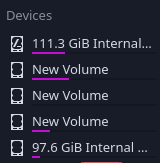
The drives which are displaying details in numbers are of ext4 types, while all the new volumes are fuseblk types.
While searching for the solution, I came across command: fdisk -l
I ran it and this is the result:-
fdisk: cannot open /dev/sda: Permission denied
fdisk: cannot open /dev/sdb: Permission denied
You’ll need sudo with that. sudo fdisk -l <device>
Disk /dev/sda: 465.76 GiB, 500107862016 bytes, 976773168 sectors
Disk model: WDC WD5000AZRX-0
Units: sectors of 1 * 512 = 512 bytes
Sector size (logical/physical): 512 bytes / 4096 bytes
I/O size (minimum/optimal): 4096 bytes / 4096 bytes
Disklabel type: dos
Disk identifier: 0x8279e22d

Device     Boot     Start       End   Sectors   Size Id Type
/dev/sda1  *       206848 204799999 204593152  97.6G 83 Linux
/dev/sda2       204802048 462125055 257323008 122.7G  7 HPFS/NTFS/exFAT
/dev/sda3       462125056 976771071 514646016 245.4G  f W95 Ext'd (LBA)
/dev/sda5       462127104 719450111 257323008 122.7G  7 HPFS/NTFS/exFAT
/dev/sda6       719452160 976771071 257318912 122.7G  7 HPFS/NTFS/exFAT


Disk /dev/sdb: 111.79 GiB, 120034123776 bytes, 234441648 sectors
Disk model: OSC SSD 120GB
Units: sectors of 1 * 512 = 512 bytes
Sector size (logical/physical): 512 bytes / 512 bytes
I/O size (minimum/optimal): 512 bytes / 512 bytes
Disklabel type: dos
Disk identifier: 0x1692c8cb

Device     Boot     Start       End   Sectors   Size Id Type
/dev/sdb1  *         2048 233378490 233376443 111.3G 83 Linux
/dev/sdb2       233379840 234436607   1056768   516M 27 Hidden NTFS WinRE
I got thisSir, using Gparted, I had converted all volumes as ext4 . But, still I am not able to move files into them.
Where have you mounted them?
After conversion, when I went to Dolphin manager, and clicked the partition, it told to authenticate and after that it got mounted.
Well, then I’d recommend adding it to fstab for auto mount.
First lets get write permissions.
Open the partition inside dolphin. Right click → select “Open Terminal”.
In terminal, run
sudo chown $USER:$USER .
Then try copying some files.
Edit: Please be careful to open terminal only inside the partition. Making mistake here might mess up permissions on your files.
It told,
chown: missing operand after 'deweshk:deweshk
’
Did you put that final dot (.) that was there in my command?
Sorry, I missed it while typing. 
After that options to add/remove files got enabled.
Thank You
So, now can I safely say that my first ever trouble which I encountered in EndeavourOS is resolved ?
I think we should also add your partition to fstab so it can auto mount on boot.
If yes, could you share output of this command
sudo blkid
/dev/sdb2: UUID="793809d8-f689-47de-94f7-593373423e0b" BLOCK_SIZE="4096" TYPE="ext4" PARTUUID="1692c8cb-02"
/dev/sdb1: UUID="a4f552a4-21c8-4da3-932a-f72d289bfde6" BLOCK_SIZE="4096" TYPE="ext4" PARTUUID="1692c8cb-01"
/dev/sda2: UUID="77d462a0-1576-4eed-b18d-bbafea04c24a" BLOCK_SIZE="4096" TYPE="ext4" PARTUUID="8279e22d-02"
/dev/sda5: UUID="9c09fd9d-f36b-42b6-9ca5-bfeb6219d0e5" BLOCK_SIZE="4096" TYPE="ext4" PARTUUID="8279e22d-05"
/dev/sda1: UUID="a86c5980-4773-4932-90ef-ad0a97610e83" BLOCK_SIZE="4096" TYPE="ext4" PARTUUID="8279e22d-01"
/dev/sda6: UUID="23c7fa5a-28fb-49e3-854a-638bfec7844c" BLOCK_SIZE="4096" TYPE="ext4" PARTUUID="8279e22d-06"
Ah ok, one more thing I forgot to ask, which one of these is your hdd partition that you want to mount?
by looking at size in Gparted, dev/sda should be HDD since its of 465 GB.
/dev/sda is your hdd, but which partition do you want to mount at boot. Looking at your last message, I see there are 6 partitions.
Or do you want to mount them all?
@flyingcakes
Yes, mounting all the partition will enable me to label each partition as a zone which will occupy files regarding it only.
I want to do this to arrange my workspace.