Still to make sure, you have the latest versions of packages eos-bash-shared and eos-reboot-recommended?
Just released a new version of eos-reboot-recommended, 26.5.4.1-1.
It contains a bit more debug output.
So update your system, install mesa, and show the related logs under /var/log and /tmp.
I just installed the latest version and tried reinstalling the Mesa package. No reboot pending message.
$ sudo cat /tmp/eos_notification_all-debug.log
cat: /tmp/eos_notification_all-debug.log: Datei oder Verzeichnis nicht gefunden
$ sudo cat /var/log/eos-reboot-required2.log
==> eos-reboot-required2: debug: eos-reboot-required2 begin.
==> eos-reboot-required2: debug: Main: not chrooting.
==> eos-reboot-required2: debug: Main: variable EOS_REBOOT_RECOMMENDING == 'yes'
==> eos-reboot-required2: debug: DoNotify begin.
==> eos-reboot-required2: info: Reboot recommendation triggered by updating package(s): mesa
==> eos-reboot-required2: debug: DoNotify end.
==> eos-reboot-required2: debug: eos-reboot-required2 end.
$ sudo cat /var/log/eos-reboot-required3.log
==> eos-reboot-required3: debug: eos-reboot-required3 begin.
==> eos-reboot-required3: debug: WaitLoop begin.
==> eos-reboot-required3: debug: WaitLoop end.
==> eos-reboot-required3: debug: DoNotify begin.
==> eos-reboot-required3: debug: user = ''; expiretime = '0'; urgency = 'critical'
==> eos-reboot-required3: debug: DoNotify end.
==> eos-reboot-required3: debug: eos-reboot-required3 end.
But I didn’t modify the conf file! I didn’t add my username yet.
Modified 2 lines of the conf file as follows.
REBOOT_NOTIFICATION_USER=denalb
REBOOT_EXPIRE_TIME=30
The strange thing is that in eos-reboot-required3.log there is still no username, and the urgency went from ‘critical’ to ‘normal’. 
$ sudo cat /var/log/eos-reboot-required3.log
==> eos-reboot-required3: debug: eos-reboot-required3 begin.
==> eos-reboot-required3: debug: WaitLoop begin.
==> eos-reboot-required3: debug: WaitLoop end.
==> eos-reboot-required3: debug: DoNotify begin.
==> eos-reboot-required3: warning: variable REBOOT_NOTIFICATION_USER in /etc/eos-reboot-recommended.conf contains an unknown user 'denalb'.
==> eos-reboot-required3: debug: user = ''; expiretime = '30000'; urgency = 'normal'
==> eos-reboot-required3: debug: DoNotify end.
==> eos-reboot-required3: debug: eos-reboot-required3 end.
And why is my username still unknown? Changed it from denalb to DenalB, but it didn’t change anything.
Yessir. Here are my logs.
==> eos-reboot-required2: debug: eos-reboot-required2 begin.
==> eos-reboot-required2: debug: Main: not chrooting.
==> eos-reboot-required2: debug: Main: variable EOS_REBOOT_RECOMMENDING == ‘yes’
==> eos-reboot-required2: debug: DoNotify begin.
==> eos-reboot-required2: info: Reboot recommendation triggered by updating package(s): mesa
==> eos-reboot-required2: debug: DoNotify end.
==> eos-reboot-required2: debug: eos-reboot-required2 end.
==> eos-reboot-required3: debug: eos-reboot-required3 begin.
==> eos-reboot-required3: debug: WaitLoop begin.
==> eos-reboot-required3: debug: WaitLoop end.
==> eos-reboot-required3: debug: DoNotify begin.
==> eos-reboot-required3: debug: user = ‘’; expiretime = ‘0’; urgency = ‘critical’
==> eos-reboot-required3: debug: DoNotify end.
==> eos-reboot-required3: debug: eos-reboot-required3 end.
/var/log/reboot-recommendation-trigger.log:
[04/21/2026 06:03:53 PM] Reboot recommendation triggered by updating package(s): wayland
/tmp/reboot-recommended: empty file
That’s the important question. (And using capital letters will not solve this.)
Please you show the output of command
ls -l /var/run/*tmp
and if that shows files, then show the contents of the file(s).
Mine is working fine but i post the logs with and without username.
With username:
[davinai@davina-hppaviliong7notebookpc ~]$ sudo cat /tmp/eos_notification_all-debug.log
==> eos_notification_all: debug: user = 'davinai'; display = 'DISPLAY=:0'; wayland_display = 'WAYLAND_DISPLAY=wayland-0'

[davinai@davina-hppaviliong7notebookpc ~]$ sudo cat /var/log/eos-reboot-required2.log
==> eos-reboot-required2: debug: eos-reboot-required2 begin.
==> eos-reboot-required2: debug: Main: not chrooting.
==> eos-reboot-required2: debug: Main: variable EOS_REBOOT_RECOMMENDING == 'yes'
==> eos-reboot-required2: debug: DoNotify begin.
==> eos-reboot-required2: info: Reboot recommendation triggered by updating package(s): systemd systemd-libs systemd-resolvconf systemd-sysvcompat
==> eos-reboot-required2: debug: DoNotify end.
==> eos-reboot-required2: debug: eos-reboot-required2 end.

[davinai@davina-hppaviliong7notebookpc ~]$ sudo cat /var/log/eos-reboot-required3.log
==> eos-reboot-required3: debug: eos-reboot-required3 begin.
==> eos-reboot-required3: debug: WaitLoop begin.
==> eos-reboot-required3: debug: WaitLoop end.
==> eos-reboot-required3: debug: DoNotify begin.
==> eos-reboot-required3: debug: user = 'davinai'; expiretime = '10000'; urgency = 'normal'
==> eos-reboot-required3: debug: DoNotify end.
==> eos-reboot-required3: debug: eos-reboot-required3 end.
Without username, i did a reboot before the change i made to it and installed mesa twice:
[davinai@davina-hppaviliong7notebookpc ~]$ sudo cat /tmp/eos_notification_all-debug.log
==> eos_notification_all: debug: user = 'davinai'; display = 'DISPLAY=:0'; wayland_display = 'WAYLAND_DISPLAY=wayland-0'

[davinai@davina-hppaviliong7notebookpc ~]$ sudo cat /var/log/eos-reboot-required2.log
==> eos-reboot-required2: debug: eos-reboot-required2 begin.
==> eos-reboot-required2: debug: Main: not chrooting.
==> eos-reboot-required2: debug: Main: variable EOS_REBOOT_RECOMMENDING == 'yes'
==> eos-reboot-required2: debug: DoNotify begin.
==> eos-reboot-required2: info: Reboot recommendation triggered by updating package(s): mesa
==> eos-reboot-required2: debug: DoNotify end.
==> eos-reboot-required2: debug: eos-reboot-required2 end.

[davinai@davina-hppaviliong7notebookpc ~]$ sudo cat /var/log/eos-reboot-required3.log
[sudo] wachtwoord voor davinai:
==> eos-reboot-required3: debug: eos-reboot-required3 begin.
==> eos-reboot-required3: debug: WaitLoop begin.
==> eos-reboot-required3: debug: WaitLoop end.
==> eos-reboot-required3: debug: DoNotify begin.
==> eos-reboot-required3: debug: user = ''; expiretime = '10000'; urgency = 'normal'
==> eos-reboot-required3: debug: DoNotify end.
==> eos-reboot-required3: debug: eos-reboot-required3 end.
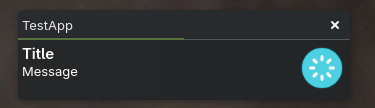
Here’s a little test script that should output
- currently logged user name(s)
- a small notification window (will go away in 5 seconds)
Copy the script below into file /tmp/test-app and run it with command
sudo bash /tmp/test-app
Those of you who have this issue, please run it and report the results.
#!/bin/bash

Main() {
    local username=""                                                  # "" or your username
    local expiretime=5                                                 # in seconds
    local icon=/usr/share/icons/Qogir/scalable/apps/system-reboot.svg  # or ""

    source /usr/share/endeavouros/scripts/eos-script-lib-yad || exit 1

    # show current users
    eos_GetUsers

    # give a notification
    eos_notification_all "$icon" normal "${expiretime}000" TestApp "Title" "Message" "" $username
}

Main
Preface (can be skipped):
When updating I just found out that I had an odd pkg on my system accounts-qml-module.
Probably a remainder from kde5 and now only had a pkg inside the aur.
The sourcecode likely no longer maintained and outdated.
Since I haven’t checked for orphans in a while I thought now is a good time.
eos-reboot-recommended was flagged as an orphan. ⇒ (install reason --asdeps)
After searching whether eos-reboot-recommended has been deprecated and thus rightfully orphaned I came to the conclusion that it is still relevant.
Running yay -D --asexplicit eos-reboot-recommended solved my issue.
So maybe it got installed by some other pkg which has been removed (and we forgot to mark it as explicit) or the installation reason was wrong from the get-go.
FYI: same thing for qt6-wayland and a few others.
eos-reboot-recommended was a dependency of eos-bash-shared, but now that “bond” has been removed. So if user wants eos-reboot-recommended, user should make it explicitly installed.
Hello,
If I have Problems with Packetmanagers I use:
eos-update
This should always work, with recommended reboot!
EOZ
That’s not the point here…
Looks corrupt. It should contain a simple list of logged in usernames.
Is /var/run/utmp any different after running the test app?
Why has the “packetmanager” post above been marked as the solution? That post has nothing to do with this thread’s subject.
concur
Same here.
After running the test app, this is the output of /var/run/utmp.
$ sudo cat /var/run/utmp
~~~reboot7.0.10-zen1-1-zen��j|zpts/1ts/1denalbl�j�
Yea, happened to me as well but, after some digging, saw it was no longer a dependency for anything so, most likely, I didn’t notice I was losing it when I did an orphan cleanup. As others have already said though, once you reinstall it, it should now be “explicit” so that shouldn’t happen again.
My /var/run/utmp also looks similar to DenalB’s.