Ditto. Unless conf file is edited.
I think users will have to wait til the next serious Core/Kernel packages before they see “inform user?” or the warning.
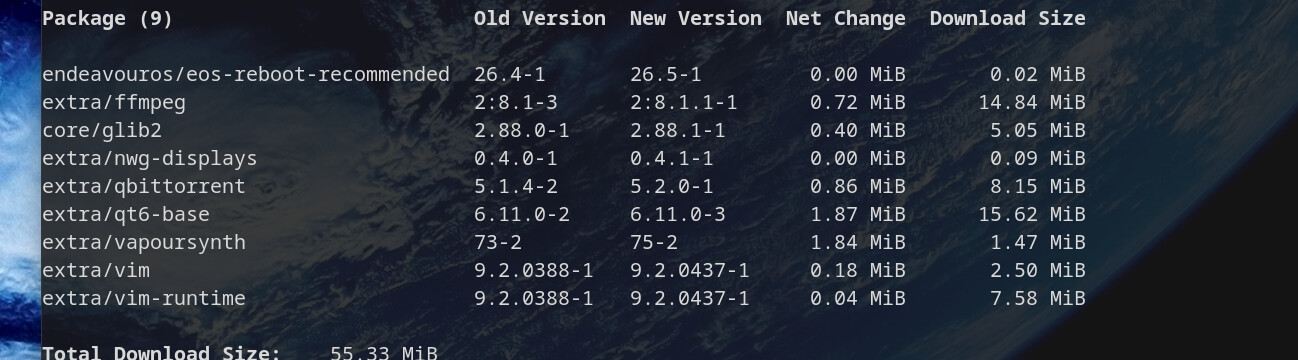
this was today’s update after coming home from work and as you can see there is nothing serious enough to trigger the recommend.
how does one do that exactly. open the .conf file for what app? edit what exactly? I’m not cheeky, I really am this clueless 
See UncleSpellbinder’s post above.
Missing 'Reboot Now' update warning - #35 by UncleSpellbinder
Use your favorite text editor.
OK I saw that one, thank you.
Working now after installation of 7.0.6 kernel a short while ago.
Rich 
Not for me.
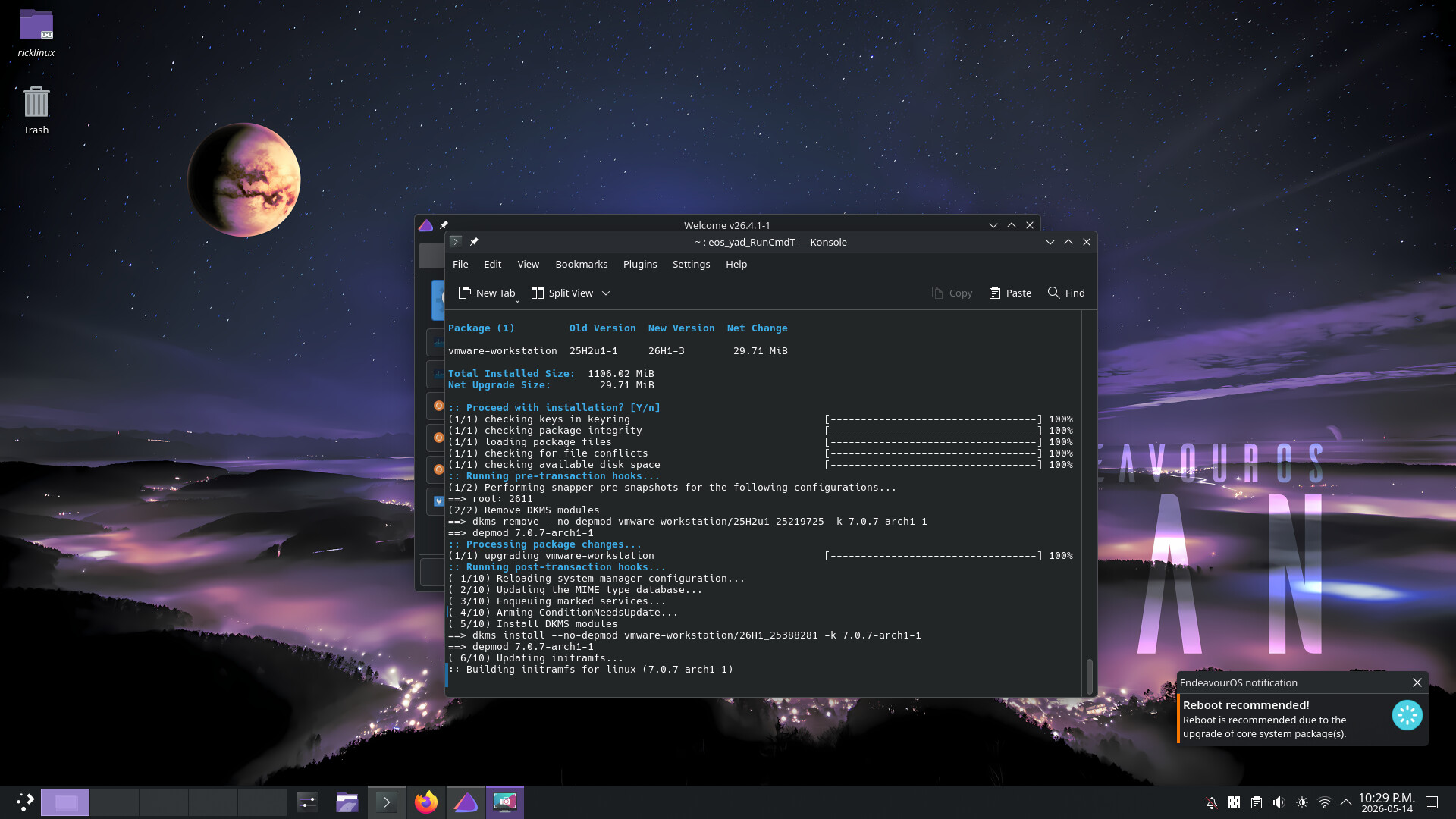
Yesterday I installed the new EndeavourOS Titan Neo and was wondering why there was no reboot pending message. Found out that the package eos-reboot-recommended wasn’t installed by default.
$ sudo pacman -Qi eos-reboot-recommended
error: package 'eos-reboot-recommended' was not found
Is that a bug or a feature?
So I installed version 26.5-2 of the package and rebooted my system. But when reinstalling mesa there is still no reboot pending message popping up.
Furthermore, the log file /etc/eos-reboot-required3.log is not available. What could be the issue? 
I think i have that installed later on.
But before i have created a file called
eos-reboot-recommended.conf
and set it op like this
REBOOT_NOTIFICATION_USER="user" your username
REBOOT_EXPIRE_TIME="30" between 15 and 300
don’t forget the " " Quotation mark
There is already such a file. But without user and time.
#!/bin/bash

## REBOOT_MAX_TOTAL_WAIT defines the maximum time in seconds
## to wait before notifying about recommended reboot.
## If you install or update a package that requires more time,
## consider increasing the value accordingly to have more accurate notifications.
## Default: 300
#
REBOOT_MAX_TOTAL_WAIT=300

## REBOOT_WAIT_DIFF defined how many seconds to wait after checking again if all
## pacman-like processes have finished and the database lock file has been released.
## Typical value: around 3 to 5 seconds.
## Default: 4
#
REBOOT_WAIT_DIFF=4

## REBOOT_NOTIFICATION_USER defines the user name to get notification about reboot recommendations.
## Then other users don't receive the notifications.
## Default: empty
## Example: REBOOT_NOTIFICATION_USER=username
#
REBOOT_NOTIFICATION_USER=""

## REBOOT_EXPIRE_TIME defines the time (in seconds) to show the reboot notification.
## If empty, then the notification will not close automatically.
## Default: empty
## Example: REBOOT_EXPIRE_TIME=30
#
REBOOT_EXPIRE_TIME=""
So I have to add the information to work properly, right?
Add it there as i described above. This should work
I doesn’t remember exactly, but there was a change. You should ask @manuel . Something to do with his EOS programs.
But yeah, you don’t need to do anything else; I’ve had a few updates too and didn’t have to change anything.
Hmm? I don’t have this set with my user name? It does work!
It works with the default unedited conf for some and not for some. The reason is still unknown. Adding user and expire time seems to always fix it.
So far I haven’t been able to reproduce the lack of reboot notifications.
Those who still have the problem, please show the contents of file
/tmp/eos-reboot-required3.log
right after you encounter the issue. This file may give a clue about the reason.
Also please show the contents of file
/etc/eos-reboot-recommended.conf
so we can rule out any possible typos or other issues in it.
And if you are not using the bash shell, please tell which shell you are using.
Edit: the latest eos-reboot-recommended is 26.5.1-1 now.
thanks!
Yes I’ve had it not working before too and got it working again but didn’t edit the .conf.
Yesterday it worked after editing my username and the expire time into the conf file.
Today I got an update for the kernel “linux-zen” that I’m using. Furthermore, I tried installing “mesa” again. But there was no reboot pending message shown. 
Actually, I didn’t get a notification anymore, although I edited the conf file.
It is installed here on my system.
$ sudo pacman -Qi eos-reboot-recommended
Name                     : eos-reboot-recommended
Version                  : 26.5.1-1
Beschreibung             : Notify if a reboot is recommended after system upgrade.
Architektur              : any
URL                      : https://github.com/endeavouros-team/PKGBUILDS/raw/master/eos-reboot-recommended
Lizenzen                 : GPL
Gruppen                  : Nichts
Stellt bereit            : Nichts
Hängt ab von             : eos-bash-shared  libnotify
Optionale Abhängigkeiten : Nichts
Benötigt von             : Nichts
Optional für             : Nichts
In Konflikt mit          : Nichts
Ersetzt                  : Nichts
Installationsgröße       : 8,98 KiB
Packer                   : manuel <manuel@endeavouros.com>
Erstellt am              : Sa 23 Mai 2026 13:10:48 CEST
Installiert am           : Sa 23 Mai 2026 14:30:08 CEST
Installationsgrund       : Ausdrücklich installiert
Installations-Skript     : Nein
Verifiziert durch        : Signatur
#!/bin/bash

## REBOOT_MAX_TOTAL_WAIT defines the maximum time in seconds
## to wait before notifying about recommended reboot.
## If you install or update a package that requires more time,
## consider increasing the value accordingly to have more accurate notifications.
## Default: 300
#
REBOOT_MAX_TOTAL_WAIT=300

## REBOOT_WAIT_DIFF defined how many seconds to wait after checking again if all
## pacman-like processes have finished and the database lock file has been released.
## Typical value: around 3 to 5 seconds.
## Default: 4
#
REBOOT_WAIT_DIFF=4

## REBOOT_NOTIFICATION_USER defines the user name to get notification about reboot recommendations.
## Then other users don't receive the notifications.
## Default: empty
## Example: REBOOT_NOTIFICATION_USER=username
#
REBOOT_NOTIFICATION_USER="denalb"

## REBOOT_EXPIRE_TIME defines the time (in seconds) to show the reboot notification.
## If empty, then the notification will not close automatically.
## Default: empty
## Example: REBOOT_EXPIRE_TIME=30
#
REBOOT_EXPIRE_TIME="30"
I don’t have that log file.
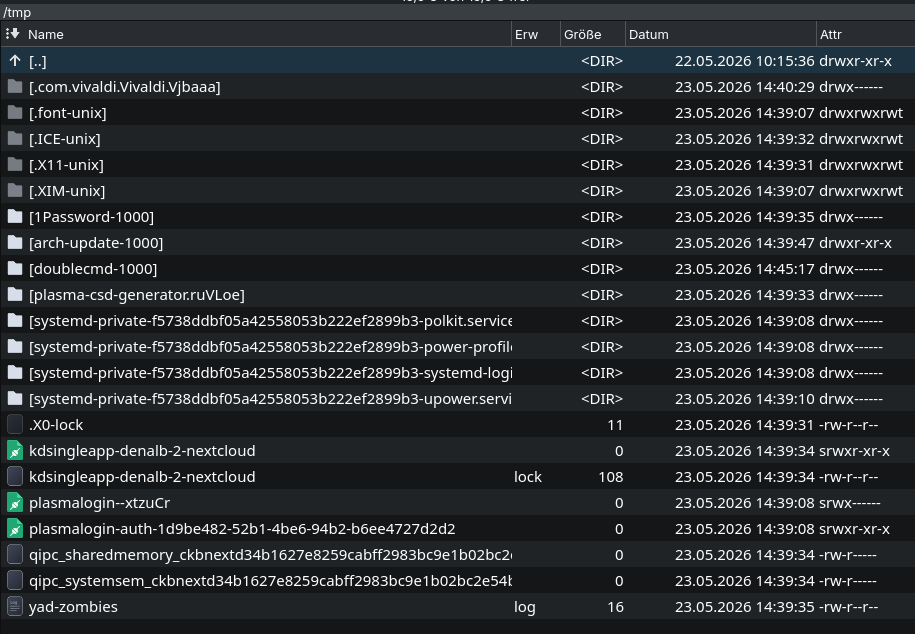
I’m using “Kitty” as my terminal with a bash shell.
#!/bin/bash

## REBOOT_MAX_TOTAL_WAIT defines the maximum time in seconds
## to wait before notifying about recommended reboot.
## If you install or update a package that requires more time,
## consider increasing the value accordingly to have more accurate notifications.
## Default: 300
#
REBOOT_MAX_TOTAL_WAIT=300

## REBOOT_WAIT_DIFF defined how many seconds to wait after checking again if all
## pacman-like processes have finished and the database lock file has been released.
## Typical value: around 3 to 5 seconds.
## Default: 4
#
REBOOT_WAIT_DIFF=4

## REBOOT_NOTIFICATION_USER defines the user name to get notification about reboot recommendations.
## Then other users don't receive the notifications.
## Default: empty
## Example: REBOOT_NOTIFICATION_USER=username
#
REBOOT_NOTIFICATION_USER=""

## REBOOT_EXPIRE_TIME defines the time (in seconds) to show the reboot notification.
## If empty, then the notification will not close automatically.
## Default: empty
## Example: REBOOT_EXPIRE_TIME=30
#
REBOOT_EXPIRE_TIME=""
I have no /tmp/eos-reboot-required3.log. There is a zero-length /tmp/eos-reboot-recommended, with today’s date, after updating mesa just now.
I’m on zsh…