How can I access a thumb drive formatted as ZFS?

Ok, zpool import seems to be showing a lot of stuff:

pool: usb_backup
id: 4877238554813059898
state: ONLINE
status: Some supported features are not enabled on the pool.
(Note that they may be intentionally disabled if the
‘compatibility’ property is set.)
action: The pool can be imported using its name or numeric identifier, though
some features will not be available without an explicit ‘zpool upgrade’.
config:

    usb_backup                              ONLINE 
      47d44304-b29e-4772-870e-c902ad1f9792  ONLINE

Sorry I accidentally replied to myself instead of you: zpool import seems to be showing a lot of stuff

So I tried what you wrote: “sudo zpool -R /mnt/ usb_backup” (because that is what the pool name is I think)

I don’t know what that returned, but if I go to /mnt/ there is no file there by the name “usb_backup”

I tried running the command “sudo zpool import -R /mnt/ usb_backup” again, however I got an error:

cannot import ‘usb_backup’: a pool with that name already exists
use the form ‘zpool import <pool | id> ’ to give it a new name

So the pool has been imported, but I still can’t access it; or perhaps more accurately I don’t know how to access it at this point. I can’t see it in Dolphin

You should start showing some output here.

By the way, shell output should be included in the proper “source code tags” here in the forum.

sow the output of zpool import and zpool status

hmm…I think I might have messed up some how

Right now, zpool status is showing

pool: usb_backup
state: ONLINE
status: Some supported and requested features are not enabled on the pool.
The pool can still be used, but some features are unavailable.
action: Enable all features using ‘zpool upgrade’. Once this is done,
the pool may no longer be accessible by software that does not support
the features. See zpool-features(7) for details.
config:

    NAME                                    STATE     READ WRITE CKSUM 
    usb_backup                              ONLINE       0     0     0 
      47d44304-b29e-4772-870e-c902ad1f9792  ONLINE       0     0     0 

errors: No known data errors

_________________

However “zpool import” is now showing something different: “no pools available to import”

If zpool status is showing this output, the pool is already imported. That is good.

Because it is already imported.

The warning about the missing features is normal because you use the brand new zfs 2.4.0. The pool was created a long while ago with zfs 2.3 or even earlier. Therefore it does not support the most recent features. That is not a problem. Just ignore this message.

Now lets see which datasets are available in that pool:

show the output of: zfs list -r usb_backup

“zfs list -r usb_backup” retunrs something a little weird:

“NAME USED AVAIL REFER MOUNTPOINT
usb_backup 306G 140G 288K /mnt//usb_backup

But as I said, there is nothing in the /mnt/ folder

However, maybe there is something with the double “//” syntax that I’m not understanding?

It is mounted. That is good.

There is no special syntax for “//”. It is the same as “/”

lets see all your mounts:

cat /proc/mounts

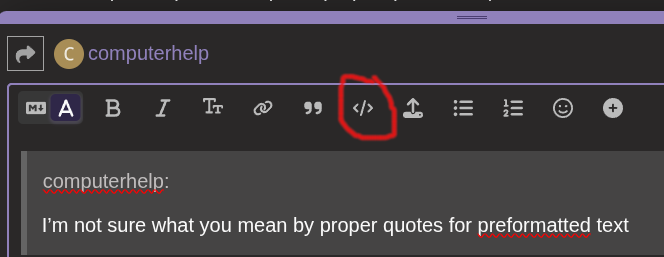
And please put the output in proper quotes for “preformatted text”

So apologies for being a dunce. I’m not sure what you mean by proper quotes for preformatted text, or how to do that even. So I put the out put in pastebin

I can only see two nvme drives,

Edits: The edits are just me playing around with quotes to see if I can get text to display in a more legible format

It is in the toolbar of the text editor:

The output does no show any zfs mount.

I suggest you start all over.

  1. zpool export usb_backup

  2. make sure /mnt does exist.

  3. zpool import -R /mnt usb_backup

  4. cd /mnt; ls -l

  1. Ran “zpool export usb_backup”
  2. /mnt exists (it’s where other nvme is mounted)
  3. Ran “zpool import” again (to make sure zfs drive is still being read, or something funky didn’t happen)
  4.  pool: usb_backup
        id: 4877238554813059898
     state: ONLINE
    status: Some supported features are not enabled on the pool.
            (Note that they may be intentionally disabled if the
            'compatibility' property is set.)
    action: The pool can be imported using its name or numeric identifier, though
            some features will not be available without an explicit 'zpool upgrade'.
    config:
    
            usb_backup                              ONLINE
              47d44304-b29e-4772-870e-c902ad1f9792  ONLINE
    
    
  5. Ran “zpool import -R /mnt usb_backup”
  6. "cd /mnt; ls-l” (it just shows the other nvme drive)
  7. total 4
    drwx------ 5 user user 4096 Jun 14  2025 83f41a0b-854b-46bb-9c74-99b964d472a8
    

“zfs-list -r usb_backup” returns the same thing, it can see it. I just can’t access it

NAME                        USED  AVAIL  REFER  MOUNTPOINT
usb_backup                  306G   140G   288K  /mnt/usb_backup

What happens if you manually create /mnt/usb_backup and then go through the zfs steps?

Unfortunately nothing/same thing. There is nothing in the directory /mnt/usb_backup

Edit: To be clear

I exported the pool

mkdir usb_backup

Ran zpool import -R /mnt usb_backup

The folder usb_backup is empty

Ma be this is not working because /mnt is not empty. Try to use a new empty directory with -R

So unfortunately that doesn’t work either. I created a new directory called “test”. Exported and reimported teh pool, this time in /test

Here is “zfs list -r usb_backup” which shows it should be in test

NAME                        USED  AVAIL  REFER  MOUNTPOINT
usb_backup                  306G   140G   288K  /test/usb_backup

Here is what’s inside /test using “ls -l”

total 0

Edit; A quick aside, thank you so much for helping me out thus far. You’ve been at this for almost two hours.

What if you just mount it to test?

Can you explain how to do that? Sorry for asking something that’s probably so basic, but I’m operating well outside my knowledge sphere