At your request, I wrote you specific instructions for your specific system, here: Grub 2:2.06.r322.gd9b4638c5-1 won't boot and goes straight to the BIOS after update - #799 by dalto
Hehe OK, fair enough. The reason why I asked was because I thought the online installer might use the live USB’s own version of grub to run grub-install before actually downloading the grub package. Glad that’s not the case.
After a new online install is completed with version r322…-1 and later grub is updated to the upcoming r322…-3, there is no extra action required, correct? Because the existing grub version would already be recent enough?
Yes. Both because it is after the transition and there is no technical difference between those two packages.
It Works !
Thank you very much 
2 Likes
This could be a solution for such problem like grub?
There could be 2 different repos; one before arch repos (even if it is empty) to hold any problematic packages as soon it is discovered and the current one at the end.
Hi, I have crypto_luks + BTRFS setup and can’t seem to chroot.
Also followed the instruction in here https://discovery.endeavouros.com/system-rescue/arch-chroot-for-bios-legacy-systems/2021/03/ but no luck.
I first typed
cryptsetup open /dev/sda1 mycryptdevice- input my key phrase
- I get the message saying
Device mycryptdevice already exists. - Then i typed
mount /dev/mapper/mycryptdevice /mnt - Then
mount /dev/sda1 - I get message saying
mount: /dev/sda1: can't find in /etc/fstab. - I also typed
sudo mount /dev/sda1 /mnt -o subvol=@ - but get message saying
mount: /mnt: unknown filesystem type 'crypto_LUKS'. dmesg(1) may have more information after failed mount system call.
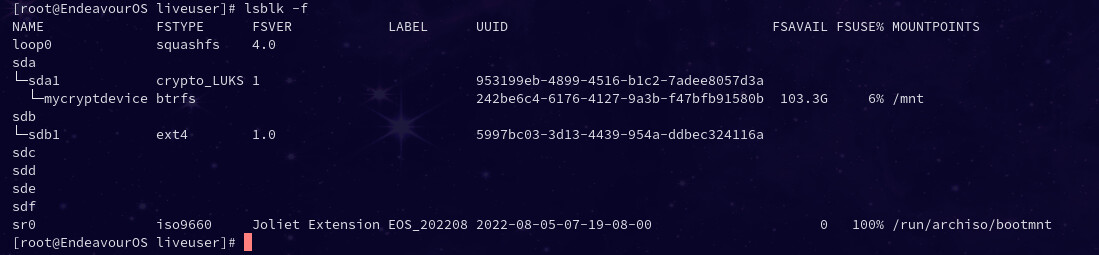
Here is the output of lsblk -f
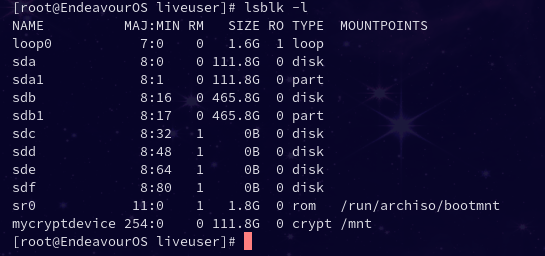
Here is the output of lsblk -l
Any help would be greatly appreciate it.
Thank you.
We have discussed the option of adding an overlay repo like that but a decision has not been made on that yet.
1 Like
Actually that doesn’t look like a UEFI system.
BIOS systems aren’t impacted by this issue.
What is the issue you are having specifically?
1 Like
I was, obviously, also bitten by this issue. But thanks to the help here, in the blog and on telegram it’s fixed. Inconvenient, but that sadly happens.
I do have one remaining issue though. I have encrypted / with luks. Decrypting it at boot is suddenly very slow. When I installed eos I had to change the iterations (because there is no hardware support at boot and the installer that tests the iterations for 2s was not usable at boot).
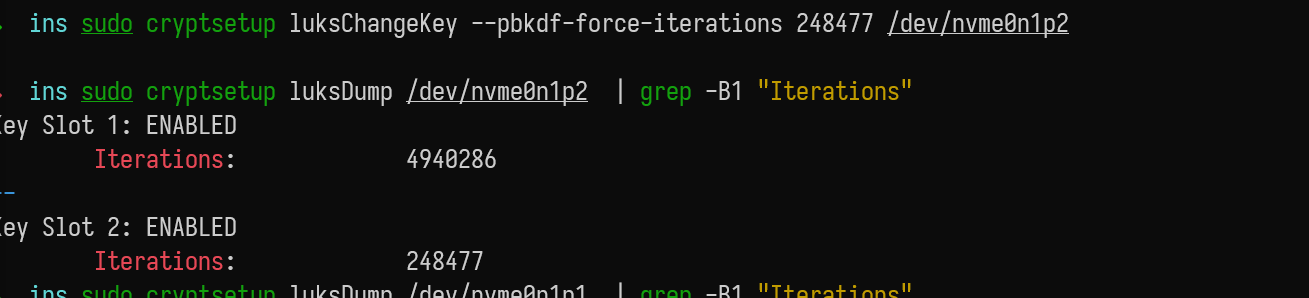
This is what I tried to fix it again, but to no avail. Anyone encountered something similar? And hopefully a tip on how to fix this?
You are correct that I am not affected but wanted to chroot and downgrade and wait for new release.
can you share the link to chroot again please?
I am also learning to chroot crypted drive 
You only need to chroot if your affected.
If your system is not impacted you can just downgrade from your normal system.
The purpose of the chroot is to rescue a broken system.
That being said, why would you downgrade?
Keep in mind, this is for a UEFI system. The only real difference is mounting it EFI partition at /boot/efi so you can just skip that step and it should be the same.
1 Like
endeavouros online installer and grub-2-2-06-r322-gd9b4638c5-1 boot fine
1 Like
understood but wanted to give it a shot using chroot and good learning experience for future needs 
1 Like
Search discovery, there should be instructions there
I followed the link in Discovery but didn’t get too far but Dalto’s link above seems to be a good reference which I will try now
I edited my post and added them in.
This whole conversation started with him trying to follow those instructions.

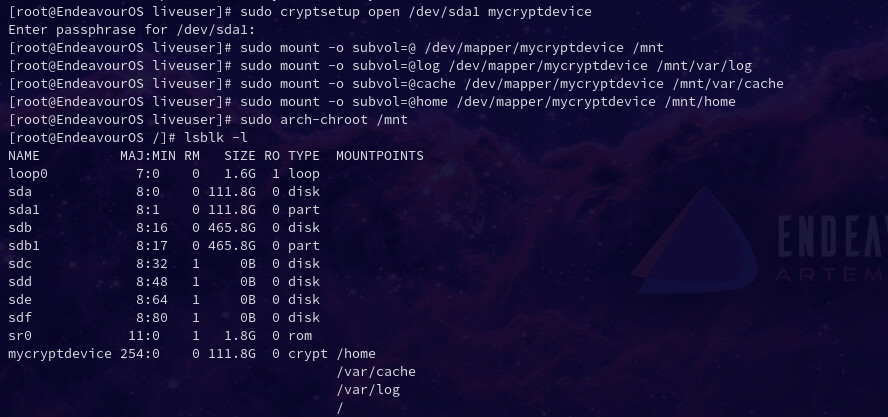
After an update that require system restart, my system not boot anymore, im redirected to BIOS settings while the boot, no text is shown on screen. I am on live cd with Endeavour os now, can i do anything to solve this?
Yes. Take a look at the instructions here:
I mount the partition and enter in chroot with exit, but i see this error when try “grub-install”:
Installing for x86_64-efi platform.
grub-install: error: cannot find EFI directory.