I’m honestly not sure where to even mount anymore
for lsblk nothing needs to be mounted.. it only shows existing partitions.
Ah.. if it isn’t necessary to mount anything, what do you suggest that I should do..? I am honestly quite lost at this point
Open a terminal and run: sudo parted -l and post the output.
Model: SMI USB DISK (scsi)
Disk /dev/sda: 63.3GB
Sector size (logical/physical): 512B/512B
Partition Table: msdos
Disk Flags:
Number Start End Size Type File system Flags
2 2964MB 3144MB 180MB primary fat32 esp
This seems still to be your live usb.
I don’t know why your disk is not shown.
Maybe you can boot your Windows, use its disk manager, take a screenshot of your disk(s) and post it here.
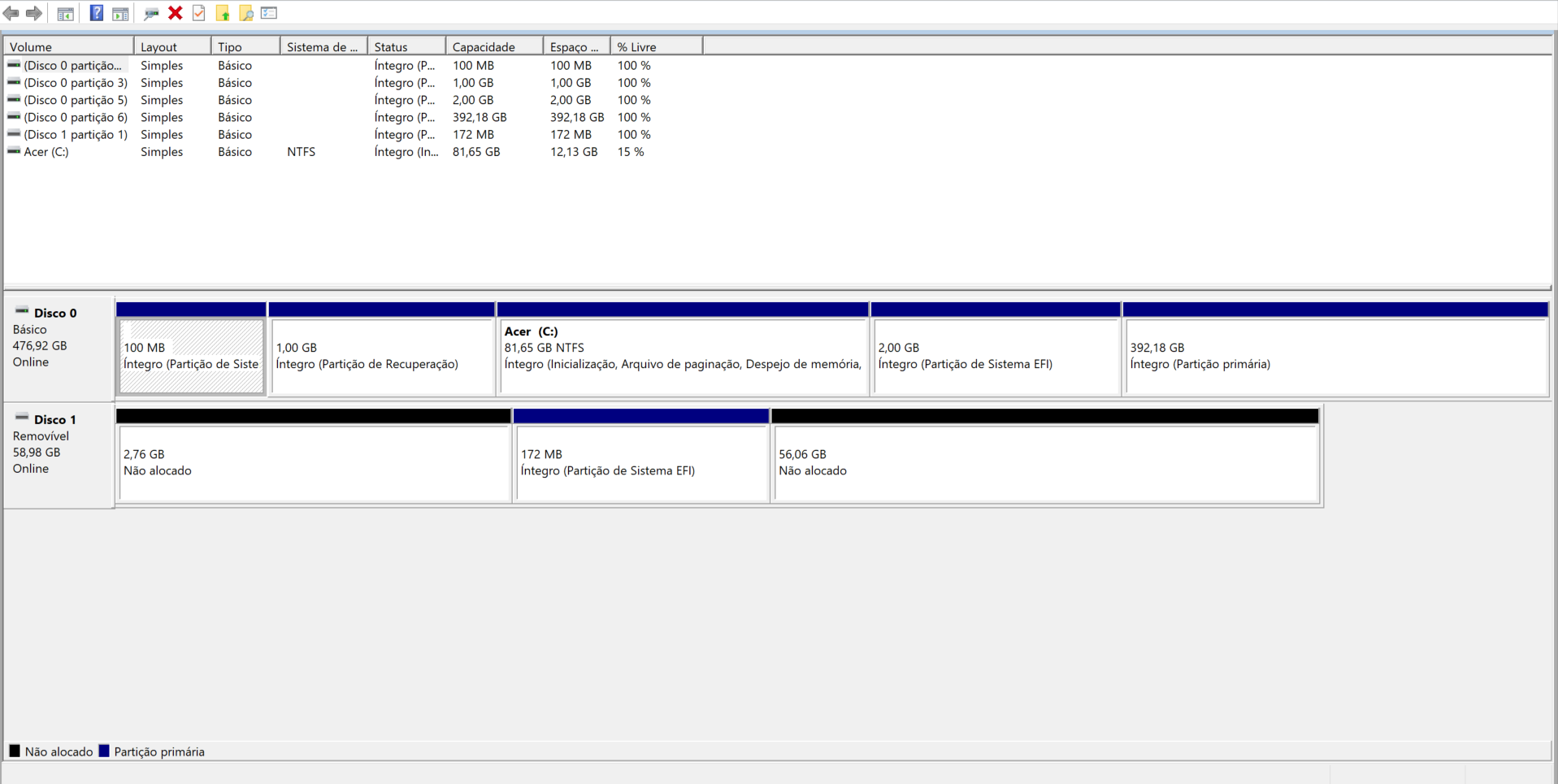
Your Linux partitions, the last two I suppose, seems to be there.
I would go into BIOS settings and check if the the SATA controller mode in BIOS/UEFI might be set to RAID instead of AHCI. If that is the case set it to AHCI.
Also disable legacy/csm mode if there is any setting for it in BIOS.
I changed it to AHCI, but my laptop just threw a blue screen at me.. I did have that blue screen when installing EndeavorOS on my first time though, I’m pretty sure it talked about an Inacessible Boot Device.. last time I had to format my laptop to get it fixed so yea.
Try booting your live usb. Report back if that works.
Seems as if booting with AHCI into my live USB did work.
Try this again:
and
efibootmgr
and post the output.
Output from lsblk:
NAME SIZE RO TYPE MOUNTPOINTS FSTYPE LABEL
loop0 2.6G 1 loop /run/archiso/airootfs squashfs
sda 59G 0 disk iso9660 EOS_202503
├─sda1 2.8G 0 part /run/archiso/bootmnt iso9660 EOS_202503
└─sda2 172M 0 part vfat ARCHISO_EFI
nvme0n1 476.9G 0 disk
├─nvme0n1p1 100M 0 part vfat ESP
├─nvme0n1p2 16M 0 part
├─nvme0n1p3 1G 0 part ntfs Recovery
├─nvme0n1p4 81.6G 0 part ntfs Acer
├─nvme0n1p5 2G 0 part vfat
└─nvme0n1p6 392.2G 0 part ext4 endeavouros
Output from efibootmgr:
BootCurrent: 0000
Timeout: 0 seconds
BootOrder: 2001,0003,0001,2002,2003
Boot0000* USB HDD: SMI USB DISK PciRoot(0x0)/Pci(0x14,0x0)/USB(0,0)/HD(1,MBR,0xea64eddc,0x5853c0,0x560
00)RC
Boot0001* Windows Boot Manager HD(5,GPT,4ff5982f-ef7d-44aa-8e73-25e4e9794acf,0xa585cbe,0x400000)/\EFI\Microso
ft\Boot\bootmgfw.efiRC
Boot0003* Windows Boot Manager HD(1,GPT,4d531f9e-9b77-4ce9-b4e9-a30236ed5e53,0x800,0x32000)/\EFI\Microsoft\Bo
ot\bootmgfw.efi57494e444f5753000100000088000000780000004200430044004f0042004a004500430054003d007b0039006400650
0610038003600320063002d0035006300640064002d0034006500370030002d0061006300630031002d006600330032006200330034003
400640034003700390035007d00000079000100000010000000040000007fff0400
Boot2001* EFI USB Device RC
Boot2002* EFI DVD/CDROM RC
Boot2003* EFI Network RC
Mount nvme0n1p6 at /mnt
sudo mount /dev/nvme0n1p6 /mnt
and post:
cat /mnt/etc/fstab
Alright, here’s the output of cat (funny name for a command lol).
# /etc/fstab: static file system information.
#
# Use 'blkid' to print the universally unique identifier for a device; this may
# be used with UUID= as a more robust way to name devices that works even if
# disks are added and removed. See fstab(5).
#
# <file system> <mount point> <type> <options> <dump> <pass>
UUID=9833-1768 /efi vfat fmask=0137,dmask=0027 0 2
UUID=46b80469-4605-4b43-b739-c8e9676cad08 / ext4 noatime 0 1
tmpfs /tmp tmpfs defaults,noatime,mode=1777 0 0
Now chroot into your system:
sudo arch-chroot /mnt
When you are in chroot, do the following:
- update your system:
pacman -Syu - mount ESP:
mount /efi - reinstall the bootloader:
bootctl install - reinstall your kernels:
reinstall-kernels
Alright, I’ve executed those commands, what do I do now?
Reboot your system and see if you can boot up your EOS.
Wait, should I go into BIOS and see if my EOS is there?
You can check if you want but reinstalling bootloader should have put it first in boot order.