Since they are targeting end users, my guess is info-stealers, ransomware or using your computer’s resources in a botnet to do something stupid like mine crypto.
Thanks for your reply. I would guess the same, but am wondering if anyone has safely evaluated the nature and function of these injected binaries to determine what they actually do. 
Thanks for the info. Well, everything seems fine.
[sermor@archlinux aur-malware-check-master]$ python -m aur_check --full
[INFO] Campaign "aur-infected": 1935 packages from data/campaigns/aur-infected/packages.txt
[INFO] Campaign "aur-infected": 1 packages from data/campaigns/aur-infected/packages-extra.txt
[INFO] Campaign "aur-infected": 4 npm packages from data/campaigns/aur-infected/npm-packages.txt
[INFO] Campaign "chaos-rat": 7 packages from data/campaigns/chaos-rat/packages.txt
[INFO] Campaign "russian-spam": 75 packages from data/campaigns/russian-spam/packages.txt
[INFO] Date window: 2026-06-09 to 2026-06-12
[INFO] Pacman log glob: /var/log/pacman.log*
[INFO] Scanning... (cache and system checks may take a few seconds)
[INFO] Home: /home/sermor
============================================================
 AUR Malware Check v5.3
 Date window: 2026-06-09 to 2026-06-12
 Packages checked: 2018
   (incl. 7 CHAOS RAT campaign, 2025-07, window 2025-07-16 to 2025-07-19)
============================================================

--- [1] Currently installed foreign packages ---
  Clean: no infected packages installed within campaign window.

--- [2] Historical pacman logs ---
  Clean: no historical log matches found.

--- [3] Systemd persistence check ---
  Clean: no suspicious systemd services found.

--- [4] eBPF rootkit check ---
  Clean: no eBPF rootkit traces detected.

--- [5] npm cache check ---
  Clean: no malicious packages in npm cache.

--- [6] bun cache check ---
  Clean: no malicious packages in bun cache.

--- [7] yarn cache check ---
  Clean: no malicious packages in yarn cache.

--- [8] pnpm cache check ---
  Clean: no malicious packages in pnpm store/cache.

--- [9] IOC file check ---
  Clean: no known IOC files found.

============================================================
 RESULT: CLEAN - No indicators found.
============================================================
But this is starting to tire me out a bit, even though I shouldn’t have any suspicious AUR packages in general.
My problem would be finding a suitable alternative, and so far I haven’t found one (even on another Linux operating system). But that’s another story.
Apparently they are infostealers:
In other words, they are looking for all kinds of access to all kinds of things for all kinds of nefarious reasons. Interestingly enough, if run as root, they can become persistent and hide their tracks slightly by hiding pids through BPF.
Keep in mind I’m (sadly, I’d love to) no security researcher and have only TL;DR’ed what I read in the articles.
as noted three weeks ago, this only targets developers and such. from the article:
"Independent researcher Whanos reverse-engineered the deps payload and describes a Rust credential stealer aimed at developer workstations and build systems. It collects:
- Cookies, tokens, and local storage from Chromium-based browsers (Chrome, Edge, Brave, and many more)
- Session data from Electron apps, including Slack, Discord, and Microsoft Teams
- GitHub, npm, and HashiCorp Vault tokens, plus OpenAI/ChatGPT bearer material and account metadata
- SSH keys, known_hosts, and shell histories
- Docker and Podman credentials and VPN profiles"
With this kind of credential info, it’s clear they can destroy hundreds, maybe thousands of projects covertly and simultaneously. Destroy Linux scaffolding…right out of a Bond movie.
Who would that benefit? Mmm…gosh…let me think…
Adding to the tools already mentioned here — I’ve been building archcanary, which started as a fork of lenucksi's aur-malware-check for the June attack and grew to cover a few more layers (systemd/eBPF persistence, npm/bun cache poisoning, DKMS module tampering, etc.) since the AUR trust model keeps getting hit this way.
It pulls the aur-audit.wtako.net black/red feed mentioned upthread plus the official package list, so it should already flag most of what’s been reported here.
Still labeled beta and mostly tested on Mabox/Arch derivatives so far — read-only, never touches your system beyond its own logs, and I’d genuinely appreciate anyone running it against their install and filing issues for false positives/negatives.
It is mainly a cli tool, but it has a yad gui too.
man archcanary

ps Feedback or Issues are welcome.
$ ./archcanary.sh
Archcanary v0.1.21
Scanned: 2026-08-01 16:46
Lists loaded
package_list.txt infostealer + eBPF rootkit 1936 pkgs
- CHAOS RAT 7 pkgs
- Russian Spam 75 pkgs
- Community Reports 42 pkgs
Packages checked: 2060
-– [1] Currently installed foreign packages —
Clean: no infected packages currently installed.
-– [2] Historical pacman logs —
Clean: no historical log matches found.
Check summary
───────────────────────────────────────────────────────
Package list (2060 pkgs)  clean
clean
pacman.log history clean
───────────────────────────────────────────────────────
RESULT: CLEAN - No indicators found.

Nice one. Thank you for that
▌▌ …/archcanary master 08:14
❯ ./archcanary.sh
============================================================
Archcanary v0.1.21
Scanned: 2026-08-02 08:14
Lists loaded
package_list.txt infostealer + eBPF rootkit 1936 pkgs
+ CHAOS RAT 7 pkgs
+ Russian Spam 75 pkgs
+ Community Reports 42 pkgs
Packages checked: 2060
============================================================
--- [1] Currently installed foreign packages ---
Clean: no infected packages currently installed.
--- [2] Historical pacman logs ---
Clean: no historical log matches found.
Check summary
───────────────────────────────────────────────────────
Package list (2060 pkgs) ✅ clean
pacman.log history ✅ clean
───────────────────────────────────────────────────────
============================================================
RESULT: CLEAN - No indicators found.
============================================================
That is an excellent question. I also would like to know.
Are they infecting AUR packages so that they can deliver malware later on? Part of Malware as a Service offering.
Or are the attacks meant to convert the computers into a zombie host, which becomes part of a botnet or attack surface?
Or are they after some specific systems, i.e. someone important or some important people are using AUR as part of their work/deliverables, but not necessarily using Arch or Arch based distros, and the attackers want to go after them.
It’s because of this post I added WTAKO to archcanary.
Thanks for mentioning wtako 
Well, it doesn’t seem to have gone so well for me. With the other script, I was fine, but with this one, I saw that at least I was exposed.
So I’ll format and change all the passwords. At this point, I think I’ll stick with the Debian family.
At least I have two other PCs running in addition to the main one, where I can still do what I need to do, like change the password.
[sermor@archlinux archcanary-master]$ sudo ./archcanary.sh --full
============================================================
 Archcanary v0.1.21
 Scanned: 2026-08-02 09:20

 Lists loaded
   package_list.txt  infostealer + eBPF rootkit  1936 pkgs
   + CHAOS RAT         7 pkgs
   + Russian Spam     75 pkgs
   + Community Reports 42 pkgs

 Packages checked: 2060
============================================================

--- [1] Currently installed foreign packages ---
  WARNING: 1 possibly infected package(s):
  - vidcutter (installed: Sun Feb 15 23:54:37 2026)

--- [2] Historical pacman logs ---
LOG_HIT: vidcutter (installed on 2026-02-15T23:54:37+0100)
  WARNING: historical log matches (name-match against official compromised list):
  - vidcutter (installed on 2026-02-15T23:54:37+0100)
  NOTE: if the PKGBUILD looks clean now, the malicious commit may have been
  reverted — check AUR git history around the install date/time above.
  Either way, treat the install-time window as a potential exposure.

--- [3] Systemd persistence check ---
  Clean: no suspicious systemd units found.

--- [4] eBPF rootkit check ---
  Clean: no eBPF rootkit traces detected.

--- [5] npm cache check ---
  Clean: no malicious packages in npm cache.

--- [6] bun cache check ---
  Clean: no malicious packages in bun cache.

--- [6b] yarn cache check ---
  Clean: no malicious packages in yarn cache.

--- [6c] pnpm cache check ---
  Clean: no malicious packages in pnpm store/cache.

--- [7] PKGBUILD/install file scan (obfuscation-aware) ---
  WARNING: ANSI-C hex/octal quoting in /home/sermor/.cache/yay/webkit2gtk/PKGBUILD:192
        while IFS= read -d $'\0' -r _f; do

--- [8] Loaded eBPF programs/links (bpftool) ---
  Loaded eBPF programs: 25
  INFO: lsm eBPF programs present — expected (systemd sandboxing / AppArmor / SELinux).
  Perf attachments (kprobe/tracepoint): none.
  Net attachments (XDP/TC): none.

--- [9] ld.so.preload injection check ---
  Clean: /etc/ld.so.preload not present or empty.
  INFO: ld.so.conf.d entry present: /etc/ld.so.conf.d/lib32-glibc.conf (mtime 2026-07-28)
  INFO: ld.so.conf.d entry present: /etc/ld.so.conf.d/intel-oneapi-compiler-shared-runtime-libs.conf (mtime 2026-04-25)
  INFO: ld.so.conf.d entry present: /etc/ld.so.conf.d/intel-oneapi-mkl.conf (mtime 2026-04-25)
  INFO: ld.so.conf.d entry present: /etc/ld.so.conf.d/intel-oneapi-compiler-dpcpp-cpp-runtime-libs.conf (mtime 2026-04-26)
  INFO: ld.so.conf.d entry present: /etc/ld.so.conf.d/rocm.conf (mtime 2026-05-31)
  INFO: ld.so.conf.d entry present: /etc/ld.so.conf.d/grass.conf (mtime 2026-05-14)
  INFO: ld.so.conf.d entry present: /etc/ld.so.conf.d/intel-oneapi-openmp.conf (mtime 2026-04-25)

--- [10] XDG autostart + shell RC persistence check ---
  WARNING: suspicious autostart entry: /home/sermor/.config/autostart/Proton Mail Bridge.desktop
    Exec="/usr/bin/protonmail-bridge" (outside standard system path)

--- [11] Kernel module / DKMS audit ---
  Clean: all loaded modules traceable to pacman packages or DKMS.

--- [12] Lynis hardening report ---
  No Lynis report found at /var/log/lynis-report.dat.
  Generate one with: sudo lynis audit system

--- [13] Package file integrity ---
  Verifying installed file checksums against pacman database...
  (May take 30-60 seconds on large installs)
  All accessible installed files match pacman database checksums.


 Check summary
 ───────────────────────────────────────────────────────
 Package list (2060 pkgs)             ❌  INFECTED
 pacman.log history                   ❌  INFECTED
 Systemd persistence                  ✅  clean
 eBPF rootkit traces                  ✅  clean
 npm cache                            ✅  clean
 bun cache                            ✅  clean
 yarn cache                           ✅  clean
 pnpm cache                           ✅  clean
 PKGBUILD obfuscation scan            ❌  INFECTED
 eBPF programs (bpftool)              ✅  clean
 ld.so.preload injection              ✅  clean
 XDG autostart + shell RCs            ❌  INFECTED
 Kernel modules (DKMS)                ✅  clean
 Lynis hardening                      ⚠   warnings
 Package integrity                    ✅  clean
 ───────────────────────────────────────────────────────
============================================================
 RESULT: INFECTED - Indicators found! Follow incident response.
============================================================
Hey @made-lief what does that output mean?
Check summary
 ───────────────────────────────────────────────────────
 Package list (2060 pkgs)             ✅  clean
 pacman.log history                   ✅  clean
 Systemd persistence                  ✅  clean
 eBPF rootkit traces                  ✅  clean
 npm cache                            ✅  clean
 bun cache                            ✅  clean
 yarn cache                           ✅  clean
 pnpm cache                           ✅  clean
 PKGBUILD obfuscation scan            ✅  clean
 eBPF programs (bpftool)              ✅  clean
 ld.so.preload injection              ✅  clean
 XDG autostart + shell RCs            ❌  INFECTED
 Kernel modules (DKMS)                ✅  clean
 Lynis hardening                      ⚠   warnings
 Package integrity                    ✅  clean
XDG autostart + shell RCs  INFECTED Should I be worried?
Re: vidcutter LOG_HIT
This is a confirmed match, not a false positive — vidcutter is on the list of ~400+ packages named in the June 2026 AUR supply-chain attack (atomic-lockfile/js-digest campaign), independently confirmed across multiple community source lists.
Your install (2026-02-15) predates the public disclosure (2026-06-11/12) by about 4 months. archcanary only does a name-match against the log, so it can’t
tell on its own whether your specific install landed inside the malicious commit window. Next steps:
- Check AUR git history for vidcutter around 2026-02-15 — look for suspicious commits (unexpected source=, prepare()/build() hooks pulling from npm/GitHub
Container Registry, base64-encoded blobs). - If the timing is inconclusive, assume exposure and check for the known IOCs: eBPF rootkit (requires CAP_BPF), hidden processes/files/sockets, Tor onion
C2 callbacks, unexplained systemd persistence units, and credential theft targeting Discord/GitHub/npm/Slack/SSH/Vault. - Rotate credentials for those services if any IOC hits.
- Reinstall clean: remove the package, verify the current PKGBUILD is clean, reinstall.
Full incident background: archlinux.org/news/active-aur-malicious-packages-incident/ and the technical writeup at ioctl.fail/preliminary-analysis-of-aur-malware/.
Thanks for testing
Hi @swh,
Likely a false positive.
The exact line is in the full scan output under section [10] XDG autostart + shell RC persistence check — look for a WARNING: suspicious autostart entry: line pointing at a .desktop file in ~/.config/autostart/. That warning fires when the Exec= binary can’t be resolved on $PATH — which happens for legit packages that ship their autostart helper in a private lib dir.
Can you paste that WARNING: line (the Exec= value specifically)?
That tells us if it’s the same class of false positive or something new.
Either way, once confirmed clean, you can allow list it two ways:
- GUI: archcanary-gui → Manage allowlists (bottom of the settings menu) → add it under Autostart.
- CLI: sudo ./archcanary.sh --allowlist-add=autostart:
sudo ./archcanary.sh --allowlist-add=autostart:<the Exec= value>
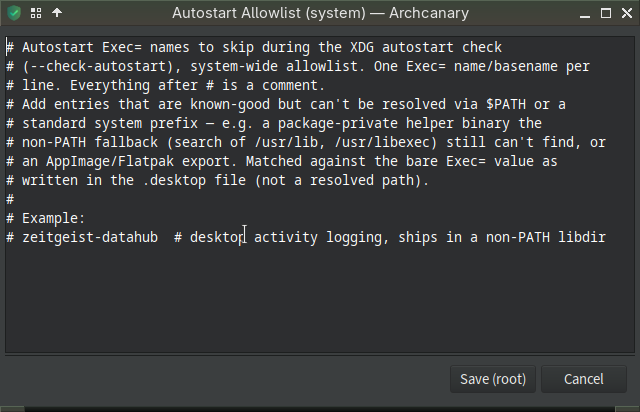
The reason for this check: it’s trivially easy to drop a .desktop file in ~/.config/autostart/ that runs arbitrary commands at every login — no root needed, and it’s a common low-privilege persistence technique.
NOTE:
archcanary --refresh
--refresh pulls the latest known-compromised package list (from the live HedgeDoc note, plus the aur-audit and community-report feeds) before scanning, so you’re checked against current data instead of whatever was bundled at install time.
Thanks for explaining. This makes it clear to me 
It seems like a false positive. The only EXEC output is a eos-update-notifier
--- [10] XDG autostart + shell RC persistence check ---
  WARNING: user service with unowned ExecStart binary: /home/swh/.config/systemd/user/eos-update-notifier.service
    ExecStart=/usr/bin/eos-update-notifier (not tracked by pacman)
Thanks for debuggin. Indeed a false positive.
I am working on it. So it can also be added to the allow list.
To be continued…
But is it not so that everything on that list was removed from the AUR, does this not mean this list is absolutely worthless now ? So what you claim not to be a false positive, I think it is, unless this package
Is malicious, now that would be very strange that it is still available from the AUR, wouldn’t you say ?
Interesting case. @swh @keescase
Recap on the vidcutter warning — how to know if you can stop worrying about it
To wrap this thread up:
yes, vidcutter genuinely was compromised — confirmed by an actual git grep hit in the AUR’s own history (vidcutter-deps.install running the malicious npm payload), not a guess.
It’s since been cleaned up, which is why it looks completely normal on the AUR today.
The list doesn’t track “is this dangerous right now” — it tracks “were you ever exposed.” So here’s how you check that for yourself and put it to rest:
- Look at the install date archcanary reported for your system.
- Compare it to the known bad window (roughly June 9–12, 2026).
- Installed before that window? You got the clean version — the warning is a name match, not an actual hit on you. Nothing more to do.
- Installed during/after it, or you’re not sure? Worth a quick look — check for anything unusual (persistence, odd network activity), rotate credentials if
in doubt, reinstall the package fresh.
Once you’ve confirmed your install predates the bad window (or cleaned up if it didn’t), you’re done.
The warning keeps showing on every scan by design — it’s a permanent record — but you don’t need to re-check it each time once you understand why it’s there.