run the command again. and then run ls -l again and show the results please
[eosblu@machina ~]$ sudo chown -R eosblu /mnt/18TB1
[eosblu@machina ~]$ ls -l
total 64
drwxr-xr-x 7 eosblu eosblu 4096 Jan 7 05:50 Desktop
drwxr-xr-x 8 eosblu eosblu 4096 Jan 6 14:19 Documents
drwxr-xr-x 8 eosblu eosblu 4096 Jan 5 14:49 Downloads
drwxr-xr-x 4 eosblu eosblu 4096 Jan 3 07:27 endeavouros-docker
drwxr-xr-x 2 eosblu eosblu 4096 Jan 5 12:23 jellyfin
drwxr-xr-x 3 eosblu eosblu 4096 Dec 28 06:38 Music
drwxr-xr-x 12 eosblu eosblu 12288 Dec 24 04:59 Pictures
drwxr-xr-x 4 eosblu eosblu 4096 Jan 2 18:29 pihole
drwxr-xr-x 8 eosblu eosblu 4096 Jan 3 08:04 Pi-hole
drwxr-xr-x 7 eosblu eosblu 4096 Oct 13 10:59 ungoogled-chromium-archlinux
drwxr-xr-x 3 eosblu eosblu 4096 Dec 28 06:38 Videos
drwxr-xr-x 4 eosblu eosblu 4096 Jan 3 15:19 ‘VirtualBox VMs’
drwxr-xr-x 3 eosblu eosblu 4096 Jan 3 15:40 vmware
drwxr-xr-x 6 eosblu eosblu 4096 Dec 16 05:00 yay
[eosblu@machina ~]$
wait did you change to the directory before running the ls command
cd /mnt/18TB1
then run
ls -l
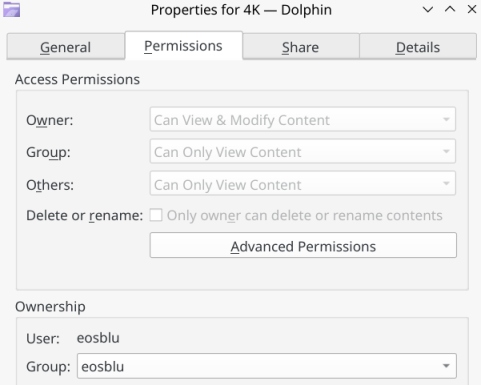
can you please show us the results of ls -l for the /mnt/18TB1
[eosblu@machina ~]$ cd /mnt/18TB1
[eosblu@machina 18TB1]$ ls -l
total 16
drwxr-xr-x+ 158 eosblu eosblu 16384 Jan 22 2025 4K
[eosblu@machina 18TB1]$
this shows your the owner so I’m not sure what is up with Dolphin and Jellyfin. I’m assuming this is a new device maybe create a folder on the device then open with dolphin
mkdir test
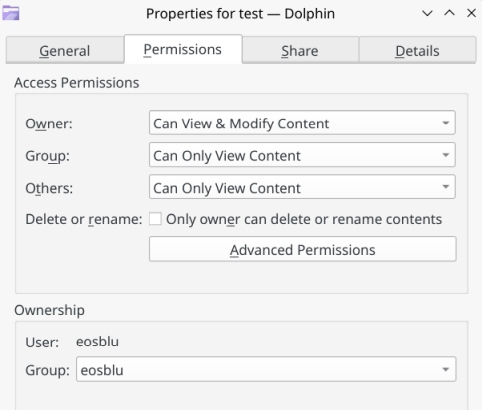
cool. glad you have it working now
I should have stated permission for the new folder not the original folder.
Must be something going on with just that folder?
I guess I could make a new folder and copy all the files from the 4K folder into it.
I’m not sure what you mean but according to the post above
eosblu is the owner of directory 4K
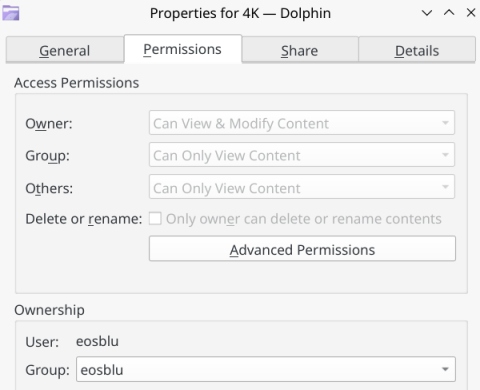
I don’t use KDE or Dolphin so I have no clue what is going on there maybe reboot 
I’ll reboot and see but have my doubts 
I just tried taking ownership of those drives using Manjaro that I have installed on another drive and same results…3 drives no problem but the 4K folder on 18TB1 not happening.
The + after the permission bits indicate there is an acl associated with the directory. You can look at the acl by running the command getfacl 4k if I recall correctly.
Must be a different cmd?
[eosblu@machina 4K]$ getfacl 4k
getfacl: 4k: No such file or directory
[eosblu@machina 4K]$
Tried some of the cmds here to but not working…
[eosblu@machina 4K]$ getfacl declaration.h
getfacl: declaration.h: No such file or directory
[eosblu@machina 4K]$ cd -
/home/eosblu
[eosblu@machina ~]$ getfacl declaration.h
getfacl: declaration.h: No such file or directory
Are you cd’ing into the parent directory /mnt/18TB1 before running the commands?
Edit: More info on the getfacl command
try adding the entire path since it looks like your in that directory
[eosblu@machina ~]$ cd /mnt/18TB1/4K
[eosblu@machina 4K]$ getfacl filename
getfacl: filename: No such file or directory
\[eosblu@machina 4K\]$ cd /mnt/18TB1
\[eosblu@machina 18TB1\]$ getfacl 4K
file: 4K
owner: eosblu
group: eosblu
user::rwx
user:flatpak:rwx #effective:r-x
group::r–
mask::r-x
other::r-x
- List item
EDIT: here’s the output for my other 18TB drive that has permissions…
[eosblu@machina ~]$ cd /mnt/18TB2
[eosblu@machina 18TB2]$ getfacl TUNES
file: TUNES
owner: eosblu
group: eosblu
user::rwx
group::rwx
other::r-x
Yeah, that looks like you’ve set up an acl. Try mounting with the acl option so the file system can handle it. Maybe it already is if it is showing it. To be honest, it’s so long since I messed with access control lists, I’m floundering about in some very vague memories.